
A 2.1 speaker system pairs left and right speakers or a soundbar with a separate subwoofer for fuller TV audio and bass. The ULTIMEA Poseidon M30 is best for buyers who want app controls and multiple TV connections; the TCL S55H is better for shoppers seeking Dolby Atmos and DTS:X features. For a desk or compact setup, consider the Klipsch ProMedia 2.1 or Logitech Z313. The Saiyin soundbar offers a straightforward option with a 5-inch subwoofer and adjustable bass.
| System | Best For | Standout Listed Features |
|---|---|---|
| ULTIMEA Poseidon M30 | TV users who want app control | Wireless subwoofer, HDMI, optical, Bluetooth |
| Klipsch ProMedia 2.1 | Desktop and computer audio | THX-certified 2.1 system |
| TCL S55H | TV viewers seeking immersive-format support | Dolby Atmos, DTS:X, room calibration |
| Saiyin Sound Bar | Buyers who want adjustable bass and simple inputs | 5-inch subwoofer, optical, AUX, Bluetooth |
| Logitech Z313 | Basic multimedia and mixed-device use | 3.5mm input, subwoofer, wired connections |
ULTIMEA Poseidon M30 Soundbar

Best for: TV owners who want a 2.1 soundbar with app control, adjustable bass, and several connection choices. The listed features include a wireless subwoofer, HDMI, optical, and Bluetooth 6.0, so it is a flexible choice for a home theater setup.
The product name lists 240W peak power and ULTIMEA’s VoiceMX and BassMX features. It also describes the bass as adjustable. These named features make the M30 a relevant option for buyers comparing dialogue and low-frequency controls, though the listing details provided do not specify how those functions work.
Why it was selected: It combines the soundbar format with a separate wireless subwoofer and multiple listed inputs. That makes it a strong match for buyers who want to connect a TV and use an app rather than choose a computer-only speaker set.
Limitation: It is a 2.1 system, not a package with separate rear speakers. Choose another type of system if physical surround speakers are a priority.
Klipsch ProMedia 2.1 THX Speakers

Best for: Buyers building a desktop audio setup for computer use, games, or media. The product is a 2.1 computer speaker system and is described as THX certified. Its two satellite speakers and subwoofer format suits a desk where speakers can be positioned to either side of a monitor.
Unlike the soundbar options in this list, the ProMedia uses separate speakers. That can be useful when a listener wants left and right speakers placed around a computer display. It may also suit a TV setup when the intended connection and placement work for the buyer, but the supplied product information does not list its input types.
Why it was selected: It is a clearly identified 2.1 system from a different category than the TV soundbars, giving desktop listeners a dedicated alternative.
Limitation: The product details provided do not specify connection options. Check the current listing and your device outputs before choosing it for a TV or other source.
TCL S55H 2.1 Sound Bar

Best for: TV viewers who want a 2.1 soundbar with listed support for Dolby Atmos and DTS:X. The S55H includes a wireless subwoofer and advertises 220W power. It also lists Bluetooth, app control, remote control, and automatic room calibration.
Those features make the TCL a useful comparison for shoppers who want TV-oriented controls and named immersive audio formats. Room calibration is listed as a feature, but the supplied information does not explain its setup process or describe performance in a particular room. Buyers should compare the connection options on the current listing with their TV before ordering.
Why it was selected: It combines a wireless subwoofer with format support, calibration, and both app and remote control. It is better suited to TV-focused use than a system described primarily as a computer speaker package.
Limitation: The listed configuration is 2.1. Buyers looking for separate rear speakers should check for a different system configuration.
Saiyin Sound Bar With Subwoofer
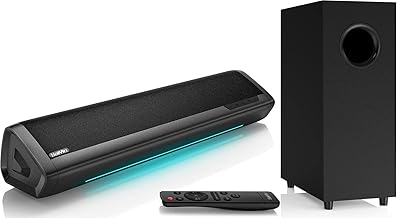
Best for: Buyers who want a soundbar with a specified 5-inch subwoofer, adjustable bass, and a short list of common inputs. The product name lists optical, AUX, and Bluetooth 5.3 connections, making it a candidate for a TV, computer, or Bluetooth audio source when the device’s output matches.
The subwoofer is described as having dual bass reflex ports. The product also lists a volume indicator, which may help users see the selected volume at the unit. The included information does not state a power figure or identify an HDMI connection, so shoppers should compare those details if they are important to the setup.
Why it was selected: It offers a straightforward 2.1-style soundbar and subwoofer approach, with adjustable bass and clearly named connection types.
Limitation: HDMI is not among the listed inputs. Avoid this option if an HDMI connection is a requirement unless the current product listing confirms otherwise.
Logitech Z313 Multimedia Speaker System

Best for: Buyers who need a basic 2.1 multimedia setup for a computer or other device with a 3.5mm audio output. The listed package includes a subwoofer and full-range audio, with 3.5mm input. The product name identifies compatibility with PC, PS4, Xbox, TV, smartphone, tablet, and music player; check the source device’s output before connecting.
The Z313 is a practical fit for a desk or mixed-device space where a simple wired input is suitable. It is not described as a TV soundbar, so it differs from the ULTIMEA, TCL, and Saiyin options in form factor.
Why it was selected: It provides a clearly identified 2.1 multimedia alternative with a 3.5mm connection and a broad range of named device types.
Limitation: The listed input is 3.5mm. Choose a soundbar with a different connection if your TV does not provide a compatible output.
Buying Guide: How To Choose A 2.1 TV Speaker System
What Does 2.1 Mean?
A 2.1 system has two main audio channels and one subwoofer channel. A soundbar may house the left and right channels in one enclosure, while a computer speaker system may use two separate satellite speakers. The subwoofer handles bass frequencies. This layout adds a dedicated bass speaker, but the “2.1” label alone does not mean the package includes rear surround speakers.
Should You Choose A Soundbar Or Separate Speakers?
A soundbar is often the more direct fit for a TV placed on a media stand or mounted nearby. It keeps the main channels together in one bar, while a separate subwoofer can be positioned elsewhere in the room. The ULTIMEA, TCL, and Saiyin products listed here use a soundbar format.
Separate left and right speakers can make sense for desktop listening when there is room to place them around a monitor. The Klipsch ProMedia and Logitech Z313 are described as computer or multimedia speaker systems. Compare their connections and placement requirements with the actual TV or source before selecting them.
Which Connections Should You Check?
Start with the outputs available on your TV, computer, or console, then compare them with the speaker system’s inputs. The ULTIMEA lists HDMI, optical, and Bluetooth. The TCL lists Bluetooth, while the product details supplied here do not identify its wired input types. Saiyin lists optical, AUX, and Bluetooth. Logitech specifies a 3.5mm input. The provided Klipsch details do not list inputs.
Do not assume that every TV connection works with every system. Check the current product listing and device manuals for supported ports and connection instructions. Bluetooth can be convenient for compatible wireless sources, but a wired connection may be preferable when a particular TV setup requires it.
How Important Is The Subwoofer?
A separate subwoofer is the defining part of a 2.1 setup. It is intended to reproduce bass apart from the main speakers, which can add weight to music, effects, and other low-frequency audio. Consider the available floor or shelf space and the subwoofer’s connection method. The ULTIMEA and TCL listings specify wireless subwoofers; the supplied descriptions for the other models do not establish that their subwoofers are wireless.
Subwoofer size and advertised power are not enough on their own to predict how a system will sound in a particular room. Compare the features you need, such as adjustable bass, alongside the layout, controls, and compatible inputs.
Do Audio Formats And Controls Matter?
The TCL S55H lists Dolby Atmos and DTS:X support and automatic room calibration. These are relevant comparison points for shoppers focused on TV audio formats and setup features. The ULTIMEA lists VoiceMX, BassMX, adjustable bass, and app control. Treat named features as product specifications, not guarantees of a particular listening result.
Also consider how you want to control the system. The TCL lists both app and remote control, and the ULTIMEA lists app control. The Saiyin product lists a volume indicator. For other control details, consult the current product information.
How Can You Match A System To Your Room?
Measure the space where the soundbar or speakers will sit and identify a practical location for the subwoofer. A compact desk may favor separate speakers designed for computer use, while a living-room TV setup may be easier to pair with a soundbar. Check the cable path, nearby outlets, and whether the layout leaves room for the subwoofer before buying.
Think about who will use the system and for what. A household primarily watching television may prioritize TV inputs and a remote. A computer user may prefer separate speakers and a direct audio input. A shared setup may benefit from Bluetooth or several connection choices, provided those options match the devices in use.
Frequently Asked Questions
Is A 2.1 Speaker System Good For TV?
A 2.1 system can be a suitable TV audio upgrade for buyers who want two main channels and a separate subwoofer. Check that the system has an input compatible with the TV and that its layout fits the room.
Does 2.1 Mean The System Has Surround Speakers?
No. The 2.1 designation refers to two main audio channels and one subwoofer channel. It does not by itself indicate separate rear speakers.
Is A Wireless Subwoofer The Same As A Wireless Soundbar?
No. A wireless subwoofer description refers to the subwoofer’s connection to the main system. It does not establish that the soundbar itself has no cables or that the entire system is wireless.
Which Product Lists HDMI?
The ULTIMEA Poseidon M30 product name lists HDMI. The supplied information for the other products does not identify HDMI as an input.
Can A Computer Speaker System Work With A TV?
It may work if the TV provides an audio output compatible with the speaker system’s input. For example, the Logitech Z313 lists a 3.5mm input. Confirm the TV’s available outputs and the speaker’s connection requirements first.
What Should I Compare Before Buying?
Compare the system layout, TV inputs, subwoofer connection, control method, and room placement. Then consider specific extras such as adjustable bass, app control, room calibration, or named audio-format support.