
The best wireless computer microphone system depends on what you need to capture: the FIFINE K031B is suited to a speaker who wants a wearable headset or lapel mic, while the ZealSound K66 is a desktop-style choice for creators who want gain control and monitoring. The EMEET M0 Plus and Yealink SP92 are better suited to calls and meetings, and the NPTCL mini clip mic is aimed at mobile video recording and simple computer use.
| Product | Best For | Format |
|---|---|---|
| FIFINE K031B | Hands-free presentations and speech | UHF receiver and wearable mic |
| ZealSound K66 | Podcasting, streaming, and desktop recording | Wireless USB desktop microphone |
| EMEET M0 Plus | Small group conference calls | Conference speakerphone with four microphones |
| Yealink SP92 | Computer calls and small meeting rooms | Bluetooth and USB speakerphone |
| NPTCL Mini Clip Mic | Vlogs and mobile video recording | Clip-on wireless microphone |
FIFINE K031B UHF Wireless Microphone System

The FIFINE K031B is a wearable wireless microphone system for computer speech. Its listed components include a UHF system, receiver, transmitter, and a clip-on lavalier microphone. The product name also identifies a headset microphone, giving buyers options for wearing the microphone rather than placing a conventional desktop mic in front of them.
Best for: Presenters, instructors, or speakers who need to move while talking and want a lapel or headset-style microphone connected to a PC or Mac. It is selected because its receiver-and-transmitter format is designed for wireless voice capture, rather than functioning as a meeting speakerphone.
Choose this if you prioritize hands-free speech and can work with a separate receiver. Limitation: the supplied information does not specify battery runtime, wireless range, computer connection type, or included accessories beyond the receiver and microphone options. Check those details before buying for a particular computer or event setup.
ZealSound K66 Wireless USB Microphone
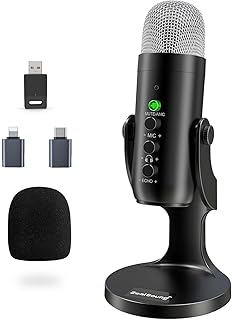
The ZealSound K66 is a cordless USB microphone aimed at creators who record at a desk or switch between a computer and a mobile device. Listed features include 48 kHz audio capture, a condenser capsule, cardioid pickup, onboard gain control, noise cancellation, mute, echo, and zero-latency monitoring. Its 2.4 GHz wireless connection uses a receiver, and the product description says no drivers or apps are required.
Best for: Podcasters, streamers, gamers, and video creators who want a desktop microphone with level adjustment and monitoring. It is a strong fit when you want to adjust gain at the microphone and use one setup across supported computer and mobile connections.
The included connection options are described as USB-C and Lightning-compatible adapters. The listing names Windows PC, Mac, laptops, PS4, PS5, iPhone, iPad, and Android devices, but buyers should verify that their specific device and recording application support the connection. Limitation: this is a desktop-style mic, not a clip-on microphone for moving around during a presentation.
EMEET M0 Plus Conference Speakerphone

The EMEET M0 Plus combines a conference speaker and microphone for group calls. Its listed features include four microphones with 360-degree voice pickup, noise reduction, USB-C and USB-A connectivity, Bluetooth, and daisy-chain support. The product description states that one unit is intended for meetings with up to eight people and that daisy chaining can extend use to 16.
Best for: Small teams that need a shared microphone and speaker on a computer or Bluetooth-connected device. It is selected because the multiple microphones and 360-degree pickup are designed for voices around a meeting table, unlike a personal headset or clip mic.
Choose this if several people need to participate in a conference call without passing around one wearable microphone. The listed noise-reduction feature may be useful in typical meeting environments, but the provided information does not quantify its performance. Limitation: this is a tabletop speakerphone, not a wireless body-worn microphone for recording a moving speaker.
Yealink SP92 Conference Speakerphone

The Yealink SP92 is a conference speakerphone for computer and laptop calls. The product name lists Bluetooth, USB connectivity, AI noise cancelling, and up to 20 hours of call time. It is described as a Teams-certified microphone and as a speakerphone for a small meeting room.
Best for: Individuals or small teams who want a shared call device with both microphone and speaker functions. Compared with a wearable wireless system, it keeps the microphone on the table and is intended for meetings rather than close-miked podcast recording.
Choose this if call participation and a stated battery runtime matter more than a clip-on mic. The listed USB and Bluetooth options provide two connection approaches, but the available information does not identify every cable or adapter included. Limitation: the product details provided do not specify the number or pickup pattern of its microphones, so do not assume it offers the same 360-degree four-mic arrangement as the EMEET M0 Plus.
NPTCL Wireless Mini Clip Microphone

The NPTCL microphone is a small clip-on system marketed for video recording, vlogging, podcasting, and computer use. Its product name lists noise cancelling, a 24-hour charging case, an LED charge display, and USB and USB-C connections. It is also described for use with iPhone, Android, PC, and laptop devices.
Best for: Mobile creators who want a compact microphone to clip on while recording videos, with computer use as another stated application. The charging case and charge display may suit buyers who prefer to store and recharge the microphone in one place.
Choose this if portability is more important than a desktop control panel or a meeting-room speaker. Limitation: the supplied product details do not explain the number of transmitters or receivers, exact wireless range, or what each USB connector supports. Confirm the included receiver and connection method for your phone or computer before purchase.
Buying Guide: How To Choose A Wireless Computer Microphone
Do you need a wearable mic or a conference speakerphone?
Start with the people and activity the system must capture. A lapel or headset microphone stays close to one speaker and is a better match for presentations, tutorials, or narration while moving. A desktop USB microphone is more suitable for a person recording at a workstation. A conference speakerphone combines a room microphone and a speaker so multiple people can talk and hear remote participants.
These formats are not interchangeable. A clip-on microphone does not replace a speakerphone when a group needs to hear a call, and a tabletop conference device is not designed to follow a presenter around a room. Match the design to the room, number of speakers, and whether playback through a built-in speaker is necessary.
Which wireless connection should you check?
Wireless systems can use different connection methods. The FIFINE K031B is identified as a UHF system with a receiver and transmitter. The ZealSound K66 is described as a 2.4 GHz system that connects through a receiver. Bluetooth is listed for the EMEET M0 Plus and Yealink SP92. Do not assume that two wireless products pair directly with each other or use the same receiver.
Also check how the receiver connects to your computer. Look for the exact USB type, any supplied adapters, and whether your computer has the required port. If you plan to record on a phone or tablet, verify the device-specific connection details rather than relying only on broad claims such as “works with Android.”
What controls and audio features matter?
For a solo creator, practical controls can be important. The ZealSound K66 lists gain control, mute, echo, and zero-latency monitoring. Gain adjustment can help set a usable recording level, while monitoring lets a speaker hear the microphone signal. A cardioid pickup pattern is also listed; it is intended to focus pickup toward the microphone’s front, so placement and speaking direction still matter.
For group calls, microphone coverage and speaker output are more relevant. The EMEET M0 Plus lists four microphones and 360-degree pickup. The Yealink SP92 lists AI noise cancelling and a speakerphone format. Product descriptions alone do not establish how a device will perform in every room, especially where there is echo, keyboard noise, or several people speaking at once.
How much battery life do you need?
Consider how long a typical recording or call lasts and whether you can recharge between sessions. The Yealink product name lists up to 20 hours of call time, while the NPTCL name describes a 24-hour charging case. These are different kinds of battery claims: one refers to call time and the other to the case. The provided information does not clarify the NPTCL microphone’s standalone runtime, so check the current listing for the exact breakdown.
For a receiver-and-transmitter kit, confirm how each component is powered and charged. Do not assume a charging case, battery indicator, or runtime unless it is specifically stated. A system used for long meetings may require a different setup from one used for short video clips.
Will it work with your recording or calling software?
Check compatibility at three levels: the operating system, the physical connection, and the app. The ZealSound description names Windows, Mac, several mobile device types, and applications such as Zoom, OBS, Discord, and Streamlabs. The EMEET description says it works with leading software, but the supplied details do not list every application. Confirm your intended app and device before relying on a microphone for a work call or recording session.
For workplace meetings, consider whether you need a Teams-oriented speakerphone or a simple microphone input. For video creation, check whether your recording app can select the microphone as its input source. A USB connection does not guarantee that every application will automatically choose the desired device.
What should you verify before ordering?
- Confirm whether the package includes a receiver, transmitter, charging case, cables, adapters, or headset parts you need.
- Check the connection type on both the microphone system and your computer or mobile device.
- Choose a clip-on or headset model for a moving speaker, a desktop model for close recording, or a speakerphone for group calls.
- Review stated battery information and distinguish microphone runtime from charging-case capacity.
- Look for specific compatibility details for your operating system, phone, and intended software.
- For shared meetings, compare microphone pickup coverage and whether the product includes a speaker.
Frequently Asked Questions
What is the best type of wireless microphone for a computer?
The best type depends on the task. Choose a receiver-based lapel or headset system for hands-free speech, a desktop wireless mic for solo recording, or a conference speakerphone for calls with multiple people in one room.
Can a wireless microphone connect to a laptop without Bluetooth?
Yes. Some systems connect through a dedicated receiver, often using a computer port. The FIFINE K031B and ZealSound K66 are described as receiver-based systems. Check the required port and included adapter before buying.
Is a conference speakerphone the same as a wireless microphone?
No. A conference speakerphone includes both a microphone and a speaker for calls. A wireless microphone system generally sends the speaker’s voice to a connected recording or amplification device and may not include a speaker for listening.
Which option is better for recording podcasts?
The ZealSound K66 is the most directly described for podcast recording among these options. It lists a condenser capsule, cardioid pickup, gain control, and monitoring. A clip-on model may be preferable for interviews or video where the speaker moves.
Does wireless mean the microphone needs no cables?
Not necessarily. The microphone’s signal may travel wirelessly, while a receiver still plugs into a computer or mobile device. Some speakerphones also offer USB connections in addition to Bluetooth. Check which components need a wired connection.
What should I check for phone compatibility?
Verify the phone model, connector type, adapter included, and support in the recording app. Product descriptions may list iPhone or Android broadly, but the required port and adapter can vary by device.