
High-end DJ equipment can mean a capable all-in-one system, a controller for learning or laptop-based sets, or event gear that supports lighting and announcements. The Pioneer DJ XDJ-AZ is best suited to DJs seeking a four-deck all-in-one system, while the XDJ-RX3 offers an all-in-one alternative. The DDJ-FLX2 is the beginner-focused controller in this selection. For event production, the truss kit and dual wireless microphone system add lighting and vocal options.
| Product | Best suited for | Category |
|---|---|---|
| Pioneer DJ XDJ-AZ | DJs seeking four-deck all-in-one operation | DJ system |
| Pioneer DJ XDJ-RX3 | DJs seeking an all-in-one system | DJ system |
| AlphaTheta DDJ-FLX2 | New DJs seeking guided learning features | Controller |
| BLACK TRUSS ARCH KIT | Mobile event setups needing a lighting structure | Lighting support |
| SGPRO D-332HB | Events needing handheld and wearable mic options | Wireless microphones |
Pioneer DJ XDJ-AZ

Best for: DJs who want four-deck control and an all-in-one format. The listed features include a 10.1-inch touchscreen, built-in Wi-Fi, SonicLink wireless technology, performance pads, and Beat FX. Those functions make it the most feature-rich primary DJ system in this selection based on the supplied product description.
Choose this if you want an integrated system with multiple decks and performance controls rather than a basic two-channel controller. It was selected for DJs who prioritize an expansive control layout and on-device display. The product listing does not specify every connection or software detail, so check those requirements before purchasing. Its larger feature set may be unnecessary for someone who only needs a simple beginner controller.
Pioneer DJ XDJ-RX3 All-In-One System
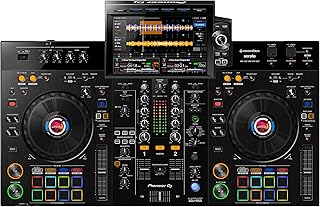
Best for: DJs who want an all-in-one system and do not need the XDJ-AZ’s explicitly listed four-deck positioning. The supplied product information identifies the XDJ-RX3 as an all-in-one DJ system, but does not provide detailed features or specifications. It is included as a dedicated DJ performance option rather than an accessory for event production.
Choose this if an integrated DJ system is the priority and you want to compare it directly with the more fully described XDJ-AZ. The model name and product listing establish its all-in-one category, but the supplied data does not confirm screen size, deck count, wireless functions, or effects. Review the current listing for those specifics before deciding. Avoid assuming that it matches the XDJ-AZ feature for feature.
AlphaTheta Pioneer DJ DDJ-FLX2 Controller

Best for: New DJs who want a two-channel controller with learning support. Its listed features include Smart Fader, USB-C, an included DJ course, streaming support, and beginner-friendly mixing features. That combination makes it a more accessible starting point than the four-deck XDJ-AZ for someone learning basic transitions and controls.
Choose this if you plan to start with a controller and value guided learning features. Streaming support may suit users who want access to music through supported services, but the listing does not name specific services or explain compatibility details. Confirm that your computer, device, and preferred DJ software work with the controller before purchase. It is not the best fit if your priority is a standalone all-in-one system.
BLACK TRUSS ARCH KIT

Best for: Mobile DJs and event operators who need a portable structure for lighting. The listed dimensions are 17.1 feet wide and 9 feet high, and the product is described as a mobile, portable DJ lighting system. It complements a DJ setup by providing a structure for event lighting, rather than adding mixing or playback controls.
Choose this if the event space needs a wide overhead lighting arch and portability is relevant to your setup. The listing does not specify included lights, load capacity, assembly requirements, or transport dimensions. Confirm those details before relying on it for a particular venue or lighting arrangement. Avoid treating the truss itself as a complete lighting package unless the listing confirms that fixtures are included.
SGPRO D-332HB Dual Wireless Microphone System

Best for: DJs and event hosts who need vocal options alongside music playback. This dual UHF wireless microphone system is listed with handheld and bodypack formats, plus handheld, head-worn, and lavalier microphone options. The product description names karaoke, DJ, church, classroom, live performance, and PA use cases.
Choose this if presenters or performers need a choice between handheld and hands-free microphone styles. It was selected as an event-audio accessory, not as a replacement for a DJ controller or mixer. The listing does not provide frequency, range, battery, or connection details in the supplied information. Check those specifications and confirm the receiving equipment’s input requirements before purchase.
Buying Guide: How to Choose High-End DJ Equipment
Do you need an all-in-one system or a controller?
An all-in-one system combines DJ controls in a single unit, while a controller is commonly used as part of a setup that includes a computer or other supported device. In this selection, the XDJ-AZ and XDJ-RX3 are identified as all-in-one systems. The DDJ-FLX2 is a two-channel controller with USB-C, streaming support, and beginner-focused features.
Choose an all-in-one system if you want an integrated performance unit and the product’s listed operating features suit your workflow. Choose a controller if you want a learning-oriented entry point or expect to build your setup around compatible software and devices. Verify exactly what is included and what additional hardware or software is required.
How many channels or decks do you actually need?
The XDJ-AZ listing explicitly describes a four-deck system. The DDJ-FLX2 is identified as a two-channel controller. Those descriptions offer a straightforward starting point for comparing control capacity, but channel count and deck count are not always interchangeable terms. Review the product specifications to confirm how the manufacturer defines each one.
For straightforward mixing, a simpler controller may provide enough control. DJs who plan to layer more sources or use additional deck workflows may prefer a system with more capacity. Avoid paying for complexity you do not expect to use, but also consider whether your needs could grow over time.
Which features matter during a live set?
Look for controls and display features that support the way you perform. The XDJ-AZ listing calls out a 10.1-inch touchscreen, performance pads, Beat FX, built-in Wi-Fi, and SonicLink wireless technology. These features distinguish it from the products in this selection that are described primarily as a basic controller, event structure, or microphone system.
Do not assume that a feature name guarantees a particular workflow or compatibility. Check the manufacturer’s documentation for supported devices, services, connections, and functions. If you use streaming, wireless connections, or specific software, confirm support for your exact setup before ordering.
What event accessories should you add?
Start with the job the accessory needs to perform. The BLACK TRUSS ARCH KIT is a mobile lighting structure with listed dimensions of 17.1 feet wide and 9 feet high. The SGPRO dual wireless microphone system provides handheld and bodypack options, with handheld, head-worn, and lavalier formats noted in its description.
These products serve different roles and do not replace core DJ playback equipment. Before choosing a truss, confirm its dimensions, assembly needs, and capacity against your venue and lighting fixtures. Before choosing microphones, check the receiver connections, operating frequency, power requirements, and the inputs available on your sound system.
What should you verify before buying?
- Included components: Confirm whether cables, microphones, lighting fixtures, software, and other accessories are included.
- Connections: Match the product’s inputs and outputs with your computer, mixer, speakers, or PA system.
- Software and streaming: Check supported platforms and devices instead of assuming that every service works.
- Setup space: Compare the product’s dimensions with your booth, stage, vehicle, or venue.
- Portability: Consider whether the system or accessory is practical for your transport and setup routine.
- Future needs: Decide whether you need a learning tool, a primary performance system, or event-production add-ons.
Frequently Asked Questions
What is the best high-end DJ equipment in this selection?
The Pioneer DJ XDJ-AZ is the most fully specified DJ system in this selection. Its listed features include four-deck operation, a 10.1-inch touchscreen, built-in Wi-Fi, SonicLink wireless technology, performance pads, and Beat FX.
Is an all-in-one DJ system better than a controller?
Neither format is best for every DJ. An all-in-one system may suit DJs seeking an integrated unit, while a controller such as the DDJ-FLX2 may suit beginners who want a two-channel control surface and included learning support. Check setup and software requirements before choosing.
Which product is best for a beginner DJ?
The AlphaTheta Pioneer DJ DDJ-FLX2 is the beginner-focused option listed here. Its description includes an included DJ course, Smart Fader, USB-C, streaming support, and beginner-friendly mixing features.
Does the BLACK TRUSS ARCH KIT include lighting fixtures?
The supplied product information describes a mobile, portable DJ lighting system and gives its width and height, but does not confirm whether lighting fixtures are included. Check the current listing for the package contents and load specifications.
Can the SGPRO microphone system be used for DJ announcements?
The product description lists DJ use and includes handheld and bodypack microphone options, including head-worn and lavalier formats. Confirm its receiver connections and compatibility with your PA or mixer before purchasing.
What should I compare when choosing between the XDJ-AZ and XDJ-RX3?
The XDJ-AZ listing specifies four decks, a 10.1-inch touchscreen, Wi-Fi, SonicLink, performance pads, and Beat FX. The supplied XDJ-RX3 information only identifies it as an all-in-one DJ system. Compare their current detailed specifications, connections, and workflow features before deciding.