
The best external sound card with optical out depends on whether you need a simple USB-to-TOSLINK transmitter or a multi-channel audio adapter. The Cubilux USB-to-TOSLINK adapter is best for a direct optical connection, while the StarTech ICUSBAUDIO7D suits buyers who also need analog surround outputs and inputs. The StarTech ICUSBAUDIO2D is a compact stereo option with Dolby Digital and DTS pass-through. Compare the listed features and confirm your device’s optical input requirements before choosing.
| Product | Best For | Optical Audio Detail |
|---|---|---|
| Cubilux USB A to TOSLINK Adapter | Direct USB-to-optical connection | Optical output; up to 192 kHz/24-bit listed |
| StarTech ICUSBAUDIO7D | Analog surround plus digital output | SPDIF output supports 48 kHz playback |
| StarTech ICUSBAUDIO2D | Stereo audio with Dolby/DTS pass-through | SPDIF digital output |
| HUANGENG USB External Sound Card | 5.1 or 7.1 system users | SPDIF digital sound listed; confirm connector details |
| SENECESLI 5.1 USB Adapter | Basic USB audio with optical output | Digital optical SPDIF output listed |
Cubilux USB A to TOSLINK Optical Adapter

Best for: Buyers who want a straightforward optical connection from a USB-A computer or compatible console to an audio system, soundbar, DAC, amplifier, or speaker. This is the most direct match for a search for an external sound card with optical out because its stated purpose is transmitting audio from USB to S/PDIF optical.
The adapter is described as unidirectional: it sends sound from the USB device to an optical audio system. It is listed as plug-and-play with Windows and Mac OS computers and does not require a driver or external power. Supported output formats are listed up to 192 kHz/24-bit, with 48 kHz/24-bit and 96 kHz/24-bit also specified.
Why it was selected: Its dedicated USB-to-TOSLINK function makes it easier to compare with a receiver or soundbar that accepts optical input, without requiring a larger multi-input sound card.
Limitation: The listing says it is not for TVs or other devices, and it requires a USB-A port. Check the source device and audio format before purchase.
StarTech ICUSBAUDIO7D 7.1 USB Audio Adapter
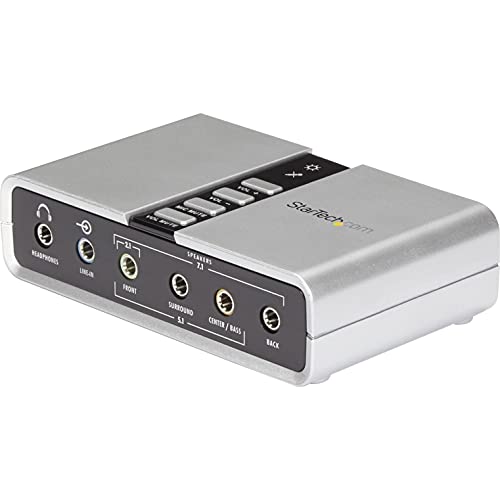
Best for: Desktop and laptop users who want optical digital output alongside several analog audio connections. This USB sound card supports 7.1-, 5.1-, and two-channel output through 3.5 mm jacks, as well as headphone, line-in, and stereo microphone connections.
StarTech lists analog playback and recording at 44.1 kHz and 48 kHz. Its SPDIF digital output supports 48 kHz playback. The adapter is bus-powered and includes a 1-meter USB cable, so it can add audio connections without installing an internal sound card.
Why it was selected: It is a flexible choice for buyers who need more than a single optical port, particularly if analog surround speakers, a microphone, or line-in audio are also part of the setup.
Limitation: The SPDIF output is limited to 48 kHz playback according to the supplied details. Optical input passthrough is also listed, but it supports up to two-channel audio at 48 kHz; that input feature is not the same as optical output.
StarTech ICUSBAUDIO2D USB Sound Card

Best for: Buyers who want a compact USB sound card with SPDIF output for a laptop or PC, especially when stereo audio and digital pass-through matter more than multiple analog surround channels. The listed features include AC3 Dolby Digital and DTS pass-through support.
This adapter also has external volume and EQ controls. Its small form is intended as an alternative to an internal sound card, and it includes a stereo microphone connection. These features make it useful when a computer needs an accessible audio control and digital output without a larger surround adapter.
Why it was selected: Its stated SPDIF output and Dolby Digital/DTS pass-through directly address buyers connecting a computer to equipment that accepts optical digital audio.
Limitation: The supplied information does not state a maximum sample rate or describe multi-channel analog output. Choose another model if you need a documented 5.1 or 7.1 analog connection.
HUANGENG USB External Sound Card

Best for: Buyers considering a USB audio adapter for a 5.1 or 7.1 surround system. The product description names both channel configurations, a 48 kHz sampling rate, an aluminum-alloy body, and compatibility with various operating systems.
The listed features position this as an external upgrade for computers without requiring an internal sound card. Its stated surround support may appeal to home theater users, gamers, or listeners who want a multi-channel setup rather than a basic stereo-only adapter.
Why it was selected: The product description specifically mentions SPDIF digital sound and 5.1/7.1 systems, making it relevant to optical-out shoppers who also need surround audio support.
Limitation: The supplied details do not specify the exact optical connector, supported output formats, or whether every surround mode is delivered through SPDIF. Confirm these points against the intended receiver or speaker system before buying.
SENECESLI USB 5.1 Optical Adapter

Best for: Buyers seeking a USB 2.0 adapter described as a six-channel 5.1 surround device with digital optical SPDIF output. The listing also states USB audio class 1.0 and 1.1 compliance, plug-and-play operation, and hot swapping.
Playback and recording are listed at 44 kHz or 48 kHz. Those specifications offer a useful baseline for users who need ordinary computer audio and want an optical output connection without selecting an adapter focused on high-resolution headphone playback.
Why it was selected: The product title explicitly identifies both 5.1 audio and digital optical SPDIF output, while its class-compliant and plug-and-play claims may suit buyers looking for a simple USB setup.
Limitation: The supplied feature list does not identify operating-system versions, optical output format support, or whether 5.1 audio is available over the optical connection itself. Verify those details if your setup depends on them.
Buying Guide: How To Choose An External Sound Card With Optical Out
Do you need a dedicated optical transmitter or a full sound card?
A USB-to-TOSLINK adapter is the simpler choice when your main goal is sending computer audio to a receiver, soundbar, external DAC, or amplifier with an optical input. The Cubilux adapter is explicitly described as a unidirectional USB-to-S/PDIF transmitter. A multi-function sound card, such as the StarTech ICUSBAUDIO7D, is a better fit if you also need analog speaker outputs, headphone connections, microphone input, or line-in recording.
Before purchasing, identify the direction of the connection. An optical output sends sound from the computer to another audio device. An optical input receives sound from a console, player, or other source. A product that has optical input does not necessarily provide optical output, and an input passthrough specification should not be treated as proof of output capability.
Will optical output provide the surround sound you want?
Check the product’s channel support and the receiving equipment’s capabilities. A listing may advertise 5.1 or 7.1 surround support without clarifying whether that applies to optical output, analog jacks, or a particular audio mode. The StarTech ICUSBAUDIO7D lists 7.1, 5.1, and stereo output through 3.5 mm jacks, while its SPDIF output is specified for 48 kHz playback. For other products, confirm the connection-specific details rather than assuming that all advertised channels travel over optical.
Optical SPDIF is also distinct from multi-channel analog output. If your speaker system uses several 3.5 mm inputs, make sure the adapter includes the appropriate analog connections. If the system accepts TOSLINK, focus on a confirmed optical output and check what audio formats it can send.
Which sample rate and resolution should you compare?
Use the listed output specifications, not a general headline about high-resolution audio. The Cubilux adapter lists optical output up to 192 kHz/24-bit. StarTech’s ICUSBAUDIO7D lists SPDIF playback at 48 kHz, even though its analog playback and recording support includes 44.1 kHz and 48 kHz. These figures describe different connections and should not be compared as if they were identical output modes.
Also check the receiving device’s supported formats. A higher stated maximum on an adapter does not establish that every application, operating system, or connected audio system will use that format.
What ports and controls do you need?
Make a quick list of the connections already in your setup. A stereo microphone, line-in source, headphones, analog surround speakers, and optical receiver may require different ports. The ICUSBAUDIO7D is the broadest option in this selection for analog connections. The ICUSBAUDIO2D is more focused on SPDIF output, stereo microphone input, and external volume and EQ controls.
Port type matters as well. The Cubilux optical adapter requires USB-A, while the listed StarTech ICUSBAUDIO7D includes a USB cable. Check the available port on your computer and any physical-space requirements before ordering.
How important are setup and operating-system details?
Some listings claim plug-and-play use or broad operating-system compatibility, but the details are not equally specific across these products. Cubilux names Windows and Mac OS and says that no driver or external power is required. SENECESLI lists USB audio class compliance and hot swapping. For the other adapters, check current product documentation for your operating system and device before relying on a particular setup process.
For console use, do not assume that a USB computer adapter works with every console or every port. The Cubilux listing specifically names certain USB-A devices and says it is not for TVs or other devices. Match the product’s stated use to the exact source device.
Frequently Asked Questions
What does an external sound card with optical out do?
It sends digital audio from a computer or compatible USB source through an optical SPDIF connection to equipment with an optical audio input, such as a receiver or soundbar.
Is optical out the same as optical in?
No. Optical out transmits audio to another device. Optical in receives audio from another source. Confirm the direction of the port in the product specifications.
Does every USB sound card with 7.1 support send 7.1 audio over optical?
No. Surround support may apply to analog connections or other modes. Check the stated channel support for the optical output specifically.
Which option is best for a simple computer-to-soundbar connection?
The Cubilux USB A to TOSLINK adapter is the most direct match among these products because it is described as a USB-to-optical audio transmitter. Confirm that the source has USB-A and the soundbar has an optical input.
Can I use an optical sound card for a microphone?
Optical output carries digital audio to another device; it does not itself provide a microphone connection. Choose an adapter that separately lists a microphone input if you need to record or communicate through a mic.
Should I choose a higher sample-rate specification?
Choose based on the audio format you intend to use and the capabilities of the receiving equipment. Compare the maximum rate stated for the specific output connection, not just the adapter overall.