
The best music system for a PC depends on whether you want Bluetooth, a separate subwoofer, or compact stereo speakers. The OHAYO is a flexible choice for Bluetooth and wired connections, while the Logitech Z313 and Cyber Acoustics CA-3090 add a subwoofer. The Edifier M60 suits buyers seeking a compact speaker with USB-C and Bluetooth, and the Sanyun SW208 offers bookshelf-style stereo with USB DAC input.
| System | Best For | Key Connection or Design |
|---|---|---|
| OHAYO 60W Computer Speakers | Wireless and wired flexibility | Bluetooth 5.3, AUX, RCA, USB |
| Logitech Z313 | PC audio with a subwoofer | 2.1 system, 3.5mm input |
| Cyber Acoustics CA-3090 | Compact 2.1 desktop setup | Subwoofer with adjustable bass |
| Edifier M60 | Compact, feature-rich stereo | Bluetooth 5.3, USB-C, AUX |
| Sanyun SW208 | Bookshelf-style desktop listening | Bluetooth 5.0, USB DAC, AUX |
OHAYO 60W Computer Speakers
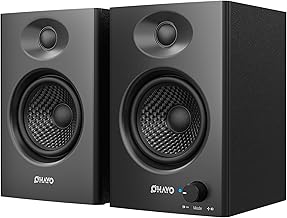
The OHAYO 60W system is best for PC owners who want both wireless playback and several wired input options. It is a stereo 2.0 pair, so it does not rely on a separate subwoofer to complete the desktop setup. The listed connections include Bluetooth 5.3, 3.5mm AUX, RCA, and USB.
Choose this system if your listening sources change between a computer, a phone, or another device with a compatible output. Bluetooth can reduce cable clutter for wireless playback, while the wired inputs offer alternatives when you prefer a direct connection. Its stereo pair format is also straightforward for a desk where a separate subwoofer would be inconvenient.
- Best for: Buyers who value input flexibility and a 2.0 speaker arrangement.
- Why it stands out: The listed connection choices span Bluetooth, AUX, RCA, and USB.
- Consider: No separate subwoofer is listed, so choose a 2.1 system if a dedicated subwoofer is a priority.
Logitech Z313 2.1 Speaker System

The Logitech Z313 is best for listeners who want a conventional PC speaker system with a separate subwoofer. Its 2.1 design combines two satellite speakers with a subwoofer, and the listed 3.5mm input supports connection to compatible devices. The product description also lists use with PCs, consoles, TVs, phones, tablets, and music players.
Choose the Z313 if you want a dedicated subwoofer as part of your desktop audio setup and do not need Bluetooth listed as a feature. The simple 3.5mm connection is useful for a computer or another source with an appropriate audio output. Its broad stated device compatibility makes it a practical option for a desk where more than one type of source may be used.
- Best for: Buyers seeking a 2.1 arrangement with a separate subwoofer.
- Why it stands out: It is listed for use with several categories of audio devices.
- Consider: The supplied information lists a 3.5mm input, not wireless connectivity.
Cyber Acoustics CA-3090 2.1 Speakers

The Cyber Acoustics CA-3090 is best for desktop users looking for a compact 2.1 system with a subwoofer and separate bass adjustment. The listed features include 18W output, a 3.5mm audio connection, a volume control pod, and an adjustable-bass subwoofer. The product is described for music, movies, and gaming.
The volume control pod gives users a listed control point separate from the computer, while adjustable bass lets listeners change the subwoofer setting to suit their setup. This system is a better fit than a 2.0 pair for shoppers who specifically want a subwoofer included in the speaker arrangement.
- Best for: Buyers who want a compact 2.1 PC system with adjustable subwoofer bass.
- Why it stands out: Its listed controls include a volume pod and bass adjustment.
- Consider: The listed connection is 3.5mm; Bluetooth is not specified in the provided product details.
Edifier M60 Multimedia Speakers

The Edifier M60 is best for buyers seeking a compact desktop speaker with modern wired and wireless inputs. The listed features include 66W RMS, Bluetooth 5.3 with LDAC, USB-C and AUX inputs, a 3-inch mid-bass driver, and a 1-inch tweeter. It is described as a multimedia speaker for computer use.
Choose the M60 if you want Bluetooth alongside direct USB-C or AUX connections. Its compact desktop format may suit a work area where a larger bookshelf-style pair is not the preferred layout. The specified driver sizes and connection types make it easier to compare with simpler 3.5mm-only systems.
- Best for: PC users who want a compact speaker with Bluetooth 5.3, USB-C, and AUX.
- Why it stands out: The listed inputs support both wireless and wired listening.
- Consider: The supplied description does not list a separate subwoofer; choose a listed 2.1 system if one is essential.
Sanyun SW208 Bookshelf Speakers

The Sanyun SW208 is best for PC listeners who prefer a bookshelf-style stereo pair with USB audio input. The listed features include Bluetooth 5.0, a built-in 24-bit DAC, USB and 3.5mm AUX inputs, and two 3-inch carbon-fiber speaker units described as 30W each. Its wood structure and direct/reflective speaker design distinguish it from small satellite-and-subwoofer systems.
Choose this pair if you want USB connectivity that uses the built-in DAC, or if Bluetooth and AUX are useful alternatives. The product description emphasizes stereo placement and a bookshelf speaker design, making it a better match for buyers who have room for a pair of speakers on or around a desk.
- Best for: Buyers who want a bookshelf-style PC pair with USB DAC input.
- Why it stands out: It lists three connection methods and a built-in 24-bit DAC for USB connection.
- Consider: No separate subwoofer is listed, and the pair may need more desk or shelf space than compact satellite speakers.
Buying Guide: How To Choose PC Speakers For Music
Do you want a 2.0 or 2.1 speaker system?
A 2.0 system uses two speakers without a separate subwoofer. It can be a simpler choice when desk space is limited or when you want a straightforward stereo pair. The OHAYO, Edifier M60, and Sanyun SW208 are described as stereo pairs or desktop speakers without a separate subwoofer listed.
A 2.1 system adds a subwoofer to the two main speakers. The Logitech Z313 and Cyber Acoustics CA-3090 are the listed options here with that format. Consider where the subwoofer will sit before choosing one, especially if the area beneath or beside your desk is already occupied.
Which connection should your PC speaker system use?
Check the audio outputs available on your computer before selecting a system. A 3.5mm input is a common direct-wired option, but the source device must have a compatible output or suitable connection method. The Z313 and CA-3090 list 3.5mm connections, while the OHAYO also lists AUX and RCA inputs.
USB audio can be useful when you want a digital connection from a computer. The Sanyun SW208 specifically lists USB input and a built-in 24-bit DAC. The Edifier M60 lists USB-C. Confirm that the cable and port arrangement you plan to use matches your computer; the product names alone do not establish what adapters may be needed.
Is Bluetooth important for your listening setup?
Bluetooth can make it easier to play music from a compatible phone or computer without connecting an audio cable. The OHAYO and Edifier M60 list Bluetooth 5.3, while the Sanyun SW208 lists Bluetooth 5.0. The Z313 and CA-3090 product information supplied here does not list Bluetooth.
Choose based on how you expect to use the speakers. If you mainly stream music from a phone, a listed Bluetooth connection may be convenient. If the PC will remain the primary source and you prefer a direct connection, a wired input may better fit your routine. Check the specific source device and connection requirements before purchasing.
How much space do you have on your desk?
Speaker layout affects placement as much as sound-system type. Compact desktop speakers can suit crowded work areas, while a bookshelf-style pair may need more room for separation and positioning. A 2.1 system also includes a subwoofer that needs a suitable place. Compare the product’s dimensions and placement needs with your available desk, shelf, and floor space before ordering.
What features matter most for music listening?
Start with the features you can verify: system format, input choices, Bluetooth availability, and controls. For example, the CA-3090 lists adjustable bass, the Sanyun lists a built-in DAC for USB input, and the OHAYO lists several input types. These specifications help distinguish systems, but they do not guarantee that one will sound best to every listener.
Think about your typical listening level, room, and music sources. A system with more inputs may be useful if you switch between a PC and other devices. A separate subwoofer may suit buyers who want a dedicated low-frequency speaker, while a 2.0 pair may be easier to place. Compare the stated features against your needs rather than choosing by wattage alone.
Frequently Asked Questions
What is the difference between 2.0 and 2.1 PC speakers?
A 2.0 system has two speakers and no separate subwoofer listed. A 2.1 system combines two main speakers with a subwoofer. The Z313 and CA-3090 are 2.1 options in this selection.
Which of these PC speakers supports Bluetooth?
The OHAYO lists Bluetooth 5.3, the Edifier M60 lists Bluetooth 5.3 with LDAC, and the Sanyun SW208 lists Bluetooth 5.0. Bluetooth is not listed in the supplied details for the Z313 or CA-3090.
Which system has adjustable bass?
The Cyber Acoustics CA-3090 product description specifically lists an adjustable-bass subwoofer. The other supplied product details do not specify that feature.
Which option includes a built-in DAC?
The Sanyun SW208 lists a built-in 24-bit DAC for USB connection. The supplied descriptions for the other systems do not list a built-in DAC.
Can I connect these speakers to devices other than a PC?
Some descriptions explicitly list broader device use. The Logitech Z313 is listed for PCs, consoles, TVs, phones, tablets, and music players. Other systems provide connection types such as Bluetooth, AUX, RCA, or USB, but confirm that your particular device has a compatible connection.
Should I choose Bluetooth or a wired connection for PC music?
Choose Bluetooth if wireless playback from a compatible source matters. Choose a wired connection if you prefer a direct cable link and your computer has the required port. Several systems in this selection offer both kinds of connection, so compare their specific listed inputs.