
The best advanced audio control box depends on the job: a USB sound card suits PC headset users who want inline volume and mute controls, a DI box is designed for stereo signal connections with multiple power options, and an audio switcher helps route stereo sources between devices. These five options cover different needs, so compare their connection types and functions before choosing.
| Product | Best For | Key Feature |
|---|---|---|
| 1Mii USB Sound Card | PC headset users | Inline mute and volume controls |
| USB Virtual 7.1 Sound Card | Gaming headset users | 6.5-foot cable and audio controls |
| Bolanle J22 DI Box | Stereo audio signal setups | Three power options |
| Radio Box Acrylic Unit | Buyers seeking a labeled radio/equalizer box | Listing specifies 2EQ |
| 4-Way RCA and 3.5mm Switcher | Switching analog stereo connections | Four-way selector operation |
1Mii USB Sound Card

This USB sound card converts a USB connection to a 3.5mm audio adapter and is aimed at PC and laptop headset use. The listing describes virtual 7.1 audio, plug-and-play setup without a driver, and direct volume and mute controls. Its six-foot braided cable provides some placement flexibility between a computer and the user.
Best for: PC or laptop users who want headset controls within reach for gaming, meetings, or voice chat. It was selected because it combines a USB audio adapter with direct mute and volume functions.
Limitation: The listed use is centered on PC and laptop devices. Check the connection requirements of the intended device before buying, and do not assume every console or operating system supports every listed function.
USB Virtual 7.1 Sound Card

This USB-to-3.5mm adapter is listed for PC, PS4, PS5, Mac, and gaming headsets. Its stated features include virtual 7.1 surround sound, a 6.5-foot cable, plug-and-play operation, and a control box with mute and volume functions. Those controls make it a practical option when adjusting headset audio without navigating software menus is a priority.
Best for: Buyers looking for an inline audio control box for a gaming headset and who need a longer cable than a short desktop adapter may provide. It was selected for its stated range of platforms and integrated controls.
Limitation: The product name lists several platforms, but it does not specify which features work on each one. Confirm platform-specific compatibility and virtual surround support before purchase.
Bolanle J22 Active Stereo DI Box
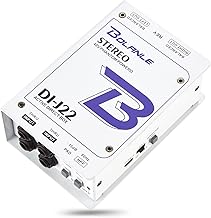
The Bolanle J22 is a direct active stereo DI box rather than a USB headset controller. Its listing identifies dual-channel operation and three power options: 48V phantom power from a mixer, a 9V battery, or 5V USB power from a power bank or adapter. This range of stated power sources can help buyers choose a DI box around the power available in their audio setup.
Best for: Users building a stereo audio connection setup who specifically need an active DI box and want a choice of power methods. It was selected because its listed function and power options make it distinct from the computer-focused adapters in this comparison.
Limitation: The provided details do not specify connector types, signal handling, or included accessories. Check the full product information against the equipment and cabling in the intended setup.
Radio Box Acrylic Unit

The product title describes a black acrylic “Radio Box” for numbered equalizer configurations and a radio, with this version identified as “2EQ.” The provided listing details do not explain its controls, connections, dimensions, or whether it processes audio electronically. Treat the name as a product description, not proof of particular functions beyond what the listing states.
Best for: Buyers who are searching for this specific radio-box or equalizer-related format and can verify that the product’s details match their intended use. It was included because it is explicitly described as a radio box with an EQ designation.
Limitation: The available information is unusually limited. Avoid choosing it as a general-purpose audio controller until you have confirmed its operation, supported connections, and what the “2EQ” configuration means.
4-Way RCA and 3.5mm Audio Switcher

This passive selector is described as a bidirectional stereo switcher for RCA left/right and 3.5mm connections. The listing presents it as either four inputs to one output or one input to four outputs. It also states that only one output plays at a time, an important distinction for anyone expecting several destinations to receive audio simultaneously.
Best for: Users who need to manually select among analog stereo sources or route one source to a selected destination. It was selected because its switching function is different from the USB adapters and DI box.
Limitation: This is a passive switcher, not a USB sound card or an amplifier. The listing says only one output plays at a time, so choose another type of device if simultaneous output is required.
Buying Guide: How To Choose An Audio Control Box
“Audio control box” can refer to several different kinds of equipment. A headset adapter, DI box, and analog switcher do not perform the same job. Start by identifying the connection you need to change or control, then compare the product’s stated function with your equipment. A device with volume buttons may not switch sources; a switcher may not adjust volume or convert a computer’s audio connection.
What do you want the box to control?
- Headset volume and mute: Consider a USB sound card with a listed inline control box. The 1Mii adapter and the USB Virtual 7.1 model both specify direct volume and mute controls.
- Stereo signal connections: Consider a DI box if the setup calls for that type of audio device. The Bolanle J22 is described as an active stereo DI box with dual-channel operation.
- Which source or destination is connected: Consider an audio switcher. The four-way selector is described for analog RCA left/right and 3.5mm stereo connections.
- A radio or equalizer-related box: Verify exactly what the product does. The Radio Box listing supplies too little detail to establish its controls or connection types.
Which connection types should you check?
Match the ports on the control box to the source, headphones, speakers, mixer, or other equipment you plan to connect. The two USB sound card listings specify USB-to-3.5mm connections, while the switcher listing names RCA left/right and 3.5mm stereo. The J22 listing’s provided description does not identify its connectors, so confirm these before selecting it.
Do not infer compatibility just because a product uses a familiar connector. Check the product listing for the target device and the specific functions you need. In particular, a stated platform list does not necessarily mean every feature is available on every platform.
Do you need controls on the cable?
For meetings, gaming, and voice chat, an inline mute control can make it easier to silence a headset quickly. A direct volume control can also avoid relying on a software menu. Compare cable length with the distance from the computer or console to where the control box will be used. The listed USB adapters have cables of six feet and 6.5 feet, respectively.
Is virtual surround sound a requirement?
Both USB adapter titles mention virtual 7.1 surround sound. Treat this as a listed feature, not a guarantee that it will function identically across every operating system, application, or console. If surround processing is essential, verify platform support and whether it requires software or works through plug-and-play operation on the device you plan to use.
How will the device get power?
Power requirements can determine whether a control box fits a portable or fixed setup. The Bolanle J22 description lists 48V phantom power, a 9V battery, and 5V USB power as options. The USB adapters are described as plug-and-play, but the supplied details do not explain power consumption or additional requirements. Review the full product information if power availability is a concern.
Do you need one output or several at once?
Check the distinction between selecting an output and splitting audio to multiple destinations. The four-way switcher listing states that only one output plays at a time. That makes it suited to selecting a connection, not to sending audio to all listed outputs simultaneously. Verify the routing behavior of any switcher before purchasing.
What should you verify when product details are limited?
Look for a clear description of supported connections, controls, power, and device compatibility. This is especially important for the Radio Box listing because the available title does not explain what its “2EQ” designation means. When a detail is not stated, do not assume it is included or supported. Contact the seller or consult the full listing if the missing information affects your decision.
Frequently Asked Questions
What is an advanced audio control box?
It is a broad term for a device that manages an audio task, such as headset volume and mute, stereo signal connections, or source selection. The exact function depends on the product type.
Which option is best for headset mute and volume controls?
The 1Mii USB Sound Card and USB Virtual 7.1 Sound Card both list direct mute and volume controls. Choose between them based on the stated cable length and verified compatibility with your device.
Can the four-way audio switcher play audio through all outputs at once?
No. Its listing says only one output plays at a time. Choose another device if you need simultaneous audio to multiple destinations.
Is a DI box the same as a USB sound card?
No. The Bolanle J22 is described as an active stereo DI box, while the USB sound card products are USB-to-3.5mm headset adapters with volume and mute controls.
Does “plug and play” confirm compatibility with every device?
No. Plug-and-play describes setup, but it does not establish that every feature works with every operating system or console. Confirm support for the specific device and function you need.
What should I check before buying the Radio Box?
Confirm its purpose, connections, controls, and the meaning of the “2EQ” designation. The provided product details do not establish those specifications.