
The best 24-bit/96kHz audio interface depends on whether you need to record a microphone, connect multiple sources, or simply add a headphone-and-microphone connection to a computer. The CAD Audio interface and Creative Live! Audio A3 explicitly support 24-bit/96kHz; the listed 2×2 model supports up to 24-bit/192kHz. The Sabrent adapter is a compact option for basic stereo output and mono microphone input, while the Pyle listing emphasizes inputs and effects but does not specify its recording resolution.
| Product | Best For | Listed Resolution |
|---|---|---|
| CAD Audio Single Channel | One microphone or instrument input | 24-bit/96kHz |
| 2×2 USB Audio Interface | Two-input recording and loopback | Up to 24-bit/192kHz |
| Creative Live! Audio A3 | Direct monitoring and recording | 24-bit/96kHz |
| Sabrent USB-C Audio Adapter | Simple stereo output and mono mic input | 24-bit/96kHz |
| Pyle PMUX9 | Connecting several audio source types | Not stated in the provided product details |
CAD Audio Single Channel Interface

The CAD Audio single-channel interface is a straightforward choice for a recording setup that needs one input and a specified 24-bit/96kHz recording format. Its listed features include +48V phantom power and USB bus power. Phantom power can be useful when using a microphone that requires it, while bus power means the interface draws power through its USB connection.
Best for: A solo vocalist, podcaster, or musician who needs one input and wants the stated 24-bit/96kHz specification. It is selected for its clearly listed resolution, phantom power, and USB-powered design.
- Resolution: 24-bit/96kHz.
- Power: USB bus powered.
- Microphone feature: +48V phantom power.
Limitation: This is a single-channel model, so it is not the choice for recording two independent sources at once. Check the input connections and your microphone or instrument requirements before buying; the supplied product details do not identify the connector types.
2×2 24-Bit/192kHz USB Audio Interface

This 2×2 interface is a better fit than a single-channel model when a recording session needs two inputs. The product name specifies 24-bit/192kHz, which is a higher maximum sample rate than 96kHz. Its listed functions include an XLR/TRS combo input, monitor mix, loopback, and a one-cable setup. The product title also identifies PC, Mac, and iOS recording.
Best for: Creators who want two-channel flexibility, loopback for routing computer audio, or a stated maximum resolution above 24-bit/96kHz. It is selected for its combination of two-input positioning and recording-oriented functions.
- Resolution: Up to 24-bit/192kHz, according to the product name.
- Connections: XLR/TRS combo input is listed.
- Workflow features: Monitor mix, loopback, and one-cable setup are listed.
Limitation: The supplied information does not identify the brand or provide detailed input and output counts beyond the 2×2 name. Confirm the exact connections and device support you need before purchase.
Creative Live! Audio A3 USB Interface
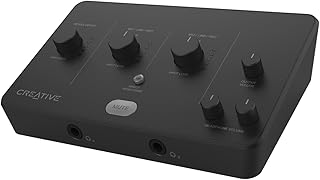
The Creative Live! Audio A3 is a candidate for buyers who want an explicitly stated 24-bit/96kHz interface with direct monitoring. Direct monitoring is relevant when you want to hear input audio while recording; the product title specifically identifies this function. The listing also describes the device as a USB interface for high-resolution audio and recording.
Best for: A creator who prioritizes direct monitoring and a clearly named 24-bit/96kHz specification. It is selected because both features are stated in the product name, making it easy to compare against interfaces with unspecified resolution.
- Resolution: 24-bit/96kHz.
- Monitoring: Direct monitoring is listed.
- Use: USB audio recording and hi-res audio are identified in the product name.
Limitation: The supplied details do not specify the number or type of inputs and outputs. If you need a particular microphone connector, instrument input, or simultaneous recording capacity, verify those details before choosing it.
Sabrent USB-C 24-Bit/96kHz Audio Adapter
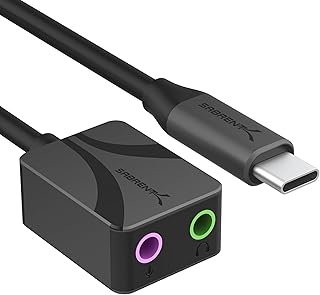
The Sabrent is a compact USB-C audio adapter rather than a conventional multi-input recording interface. Its listed specification is 24-bit/96kHz, with stereo output and mono microphone input through 3.5mm connections. The product details also state plug-and-play use and compatibility with Windows, macOS, and Linux.
Best for: Someone who needs a simple USB-C connection for headphone or speaker output plus a mono mic input. It is selected for its explicit resolution and compact, basic input/output arrangement.
- Resolution: 24-bit/96kHz.
- Connections: Stereo out and mono mic in.
- Design: USB-C, aluminum, and plug-and-play operation are listed.
- Operating systems: Windows, macOS, and Linux are listed.
Limitation: Its stereo-output and mono-mic configuration is not a substitute for a multi-input interface intended to record several sources independently. Check that your computer has the required USB-C connection.
Pyle PMUX9 USB Audio Interface
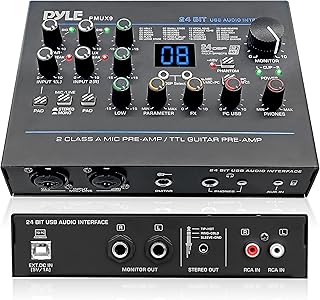
The Pyle PMUX9 is presented as a USB audio interface with several source and monitoring connections. Its listed features include mic/line, guitar, AUX stereo, and RCA inputs, along with 24 digital effects, phantom power, and phone, stereo, monitor, and headphone outputs.
Best for: A buyer comparing interfaces by available source connections and output options rather than by confirmed sample rate. It is included because its listing identifies computer recording and a broad selection of input and output types.
- Inputs: MIC/LINE, guitar, AUX stereo, and RCA are listed.
- Controls and effects: The product name states 24 digital effects and phantom power.
- Outputs: Phone, stereo, monitor, and headphone outputs are listed.
Limitation: The supplied product details do not state 24-bit/96kHz resolution. Do not choose it specifically for that recording format without verifying the specification in the current product documentation.
Buying Guide: How To Choose A 24-Bit/96kHz Interface
Do you need 24-bit/96kHz specifically?
Look for both the bit depth and sample rate in the product specifications, not just phrases such as “high resolution” or “studio quality.” The CAD Audio, Creative Live! Audio A3, and Sabrent listings explicitly state 24-bit/96kHz. The 2×2 interface states 24-bit/192kHz, which includes a higher maximum sample rate. The Pyle information provided here does not confirm a sample rate or bit depth.
A higher maximum sample rate is not automatically the right reason to buy an interface. Choose based on the recording format you plan to use, the number of sources you will capture, and whether the device has the connections and monitoring functions you need.
How many inputs should an interface have?
Count the sources you need to record at the same time. A single-channel interface is suited to one input at a time. A 2×2 design is a more appropriate starting point when two inputs are important. For a simple computer audio connection, the Sabrent adapter provides stereo output and a mono microphone input, but that arrangement is different from a multi-input recording interface.
Also identify the connector type on each source. A microphone, guitar, and line-level device may require different input options. The Pyle listing names several source types, while the CAD and Creative details supplied here do not specify connector types.
Will you need phantom power or direct monitoring?
Phantom power is a relevant feature when your microphone requires +48V power. It is listed for the CAD Audio interface and Pyle PMUX9. Direct monitoring is explicitly listed for the Creative Live! Audio A3. The 2×2 model lists monitor mix, a function that may be useful when balancing the listening mix; compare the product documentation to confirm the precise monitoring controls.
Is a USB adapter enough, or do you need a recording interface?
A small adapter can suit basic listening and a simple mono microphone connection. The Sabrent is described as a USB-C-to-3.5mm device with stereo output and mono mic input. Choose a fuller interface when your workflow needs multiple independent inputs, dedicated monitoring controls, or specified microphone and instrument connections. Do not assume an adapter offers the same routing or recording options as a larger interface.
What should you check for computer compatibility?
Confirm the connector type and operating-system support before purchase. The Sabrent listing names Windows, macOS, and Linux and specifies USB-C. The 2×2 product title names PC, Mac, and iOS. The supplied details for other products do not establish a complete compatibility list, so check the product documentation for your computer and recording software.
Frequently Asked Questions
What does 24-bit/96kHz mean on an audio interface?
It identifies the stated digital audio bit depth and sample rate. A product listing should specify both values if you need to confirm that it supports 24-bit recording at 96kHz.
Which listed products explicitly support 24-bit/96kHz?
The CAD Audio single-channel interface, Creative Live! Audio A3, and Sabrent USB-C audio adapter explicitly list 24-bit/96kHz. The 2×2 model lists 24-bit/192kHz. The supplied Pyle details do not state a resolution.
Is 24-bit/192kHz compatible with a 96kHz recording workflow?
The 2×2 product is listed with a maximum resolution of 24-bit/192kHz, but the supplied information does not describe its selectable settings. Check its documentation to confirm the supported recording formats and settings you intend to use.
Can I use a 24-bit/96kHz adapter to record a microphone?
The Sabrent listing specifies a mono microphone input and stereo output at 24-bit/96kHz. Its compact connection layout is intended for a basic input/output setup, not multiple independent recording inputs.
Which option is best for a solo recording setup?
The CAD Audio model is a clear option to compare for a single-input setup because it lists 24-bit/96kHz, +48V phantom power, and USB bus power. Confirm that its physical input connection suits your microphone or instrument before buying.