
The best two-in-one audio jack depends on which connections you need: choose a headset splitter to separate microphone and audio plugs, or a headphone Y splitter to connect two listening devices to one source. The 3.5mm female-to-dual-male adapter below is best for a single-plug headset and a computer with separate jacks; KINGTOP and UGREEN’s mic-and-audio adapters suit dual-plug headsets and combo ports; SYNCWIRE and UGREEN’s male-to-dual-female models are for sharing audio outputs.
| Product | Best For | Connection Direction |
|---|---|---|
| 3.5mm Female to Dual Male Y Separator | Single-plug headset on a computer with separate jacks | One headset plug to separate mic and audio plugs |
| KINGTOP Headphone Mic Splitter | Dual-plug headset on a combo-port device | Two headset plugs to one combo port |
| SYNCWIRE Headphone Splitter | Listening through two output devices | One audio source to two outputs |
| UGREEN Headphone Splitter, Male To Dual Female | Sharing a 3.5mm audio source | One audio source to two outputs |
| UGREEN Mic And Audio Y Splitter | Dual-plug headset on a single port | Two headset plugs to one combo port |
3.5mm Female To Dual Male Y Separator

This adapter is best for connecting a single-plug headset to a computer that has separate headphone and microphone jacks. Its female TRRS connector accepts a combined headset plug, then its two male connectors divide the audio and microphone signals. The listed features identify the black connector for stereo audio and the red connector for microphone input.
The cable is 23.8 centimeters, or 9.3 inches, long and is described as compact and lightweight. It is a plug-and-play option for gaming, conferencing, or chat when the computer has the matching separate 3.5mm inputs.
- Choose this if: Your headset has one combined 3.5mm plug and your computer has separate audio and mic jacks.
- Why it was selected: Its female-to-dual-male layout directly serves the common task of splitting a headset’s combined signals for separate computer ports.
- Limitation: It is not the right direction for connecting a dual-plug headset to a device with one combo port.
KINGTOP Headphone Mic Splitter

The KINGTOP splitter is best for a headset with separate microphone and headphone plugs when the target device has one 3.5mm CTIA combo port. It has one male plug and two female TRS jacks, marked for mic and audio. This is the reverse connection direction of a female-to-dual-male PC splitter.
The product listing describes compatibility with PS4, PS5, Xbox One, Switch controllers, newer laptops, and Android phones that have a CTIA combo port. It also names dual-plug gaming headsets from Logitech, Turtle Beach, HyperX, Razer, and SteelSeries among supported examples. Gold-plated connectors and compact portability are listed features.
- Choose this if: Your headset has two separate plugs, but your device has one compatible combo jack.
- Why it was selected: It clearly identifies its connector arrangement and target use, making it useful for gamers and laptop users with a matching port.
- Limitation: Compatibility depends on the device having a CTIA combo port; it does not split a single headset plug into separate computer inputs.
SYNCWIRE Headphone Splitter

SYNCWIRE’s male-to-two-female Y cable is best for sending audio from one 3.5mm source to two listening devices. The listed examples of sources include phones, tablets, laptops, MP3 players, and CD players. Example outputs include headphones and speakers, so it is intended for shared listening rather than separating a headset microphone from its audio.
The listing describes a compact, lightweight design for travel, a nylon-braided cable, double shielding, and polished 24K gold-plated connectors. It says the splitter provides stereo sound at both outputs. These listed details make it a suitable choice when portability and a more durable cable construction are priorities.
- Choose this if: You want to connect two output devices to one audio jack for shared listening.
- Why it was selected: Its male-to-dual-female design and stated source/output examples address the audio-sharing meaning of “two in one audio jack.”
- Limitation: The listing notes that the slim connector fits almost all cases except Lifeproof cases. It is not described as a mic-and-headphone splitter.
UGREEN Male-To-Dual-Female Audio Splitter

This UGREEN product is listed as a 3.5mm male-to-dual-female headphone splitter. Its connector arrangement indicates that it is intended to connect one audio source to two output connections. It is therefore a candidate for people who want to share audio through two listening devices, rather than route a headset microphone to a separate input.
The supplied product information does not include additional features or specific compatibility details. Check the device’s 3.5mm output and the plugs on the headphones or speakers before choosing it. Its product name provides the key comparison point: it has one male connection and two female connections.
- Choose this if: You need a male-to-two-female 3.5mm Y splitter for sharing audio from one source.
- Why it was selected: It represents the common two-output interpretation of a two-in-one audio jack and has a clearly stated connector layout.
- Limitation: The available feature information does not specify microphone support, cable construction, or a detailed compatibility list.
UGREEN Mic And Audio Y Splitter
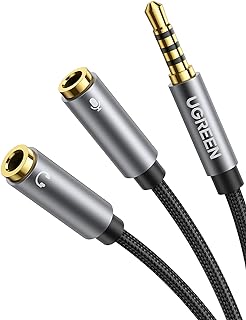
This UGREEN Y splitter is best for users whose headset has separate microphone and headphone plugs and whose device has one compatible 3.5mm port. The product name identifies two female connections for mic and audio and one male connection for the device. That makes it a headset-to-combo-port adapter, not an audio-sharing splitter.
The supplied listing names it as a headphone and microphone splitter compatible with a controller, but provides no fuller feature list. Compare the plug arrangement carefully with the headset and device before buying. If the headset already has one combined plug and the computer has two separate inputs, choose a female-to-dual-male adapter instead.
- Choose this if: Your headset has separate mic and headphone plugs and your device has one 3.5mm connection.
- Why it was selected: The listed two-female-to-one-male layout addresses the same essential use case as the KINGTOP adapter.
- Limitation: The provided product data does not spell out detailed platform support or connector standards, so verify those details for your device.
Buying Guide: How To Choose A Two-In-One Audio Jack
Do you need to split a headset plug or share audio?
Start by identifying the job. A headset adapter carries headphone audio and microphone signals between a headset and a device. An audio-sharing splitter sends sound from one source to two listening devices. These products may all look like small Y cables, but their connector directions and wiring are different.
For shared listening, look for one male 3.5mm plug and two female 3.5mm sockets. SYNCWIRE and the listed UGREEN headphone splitter use this male-to-dual-female format. For converting a single-plug headset to separate computer inputs, look for one female TRRS connector and two male plugs, such as the first adapter in this guide.
How many jacks does your device have?
Check the device before selecting an adapter. A computer with separate headphone and microphone ports needs a splitter that separates those signals. A laptop, controller, or phone with one combo port generally needs the reverse arrangement: two headset plugs joined into one compatible device plug.
Do not rely on the phrase “audio splitter” alone. Read the connector description: male and female refer to the physical plug and socket, while labels such as mic, audio, TRRS, and TRS indicate intended signal roles. Matching the layout is more important than choosing a cable based only on brand or appearance.
Does the headset use one plug or two?
A headset with a single combined 3.5mm plug typically needs either a device with a combo port or an adapter that splits its audio and microphone signals into separate plugs. A headset with two plugs needs a compatible combo-port adapter if the target device offers only one jack.
For gaming headsets, verify whether the device port follows the wiring standard required by the adapter. The KINGTOP listing specifies a CTIA combo port. If the device standard is unknown, check its documentation or product information before purchasing.
Are you connecting two headphones to one source?
A male-to-dual-female audio splitter is the appropriate type when one source should feed two headphones or speakers. The SYNCWIRE listing explicitly describes audio transfer to two output devices and names headphones and speakers as examples. The UGREEN male-to-dual-female product has the same stated connector configuration, though its supplied feature information is more limited.
These passive Y splitters are not described as independent volume controls. The available product details also do not establish that each output can be controlled separately. Choose one only when the source, cable, and output devices all use compatible 3.5mm connections.
Which cable details matter?
For a cable that will be carried frequently, consider its length, size, and construction. The first adapter is listed as 9.3 inches long and compact. SYNCWIRE lists a nylon-braided cable, double shielding, and a lightweight design. These are stated construction features, but they do not remove the need to protect the connectors from bending or strain.
Connector plating and shielding may be useful comparison details, but they do not fix an incorrect wiring layout. Confirm that the adapter supports the required signal path first. Also check whether a phone case blocks a connector: SYNCWIRE specifically notes a limitation with Lifeproof cases.
Frequently Asked Questions
What does “two-in-one audio jack” mean?
It can mean a headset adapter that combines or separates microphone and headphone connections, or a Y splitter that connects two listening devices to one audio source. Check the number and type of plugs to identify the correct product.
Can I use a headphone splitter to connect a microphone?
Not necessarily. A male-to-two-female splitter for shared listening is intended to provide two audio outputs. Use a headset mic splitter only when its connector layout and wiring match the microphone and device ports.
Which adapter connects a single-plug headset to a PC with separate jacks?
Use a 3.5mm female-to-dual-male headset splitter with separate microphone and stereo-audio connectors. Connect each male plug to the matching computer input.
Which adapter connects a dual-plug headset to one combo jack?
Use a dual-female-to-one-male headset adapter designed to join the microphone and headphone plugs into one compatible combo port. Confirm the device’s port standard before buying.
Can a 3.5mm Y splitter send audio to two headphones?
A male-to-dual-female audio splitter is designed for one source and two output connections. Check the product description for that exact configuration, since a headset mic adapter has a different purpose.
Will every 3.5mm adapter work with every phone or computer?
No. Devices vary in port availability, wiring standards, and connector layout. Check whether the device has a combo port or separate mic and audio jacks, then match those ports to the adapter’s stated configuration.