
A home MP3 CD player can play discs while adding features such as built-in speakers, Bluetooth, radio, or USB playback. The Gueray desktop models are best for buyers who want several playback options in one compact unit, while the MEGATEK and Philips boomboxes suit listeners who prefer a portable speaker-style design. The CARONSORT is a better fit for shoppers seeking a wood-cabinet look and bass controls. Compare the listed formats and connections below before choosing.
| Product | Best For | Notable Features |
|---|---|---|
| Gueray Desktop CD Player | All-in-one desktop playback | MP3 discs, Bluetooth, FM, USB, TF card |
| MEGATEK Boombox | Portable stereo-style listening | MP3/WMA discs, EQ modes, resume function |
| Gueray Desktop CD Player, Black | Compact home setups | MP3 discs, Bluetooth transmitter and receiver |
| CARONSORT Retro CD Player | Wood-cabinet design and sound controls | Bluetooth, USB, FM, bass adjustment |
| Philips Boombox CD Player | CD, radio, and cassette playback | MP3, USB, FM tuner, cassette player |
Gueray Desktop CD Player With Bluetooth

Best for: Home listeners who want a desktop CD player that can also handle several other audio sources. It supports CD, CD-R, CD-RW, MP3, and WMA, so it is a strong match for buyers with a mix of standard and recorded discs.
The feature list includes Bluetooth 5.0, FM radio, TF card playback, USB flash drive playback, and a 3.5 mm audio connection. Its built-in dual speakers are designed for direct listening, and Bluetooth operates as both a transmitter and receiver. That gives users the option to connect a Bluetooth device to the player or send audio to a Bluetooth speaker or headphones.
A built-in LCD shows the track number, play time, and selected mode. The desktop design stands without assembly or additional support, and a remote control is included according to the listing. Choose this model if you want a single unit for discs, radio, and digital audio sources. Limitation: The feature information does not specify battery or power details, so check the listing for the setup requirements that suit your room.
MEGATEK Portable CD Player Boombox

Best for: Buyers who want a compact, portable-style player with physical controls and built-in stereo speakers. The listing describes large buttons, top dials, and a backlit LCD, which may suit people who prefer visible, straightforward controls.
This top-loading player supports CDs, CD-R/RW, CD-G, audiobooks, and MP3/WMA discs. Playback options include shuffle, repeat, and resume, while five EQ modes provide ways to adjust the sound. Its dual 3-inch front-firing speakers are described as delivering clear, balanced stereo sound.
Choose the MEGATEK if disc playback and an easy-to-use boombox layout matter more than a long list of digital inputs. The product is described as suitable for home, shop, or on-the-go use, but the provided features do not explain its power options. Limitation: Bluetooth and USB playback are not included in the supplied feature details, so this is a less suitable choice if those connections are essential.
Gueray Black Desktop CD Player

Best for: Buyers who want a black desktop player with broad source support and built-in speakers. The listed functions closely match the other Gueray desktop model: CD, CD-R, CD-RW, MP3, and WMA disc playback, plus FM radio, TF card, USB flash drive, and 3.5 mm audio support.
Bluetooth 5.0 works in both transmitter and receiver modes. The player can receive audio from a Bluetooth-enabled device or transmit audio to Bluetooth headphones or a speaker. Its dual built-in speakers also allow listening without adding an external audio device. The LCD displays track number, play time, and mode, while the desktop design stands without assembly or extra support.
This model is a practical choice when you want a stationary player that can serve as a CD unit, radio, and Bluetooth speaker. The listing also specifies a remote control. Limitation: The feature list does not give detailed information about output power or power supply, so confirm those details if they affect your room setup.
CARONSORT Retro Bluetooth CD Player
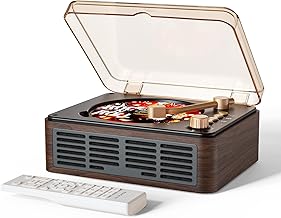
Best for: Home listeners looking for a retro-style player with a wooden cabinet and bass adjustment. The listing says its fully sealed wooden cabinet is designed to enhance sound quality, and its remote can raise or lower bass and increase treble settings.
The player supports CD, USB, Bluetooth, and FM radio modes. It also has Bluetooth input and output: users can receive audio from an external Bluetooth device in CD mode or use the unit as a Bluetooth speaker. Listed connections include 3.5 mm, AUX, and S/PDIF, with a remote control included.
Choose the CARONSORT if its cabinet style, sound adjustment, and multiple connection options fit your home setup. Limitation: The supplied features do not explicitly identify MP3 CD or MP3 file support. Buyers specifically looking for an MP3-disc player should verify that format support before choosing it.
Philips CD Boombox With Cassette Player

Best for: Buyers who want a boombox-style player that combines CDs with cassette playback, FM radio, and USB/MP3 features. The listing describes dual stereo speakers with bass reflex technology, large controls, and a backlit LCD.
The built-in FM tuner has digital tuning and 30 station presets, allowing users to save radio stations. The feature list also mentions USB, MP3, and AUX input. Its compact boombox format is presented as suitable for home, shop, or on-the-go use.
This model is the most relevant option in this group for households that still use cassette tapes as well as CDs and radio. Limitation: The supplied description does not clearly state which CD formats are supported or whether MP3 files can be played from a disc, so confirm those details if MP3-CD playback is a requirement.
Buying Guide: How To Choose A Home MP3 CD Player
Does the player support MP3 CDs?
Check whether the product specifically lists MP3 disc playback. The two Gueray models list MP3 support alongside CD, CD-R, and CD-RW. The MEGATEK lists MP3/WMA discs. The Philips description mentions MP3 but does not clearly connect it to disc playback. The CARONSORT features provided here do not specify MP3 support. If you have discs containing MP3 files, that distinction matters.
Do not assume that a player that supports standard CDs or USB audio will also read MP3 files burned to a CD. Look for wording that explicitly names MP3 discs or MP3 CD playback. If the description is unclear, check the product listing or contact the seller before buying.
Do you want built-in speakers or external audio?
Built-in speakers make a player usable without a separate stereo. The Gueray models list dual built-in speakers, the MEGATEK lists dual front-firing speakers, and the Philips model describes dual stereo speakers. The CARONSORT emphasizes its wooden cabinet and sound controls. Consider the intended listening area and whether you plan to connect a separate speaker system.
Bluetooth can serve different purposes. A receiver accepts audio from a phone or another Bluetooth source, while a transmitter sends the player’s audio to compatible Bluetooth headphones or speakers. The Gueray models list both modes, and the CARONSORT description also specifies Bluetooth input and output. Check the feature list for the direction of Bluetooth use rather than relying on the word “Bluetooth” alone.
Which extra sources and connections are useful?
Choose features based on the audio you already own. The Gueray players list FM radio, USB flash drive playback, TF card playback, and a 3.5 mm connection. The CARONSORT lists USB, FM, 3.5 mm, AUX, and S/PDIF. The Philips unit includes FM, USB, MP3, and AUX in its description. The MEGATEK feature list focuses on disc formats and playback modes.
More inputs can make one unit useful for more purposes, but they are only valuable if they match your devices. Make a short checklist of the formats, connections, and playback sources you plan to use. Then compare that list with the product’s stated features.
Is a desktop player or boombox a better fit?
A desktop design is suited to a fixed spot such as a desk, shelf, or bedside table. The Gueray models are described as stand-alone desktop units that require no assembly or additional support. A boombox layout, such as the MEGATEK or Philips, may be preferable if you want large controls and a compact speaker-style body. The product details provided do not establish the power options for every model, so check those before planning to move a player between rooms or use it away from home.
Also consider how you prefer to operate the unit. The Gueray listings mention a remote control and LCD information. The MEGATEK highlights large buttons, top dials, and a backlit LCD. The Philips description mentions large controls and a backlit LCD. If you regularly select tracks or adjust settings from across a room, control layout may be as important as the number of supported formats.
Which playback controls should you compare?
Playback functions can make a difference when listening to albums, audiobooks, or mixed collections. The MEGATEK lists shuffle, repeat, and resume functions. The Gueray displays track number and play time, while the CARONSORT remote offers bass and treble adjustment. The Philips listing focuses on radio presets and its speaker system. Match the controls to your habits instead of assuming every CD player offers the same options.
Frequently Asked Questions
What is an MP3 CD player?
An MP3 CD player is a CD player that supports discs containing MP3 audio files. Check the product description for explicit MP3-disc support because standard CD playback does not confirm it.
Can I play regular audio CDs on these players?
The listed products are described as CD players, but their supplied feature details vary. Check each product’s stated disc formats, particularly if you also use CD-R or CD-RW discs.
Can a Bluetooth CD player send music to headphones?
It can if the product supports Bluetooth transmitter mode. The Gueray models list transmitter and receiver functionality. Confirm the specific Bluetooth functions before purchasing another model.
Which option includes FM radio?
FM radio is listed for both Gueray desktop players, the CARONSORT, and the Philips boombox. The supplied MEGATEK feature details do not mention an FM tuner.
Which player is described with cassette playback?
The Philips boombox product description includes a cassette player along with CD, radio, USB, and MP3 features.
Should I choose USB playback instead of MP3 CDs?
Choose USB playback if your music is stored on a compatible flash drive; choose MP3-disc support if you want to play MP3 files burned to CDs. They are separate features, so confirm that the player lists the one you need.