
A 7.1-channel USB external sound card can add audio connections or virtual surround processing through a computer’s USB port. The StarTech adapter is best for buyers who need multiple analog connections and SPDIF; the Vantec is a simpler choice for USB-connected surround audio. For a compact headset connection, consider the FEMORO adapter, while the DSYJ and USB 3D adapter offer straightforward stereo and microphone jacks.
| Product | Best For | Key Feature |
|---|---|---|
| StarTech 7.1 USB Audio Adapter | Multiple audio connections | 7.1, 5.1, and stereo output options |
| VANTEC USB External 7.1 Channel Audio Adapter | Simple USB surround audio | USB 2.0 and 1.1 support |
| FEMORO USB Sound Card | Headset listening and speaking | Compact aluminum housing |
| USB 3D Stereo Audio Adapter | Convenient volume controls | Built-in volume and mute buttons |
| DSYJ 7.1 Channel USB Adapter | Basic headphone and mic connections | Stereo output and mono mic input |
StarTech 7.1 USB Audio Adapter
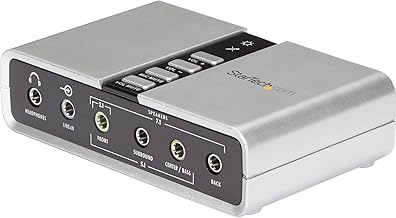
The StarTech ICUSBAUDIO7D is the most connection-focused option in this selection. It adds up to 7.1-channel audio through a USB port and supports 7.1-, 5.1-, and two-channel output using 3.5 mm jacks. Listed connections include a headphone port, line-in, stereo microphone inputs, and SPDIF digital output.
Best for: Buyers who want a broader range of audio connections for a desktop or laptop, rather than only a basic headphone-and-microphone adapter. The included 1-meter USB cable provides some separation between the adapter and the computer.
- Supports 44.1 kHz and 48 kHz analog playback and recording.
- SPDIF digital output supports 48 kHz playback.
- SPDIF optical input passthrough supports up to two-channel audio at 48 kHz.
Limitation: The SPDIF input passthrough is specified for two-channel audio, not 7.1-channel input. Check that the listed ports and signal limits suit your setup before choosing it.
VANTEC USB External 7.1 Audio Adapter

The VANTEC adapter is a straightforward option for buyers seeking 7.1-channel surround sound through a USB connection. Its listed features include a USB 2.0 connection that is backward compatible with USB 1.1, along with support for 48 kHz and 44.1 kHz sampling rates for playback and recording.
Best for: Users who want a simple external audio adapter and value the stated sampling-rate support. It may be a better fit than a multi-connection model when the main priority is USB-based surround audio rather than a wide set of documented inputs and outputs.
The product description does not list a detailed port configuration, operating-system compatibility, or whether its 7.1 output is physical multichannel or virtual surround. Confirm those details with the seller if your setup depends on a particular connection layout or surround implementation.
Limitation: Its feature listing is less specific about connectors than the StarTech adapter, so it may not be the right choice when you need a confirmed line-in, microphone port, or SPDIF connection.
FEMORO Compact USB Sound Card

The FEMORO adapter is designed to provide USB-to-3.5 mm audio for listening and speaking. Its description highlights a compact aluminum-alloy shell and plug-and-play operation without drivers. The manufacturer also describes a noise-control chip intended to reduce electromagnetic interference and unwanted noise.
Best for: Buyers who want a portable headset-style adapter with a stated combination of audio listening and microphone functions. The compact format and metal housing may suit users who carry an adapter between workspaces or keep it connected to a laptop.
Important connection detail: The product listing says the USB port is the output and audio transfers from USB to the 3.5 mm port. Check that direction and the port arrangement match your intended equipment before buying. The description names PC, laptop, Mac, PS4, and headphone use, but does not provide specific compatibility conditions for each device.
Limitation: This listing describes USB-to-3.5 mm headset audio, not a detailed set of separate 5.1 or 7.1 analog output jacks. Do not choose it if you specifically need individually connected multichannel speakers.
USB 3D Audio Adapter With Controls

This USB 2.0 adapter is described as a virtual 7.1-channel sound card for USB-enabled laptop and desktop computers. It has a stereo output jack and mono microphone input jack, plus built-in volume and mute controls. The listed dimensions are 57 × 25 × 12 mm.
Best for: Buyers who want physical volume and mute buttons on a small external adapter. It is a useful comparison against basic USB audio dongles when quick access to those controls matters. The listing specifically describes the surround effect as virtual 7.1 audio for Windows.
The product also identifies a USB Type-A connector and a USB 2.0 full-speed specification of 12 Mbps. The described output is stereo, while the 7.1 feature is virtual; those terms should not be treated as evidence of seven separate speaker outputs.
Limitation: The listing does not name a brand or provide broader operating-system details. Buyers who need a physical multichannel jack layout or confirmed compatibility with a particular device should verify those points first.
DSYJ 7.1 Channel USB Adapter

The DSYJ Store adapter provides a USB Type-A connection, a stereo output jack, and a mono microphone input jack. Its listing identifies USB 2.0 full-speed operation at 12 Mbps. The connector arrangement is simple and clearly stated, which makes it easier to compare with adapters that have extra ports.
Best for: Buyers who need a basic external USB audio connection for stereo output and a mono microphone input. It may suit a setup where those two jacks are enough and a more extensive collection of analog or digital connections is unnecessary.
The product name refers to 7.1 channels, but the supplied feature details list only a stereo output and a mono microphone input. The description does not explain whether the 7.1 feature is virtual processing or identify separate multichannel speaker outputs.
Limitation: Avoid assuming that the two listed audio jacks provide physical 7.1 speaker connections. Confirm how the adapter handles surround audio if that is a primary requirement.
Buying Guide: How To Choose A USB Sound Card
Do you need physical 7.1 output or virtual surround?
“7.1” can refer to different kinds of audio support. A device may provide multiple physical outputs for a multichannel speaker setup, or it may create a virtual surround effect through stereo headphones or speakers. The USB 3D adapter explicitly describes virtual 7.1 output, while the DSYJ listing names stereo and microphone jacks without explaining the surround method. Read the port details, not only the product name.
Which connections do you need?
Start with the devices you plan to connect. A headset setup may need a headphone output and microphone input. A desktop speaker system can require more than one analog output, while a digital audio setup may call for SPDIF. The StarTech listing describes the widest selection here, including 3.5 mm connections and SPDIF. The FEMORO, DSYJ, and USB 3D adapters describe more limited 3.5 mm arrangements.
- For headphones and a mic: Check whether the adapter has the required separate or combined jacks.
- For multichannel speakers: Confirm the number and type of physical output connections.
- For digital audio: Check whether SPDIF is included and note any stated sampling-rate limits.
Does sampling-rate support matter?
Sampling-rate details can help compare adapters if your playback or recording equipment has a particular requirement. VANTEC lists 44.1 kHz and 48 kHz for playback and recording. StarTech specifies those rates for analog playback and recording, with separate limits for SPDIF. The other product descriptions do not provide comparable sampling-rate information, so avoid assuming they support the same formats.
Check USB and operating-system details
USB Type-A and USB 2.0 appear in several listings, but the provided information does not establish support for every computer or operating system. FEMORO says it is plug and play and names several device categories; the USB 3D model identifies USB-enabled laptop and desktop computers and mentions virtual 7.1 for Windows. Verify the exact requirements for your computer, console, or audio software before purchasing.
Are controls and portability priorities?
An adapter with onboard volume and mute buttons can make common adjustments easier without opening software controls. The USB 3D model lists both. FEMORO emphasizes a compact design and aluminum-alloy shell. These features may matter more to people who travel with an adapter than to buyers installing a sound card beside a desktop. Compare the physical design and controls against the connection requirements first.
Frequently Asked Questions
What does a 7.1-channel USB sound card do?
It adds USB-connected audio capability and may support multichannel or virtual surround features. The exact result depends on the adapter’s outputs and audio implementation.
Is virtual 7.1 the same as seven physical speaker outputs?
No. Virtual 7.1 describes processed surround audio, often through a stereo output. Physical multichannel output requires the appropriate separate connections, which should be confirmed in the product specifications.
Can I use a USB audio adapter for both headphones and a microphone?
Some listed adapters describe both listening and microphone input. Check whether the adapter has the correct jack arrangement for your headset, since the products differ in their stated ports.
Which product lists SPDIF?
The StarTech ICUSBAUDIO7D listing specifies SPDIF digital output and optical input passthrough, with stated sampling-rate limits.
Do these adapters require drivers?
The FEMORO listing says plug and play with no drivers needed. The other supplied descriptions do not establish driver requirements, so check the product details for your operating system.