
Looking For A 2.1 Computer Speaker System? This guide compares five popular 2.1 desktop systems suitable for music, movies, and gaming. Below is a quick summary table to help you scan options before diving into individual reviews.
| Product | Brand | Key Strengths |
|---|---|---|
| Logitech Z623 | Logitech | THX Certification, Powerful Output, RCA + 3.5mm Inputs |
| Logitech Z533 | Logitech | Balanced 120W Power, Front-Facing Subwoofer, RCA + 3.5mm |
| Logitech G560 | Logitech (G) | Gaming-Focused, LIGHTSYNC RGB, DTS:X Ultra Surround |
| Cyber Acoustics CA-3610 | Cyber Acoustics | Control Pod, Dual Titanium Drivers, Down-Firing Subwoofer |
| Nylavee 2.1 Computer Speakers | Nylavee | USB/USB-C Power, Lighting Modes, Enhanced Bass |
Logitech Z623 400 Watt Home Speaker System
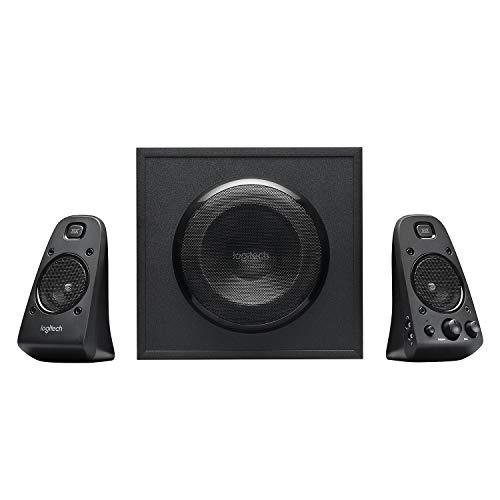
The Logitech Z623 Is A THX-Certified 2.1 Speaker System Designed For Immersive Audio Across Music, Movies, And Games. It Includes Two Satellite Speakers At 35 Watts Each And A Powerful Subwoofer To Deliver High Peak Output.
- Inputs: RCA And 3.5mm For Multiple Sources (PC, Console, Phone)
- Power: High Maximum Output For Larger Rooms
- Mounting Type: Tabletop Satellites; Subwoofer Floor Placement Recommended
- Note: Manufacturer Advises Referring To The User Guide For Setup
Logitech Z533 2.1 Multimedia Speaker System

The Logitech Z533 Provides 120 Watts Of Peak Power (60W RMS) From Full-Range Drivers And A Front-Facing Subwoofer. It Emphasizes Balanced Acoustics And Room-Filling Sound Suitable For Desktops And Small Entertainment Areas.
- Connectivity: 3.5mm And RCA Inputs For Broad Compatibility
- Design: Front-Facing Subwoofer For Direct Bass Response
- Use Cases: Works With PC, Tablet, Smartphone, Game Console, Or TV
Logitech G560 PC Gaming Speaker System

The Logitech G560 Targets Gamers With 7.1 DTS:X Ultra Surround Sound And Game-Driven LIGHTSYNC RGB Lighting That Reacts To In-Game Audio. The System Includes Two Satellites And A Subwoofer With Multiple Input Options Including Bluetooth And USB.
- Lighting: Game-Based LIGHTSYNC RGB For Visual Feedback
- Audio Tech: DTS:X Ultra For Positional Audio
- Connectivity: Bluetooth, USB, And Standard Analog Inputs
Cyber Acoustics CA-3610 2.1 Multimedia Speaker System

The Cyber Acoustics CA-3610 Is A Desktop-Focused 2.1 System With Dual 2-Inch Titanium Drivers In The Satellites And A 5.25-Inch Down-Firing Subwoofer. It Includes A Convenient Control Pod For Volume And Bass Adjustment, Plus A Headphone Jack For Private Listening.
- Power: 62W Peak, 30W RMS
- Controls: Wired Control Pod For Easy Adjustments
- Compatibility: 3.5mm Aux For Quick Connections To PCs And Consoles
Nylavee Computer Speakers With Subwoofer 2.1 Hi-Fi

The Nylavee 2.1 System Is A Compact USB/USB-C Powered Option With A Wired Subwoofer And Multiple Lighting Modes. It Focuses On Enhanced Bass From A Downward-Firing 4-Inch Subwoofer And Offers Touch-Control Illumination For Desk Ambiance.
- Power & Sound: 28W Total Hi‑Fi Output With Distortion‑Free Audio
- Bass Design: Downward-Facing Subwoofer For Ground-Reflected Low End
- Connectivity & Power: USB/USB‑C Power Plus 3.5mm Aux Input
Buying Guide: How To Choose The Best 2.1 Computer Speaker System
This section outlines the factors to weigh when selecting a 2.1 speaker system for desktop use.
Sound Quality And Power
Check RMS or peak power to match room size and listening habits. Look For Systems With Clear Full-Range Drivers For Mids/Highs And A Dedicated Subwoofer For Low-End Extension. Certification (e.g., THX) Or Specified RMS Values Help Gauge Real-World Performance.
Subwoofer Design And Placement
Downward-Firing And Front-Facing Subwoofers Deliver Different Bass Characters. Downward-Firing Units Use Floor Reflection To Enhance Low Frequencies, While Front-Facing Subs Offer More Direct, Tuned Bass Response. Consider Room Size And Desk Layout For Best Placement.
Connectivity And Compatibility
Ensure The System Offers The Inputs You Need: 3.5mm AUX For Laptops And Phones, RCA For TVs And Older Devices, USB/USB-C For Modern PC Power Or Plug-And-Play, And Bluetooth If Wireless Streaming Is Desired. Check For Dedicated Control Pods Or Front-Facing Controls For Convenience.
Special Features And Use Case
Gaming Systems May Include Surround Virtualization (DTS:X) And Reactive RGB Lighting For Immersion. Multimedia Systems Prioritize Balanced Sound For Movies And Music. If You Need Portable Or Desk-Friendly Options, Look For Compact Satellites And USB Power.
Controls And User Experience
Physical Control Pods, Remote Controls, Or Front Panel Dials Make Real-Time Adjustments Easier. Headphone Jacks And Bass/Volume Knobs On The Unit Or Pod Improve Usability For Multi‑tasking Workstations.
Build Quality And Warranty
Consider The Materials Used In Drivers And Cabinets—metal or reinforced drivers and well-sealed enclosures typically reduce distortion. Check Manufacturer Warranty Terms And Manufacturer Reputation For Support And Reliability.
Comparison Perspectives
- Performance vs. Room Size: Higher peak/RMS power systems (Logitech Z623, Z533) Suit Larger Rooms; Compact 28W Systems (Nylavee) Fit Small Desks.
- Feature Set: Gaming-Centric Systems (G560) Add Surround Processing And RGB; Multimedia Models Focus On Balanced Sound And Versatile Inputs.
- Connectivity Tradeoffs: USB-Powered Systems Are Easy To Set Up But May Limit Output Compared To Dedicated AC-Powered Units With Larger Subwoofers.
Use These Criteria To Match A 2.1 System To Your Priorities: accurate sound for music, punchy bass for movies, or immersive positional audio for gaming. Each product reviewed Above Highlights Different Strengths—select Based On The Combination Of Power, Connectivity, And Features That Best Fit Your Desktop Setup.