
Best 2 in 1 Out Optical Splitter and Switches for Home Theater
Answering the most common buyer question: which 2 in 1 out optical splitter or switch best fits your setup? This guide highlights five reliable options for conforming to common home theater and gaming needs. Each product section explains who it’s best for, why it’s selected, and a practical caveat. The focus is on simple, direct use, compatibility, and clear value for typical American living rooms, entertainment setups, and gaming dens.
| Product | Brand | Best For |
|---|---|---|
| 2 in 1 Out Optical Audio Switcher | cooidea | Quick auto-switching between two devices without a remote |
| LiNKFOR Digital Toslink 4×1 Switch | LiNKFOR | Multiple sources to a single receiver with IR control |
| Optical Splitter 1×2 (Orisell) | Orisell | Two outputs from one optical source, broad compatibility |
| BlueRigger 1×2 Active Toslink Splitter | BlueRigger | Active splitting with simultaneous outputs |
| NEWCARE Digital Optical Splitter 1×2 | NEWCARE | Plug-and-play dual-output from one source |
cooidea 2 in 1 Out Optical Audio Switcher

Best for: users who want hands-free switching between two optical sources without a remote. The auto-switching feature detects the active channel and selects it within about 0.3 seconds. This is ideal for gaming consoles and set-top boxes that you frequently power on and off. The device supports high-fidelity PCM up to 192kHz/24Bit and 5.1 surround formats, ensuring minimal latency and lossless sound. It prioritizes a simple plug-and-play experience for potential clutter reduction in living rooms.
Why chosen: its automatic operation reduces clutter and excuses for lost remotes. The long-distance optical transmission helps keep signal quality in larger rooms as long as you use a standard 0.2dB/m cable. Caution: when both devices are inactive, the switch remains passive; ensure one device is powered to guarantee reliable switching.
LiNKFOR Digital Toslink 4×1 Switch

Best for: households with multiple optical sources (PS3/PS4, Blu-ray, HDTV) needing one receiver with easy remote-controlled switching. The 4×1 design supports up to four inputs and selects a single output path to a Toslink receiver. It supports PCM 2.0, DTS, and Dolby-AC3 formats, and can extend signal up to about 40 meters with low loss. The metal chassis helps durability in home media cabinets.
Why chosen: it provides multiple source flexibility without swapping cables. Caution: 7.1-channel formats cannot be transmitted via Toslink; this device handles common stereo and 5.1 scenarios, not advanced object-based audio over fiber.
Orisell Optical Splitter 1×2
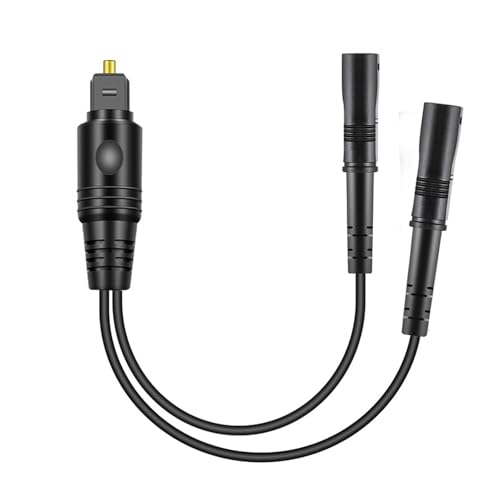
Best for: gamers and home theaters that need to feed two outputs from a single optical source, such as a TV to a soundbar and a receiver simultaneously. It supports uncompressed PCM and 5.1/7.1-style content via Toslink, with a built-in solid PVC outer layer and gold-plated connectors for reduced signal loss. The range can reach up to 150 feet in proper cable length, which helps in larger rooms.
Why chosen: it offers broad compatibility and reliable passive splitting for common setups. Caution: this is a passive splitter; signal strength is divided, which may reduce volume on one output if the other is in use at high levels.
BlueRigger Digital Optical Splitter (1×2 Active)

Best for: users who want strong, reliable simultaneous outputs from a single optical source. This active splitter can drive two outputs at once, which helps ensure adequate signal strength when feeding a TV and a soundbar or other Toslink-enabled devices. The device requires a power connection (power cable included, adapter not included), ensuring consistent performance across longer cable runs.
Why chosen: active splitting can prevent the common problem of weak signal on one output when both are used. Caution: ensure you have the correct power supply and check output cable length to avoid attenuation issues.
NEWCARE Digital Optical Splitter 1×2

Best for: setups needing straightforward dual-output from one optical source with emphasis on reliability and safety features. It includes an electrostatic protection circuit and automatic balance to minimize transmission loss or delay. Compatible with Apple TV, Blu-ray players, Xbox, PS4/PS5, and more, making it a broadly adaptable choice for living rooms and entertainment centers.
Why chosen: the built-in safety and balance features reduce risk of audio dropouts in busy multimedia environments. Caution: while it promotes stability, it remains a passive splitter; in high-demand scenarios, consider an active solution to preserve signal integrity across two outputs.
Buying Guide
- What is your primary goal? Auto-switching (no remote) vs. manual input selection (remote-or-button driven) will guide whether a switch or splitter is right.
- Are you feeding two devices or more? If you need multiple inputs to one output, a 4×1 or 4×2 switch offers more flexibility than a simple 1×2 splitter.
- Do you require active amplification? Passive splitters may reduce signal strength when both outputs are used; active splitters can help maintain level.
- Distance and cable quality matter. Optical cables longer than 50 feet can experience more loss; verify the recommended range for each device.
- Format compatibility. Ensure the chosen device supports PCM, Dolby Digital, DTS, and your target formats. Some devices cannot pass through Dolby TrueHD or DTS-HD Master Audio over Toslink.
- Power considerations. Some 1×2 splitters require external power; check included accessories and ensure you have a suitable adapter if needed.
Frequently Asked Questions
- Q: Can a 1×2 optical splitter carry 7.1 audio?
A: Toslink splitters typically do not transmit 7.1 channel formats; they handle 2- or 5.1-channel content and PCM. - Q: Do I need a remote for a Toslink switch?
A: Some models offer remote control, but several options provide auto-switching or manual input switching without a remote. - Q: Will a passive splitter reduce sound quality?
A: Passive splitters can reduce signal strength when both outputs are used; active splitters can compensate for loss. - Q: How far can Toslink signals travel without degradation?
A: Typical optical cables work well up to around 40 meters (130 feet) for standard 0.2dB/m cables, though quality varies with cable type. - Q: Are these devices compatible with all TVs and soundbars?
A: Compatibility depends on Toslink ports and supported formats; most modern TVs and soundbars with SPDIF/TosLink inputs are supported. - Q: Should I buy a switch or a splitter?
A: If you need to feed two devices from one source, a splitter is appropriate. If you need to switch between two sources to one output, choose a switch.