Best 2 Player Arcade Control Panel Kit for DIY MAME Projects
Thinking about building a two-player arcade experience at home? A 2 player arcade control panel kit provides the essential hardware—joysticks, LED buttons, and a USB encoder—to connect to a PC, Raspberry Pi, or arcade cabinet. The kits below are designed for easy assembly, reliable performance, and vivid LED lighting to evoke classic arcade vibes. Each option supports two players and works with popular emulation software like MAME, making them ideal for hobbyists and DIY arcade builders alike.
Summary at a glance: the following five kits cover a range of styles from bright LED button sets to complete DIY kits with encoders and wiring. All are compatible with Windows systems and widely used for MAME and Raspberry Pi projects. Use this table to compare basics at a glance, then dive into in-depth sections to see which kit best matches your build goals and skill level.
| Product | Brand | Highlights |
|---|---|---|
| EG STARTS 2 Player Arcade Games DIY Kit | EG STARTS | 2x joystick, 20 LED buttons, zero-delay encoder |
| Hikig 2 Player LED Arcade Kit | Hikig | 2x joysticks, 20x LED buttons, DIY expansion |
| Arcade Kits 2 Player Classic DIY USB Encoder Kit | EG STARTS | USB encoder, 16x 30mm LEDs, two players |
| Qenker 2-Player LED Arcade DIY Kit | Qenker | 2x arcade joysticks, 20x LEDs, USB encoder |
| Easyget 2-Player LED DIY Arcade Kit | Easyget | Zero-delay encoder, 2x joysticks, 20x LEDs |
EG STARTS 2 Player Arcade Games DIY Kit

The EG STARTS 2 Player Arcade Games DIY Kit is designed as a complete two-player solution suitable for MAME and other retro recreations. It includes two joysticks and a set of 20 LED-lit arcade buttons, delivering a bright and responsive control surface. The kit emphasizes a zero-delay encoder that aims to ensure smooth input between the PC or Raspberry Pi and the arcade hardware. This setup is well-suited for builders seeking a straightforward plug-and-play experience with reliable Windows compatibility.
Key features include a 100% zero-delay USB encoder and a straightforward two-player layout, making it a popular choice for first-time arcade builds or enthusiasts upgrading from a basic control panel. The LEDs provide vivid illumination, and the included components are aligned for use with common MAME configurations. While primarily a two-player kit, it supports expansion with standard 30mm pushbuttons and common wiring approaches used in DIY arcades.
Pros include a compact, all-in-one package that reduces wiring complexity and a focus on immediate playability. Potential considerations are compatibility with non-Windows environments or the need for additional mounting hardware if your cabinet requires a custom footprint. Overall, it delivers solid value for two players in a ready-to-go DIY kit.
Hikig 2 Player LED Arcade Kit

The Hikig 2 Player LED Arcade Buttons and Joysticks DIY Kit focuses on a pair of joysticks and 20 LED arcade buttons, designed for MAME and Raspberry Pi projects. It features a zero-delay encoder that is compatible with Windows systems, aiming to deliver precise and responsive input for two players. The kit is described as a DIY-friendly option that supports building a personal arcade cabinet or console setup with a classic look and modern LED lighting.
Users can expect straightforward assembly with standard wiring practices, and the LED lighting enhances the retro aesthetic. The kit is positioned for hobbyists who want a reliable two-player control surface without needing extensive electronics know-how. While it provides the main components, some builders may prefer additional artwork or panel customization to tailor the finish to their cabinet. Overall, Hikig’s kit is a solid choice for readers seeking a balanced two-player package with clear instructions and reliable performance.
Considerations include ensuring compatibility with your chosen enclosure and verifying that your power supply can safely support the LEDs. The kit’s emphasis on universal Windows compatibility makes it a practical pick for many home arcade projects, though advanced users may supplement with extra wiring or controller headers for expanded functionality.
Arcade Kits 2 Player Classic DIY USB Encoder Kit

The Arcade Kits 2 Player Classic DIY USB Encoder Kit combines a USB encoder with two players’ worth of hardware, including 16 LEDs and 30mm pushbuttons. The kit is described as a “Beautiful LED Arace Game DIY Parts” package, emphasizing compatibility with MAME JAMMA-style projects and Windows systems. Builders appreciate its straightforward wiring and reliability for two-player arcade builds.
With a focus on simplicity and reliable foreign-application compatibility, this kit is a practical option for those seeking an approachable two-player setup. The inclusion of a USB encoder supports plug-and-play operation with most PC emulation software, while the LED array adds visual appeal for cabinets or desks. Potential drawbacks may include limited support for non-Windows platforms or the need to source a suitable mounting panel if your cabinet has unusual dimensions. Overall, it’s a dependable choice for a classic two-player experience.
For those building Raspberry Pi projects, confirm that the encoder and LED configuration can be wired to the Pi’s GPIO or USB host as needed, since some Pi images may require manual configuration for input devices.
Qenker 2-Player LED Arcade Kit
The Qenker 2-Player LED Arcade DIY Kit provides two arcade joysticks, 20 LED arcade buttons, and a zero-delay USB encoder, designed for USB MAME PC game DIY projects and Raspberry Pi retro controllers. The kit emphasizes a polished LED aesthetic and reliable input timing, which is important for fast-paced fighting games and action titles. Compatibility with both Windows systems and Raspberry Pi makes it versatile for varying build plans.
As with other LED-focused kits, the ease of use is a highlight, particularly for builders who want a visually striking panel without extensive wiring. The 2-player arrangement supports co-op and versus modes, while the included components align with standard arcade layouts. Builders should consider panel depth and mounting when integrating into a home cabinet. Given its emphasis on LED lighting and a streamlined USB encoder, this kit strikes a balance between performance and appeal for two players.
Note: Some users may wish to augment with extra wiring harnesses or a control PCB if their enclosure requires more complex routing. Overall, Qenker offers a dependable two-player LED kit with a focus on classic arcade aesthetics.
Easyget New Updated 2-Player LED DIY Arcade Kit

The Easyget 2-Player LED DIY Arcade Kit features a 2x zero-delay USB encoder, two joysticks, and 20 LED arcade buttons designed for PC, Windows, MAME, and Raspberry Pi projects. The 2020 version highlights improved encoder reliability and broader Windows compatibility. The kit is pitched as user-friendly, with a design that simplifies wiring and connectivity—making it attractive to beginners or those seeking a quick, plug-and-play assembly.
What stands out is the “Just plug and player” approach, which reduces setup time and potential mistakes during wiring. The 3x 5V power outputs may support additional LED devices, offering expansion potential for larger cabinets or more elaborate LED schemes. Builders should verify panel cutouts and mounting compatibility with their specific cabinet design. The Easyget kit provides a cohesive two-player solution with modern LED styling and reliable input timing for a satisfactory retro gaming experience.
EG STARTS 2 Player Arcade Contest DIY Kit

The EG STARTS 2 Player Arcade Contest DIY Kit emphasizes LED illuminated push buttons and a USB encoder suitable for PC-based MAME projects. It includes 1- and 2-player coin buttons and a chrome LED setup that enhances the arcade style. The kit is crafted for a two-player setup with a focus on decorative LED lighting and reliable encoding, making it a strong option for those pursuing a polished arcade aesthetic and solid performance in a home cabinet environment.
Considerations include ensuring the coin button setup aligns with your cabinet’s coin mechanism preferences and confirming compatibility with your chosen enclosure. The LED emphasis adds a striking visual dimension, and the encoder’s reliability supports smooth, lag-free play. This kit serves as a good choice for builders prioritizing a stylish LED presentation with dependable two-player action.
EG STARTS Arcade Buttons 1 Player DIY Kit
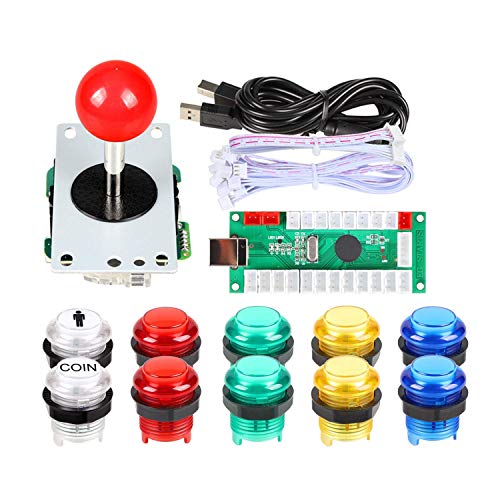
The EG STARTS 1-Player DIY Kit focuses on a high-quality control surface for a single player, featuring a quality USB encoder, a robust 8-way joystick, and LED illuminated buttons. While designed for a single-player experience, this kit can be a complementary addition to a 2-player setup by providing a spare controller or a dedicated game mode panel. The 8-way joystick is built for reliable performance, and the combination of 5V LED buttons can create an attractive, illuminated control area for retro titles and single-player campaigns.
Builders should consider whether a 1-player kit fits their cabinet’s layout or if a split-panel design is preferred. The kit’s durability and lighting make it appealing for a visually dynamic arcade project. As with other kits, ensure compatibility with your enclosure, wiring approach, and software configuration for the best results.
Buying Guide: Key Purchase Considerations
- Compatibility: Check whether the kit uses a USB encoder compatible with your PC, Raspberry Pi, or cabinet hardware. Ensure Windows support and consider Pi compatibility if you plan to run MAME on a Raspberry Pi.
- Controls and layout: Confirm the number of buttons per player, the joystick style (8-way vs 4-way), and the button size (30mm is common). Some kits include Coin or Start buttons for cabinet emulation.
- LED lighting: LED-lit buttons add visual appeal but may affect power needs. Consider power supply limits and whether the LEDs are individually addressable or share a common power line.
- Wiring and assembly: Look for kits marketed as DIY-friendly with clearly labeled wiring diagrams. Ensure you have space for wiring harnesses and that the panel depth accommodates your cabinet.
- Expansion potential: If you plan a larger cabinet or multiple panel configurations, select a kit with extra mounting points, spare LEDs, or a plan to add more buttons or headers.
- Materials and durability: Review the quality of buttons and joysticks, including switch life and tactile feedback. Seek components rated for high-use arcade sessions where reliability matters.
- Software integration: Verify compatibility with MAME, RetroPie, and other emulation platforms. Ensure the kit’s wiring approach aligns with your emulator’s button mappings and input expectations.
- Case and mounting: Consider the panel’s size, how it will be mounted in a cabinet, and whether you need a bezel or control panel overlay for style and durability.
Across these options, two-player configurations balance simplicity with expandability. Some kits emphasize LED aesthetics, while others prioritize plug-and-play usability and universal Windows support. Beginners may favor kits with simpler wiring and clear instructions, whereas seasoned builders might seek more customization options for coin inputs, panel overlays, or larger LED arrays.
In choosing the best kit for your project, align the product features with your cabinet design, preferred software, and anticipated play style. The five kits above offer a spectrum from cohesive two-player sets to LED-forward options, enabling a range of retro-arcade builds that meet different budgets and skill levels. Always verify current product compatibility with your specific hardware and software stack before purchasing.