
Best 3.5mm to Optical Converter Solutions for Clear Digital Audio
Need to convert analog 3.5mm audio to digital optical (Toslink) for amplifiers, soundbars, or AV receivers? This guide highlights five reliable 3.5mm to optical converters best suited for different setups. Choose based on source compatibility, ease of use, and whether you need additional cables included. The top picks here are ideal for home theater, office, and PC audio setups, with clear reasons why each is a strong match for specific buyers. A quick summary table follows to help you compare at a glance.
| Product | Best For | Key Benefit |
|---|---|---|
| LiNKFOR 3.5mm to SPDIF Converter | Audio purists with Toslink-ready amplifiers | Preserves uncompressed 2-channel PCM audio |
| eSynic 7 ft 3.5mm to Toslink Adapter | Desk setups needing minimal clutter | Two-in-one cable plus converter in a compact shell |
| ESWN DNXB 192KHz Optical to 3.5mm | TVs or players outputting optical to headphones/receivers | Supports up to 192kHz sample rate |
| PROZOR 192KHz DAC Optical to Analog | Home theater systems requiring analog outputs | High-resolution 192kHz capability with PCM/LPCM |
| DigitConvert DAC 192K | Multi-device homes needing versatile DAC | Coaxial or Toslink to analog L/R and 3.5mm |
LiNKFOR 3.5mm to SPDIF Converter

Best for listeners who want straightforward analog-to-digital output without extra processing. This LiNKFOR model converts 3.5mm audio signals to Toslink SPDIF digital output, enabling connection to AV receivers or sound systems with optical inputs. It delivers 2-channel PCM audio at 48 kHz for faithful reproduction. It’s a strong pick for simple setups where digital fidelity matters and only a single converter is needed.
- Best for: users with amplifiers or soundbars that accept Toslink but lack analog inputs.
- Why selected: clear PCM digital path preserves essential detail for stereo playback.
- Caution: Not a digital-to-analog converter; it outputs digital SPDIF, not a raw digital-to-analog conversion for 5.1 systems.
eSynic Professional 7 ft 3.5mm to Toslink Adapter
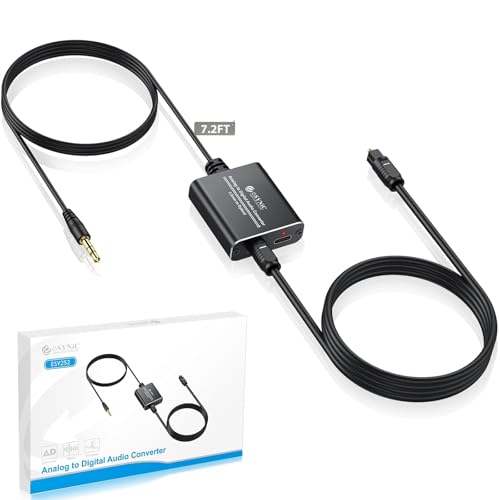
Designed for minimalists and flexible desk setups, this two-in-one device combines a 1.2 meter (4 ft) 3.5mm cable with a compact optical converter box. It converts analog audio from computers, laptops, or projectors into a digital Toslink signal for soundbars or receivers. The included 1 meter optical cable reduces extra clutter and helps you reach nearby units without tangling cords.
- Best for: small to medium desks needing a tidy, integrated solution with one cable path.
- Why selected: reduces cable clutter while delivering reliable PCM-compatible optical output.
- Caution: Not suitable for decoding Dolby Digital or other multichannel formats; relies on PCM/LPCM output.
ESWN DNXB 192KHz Optical to 3.5mm
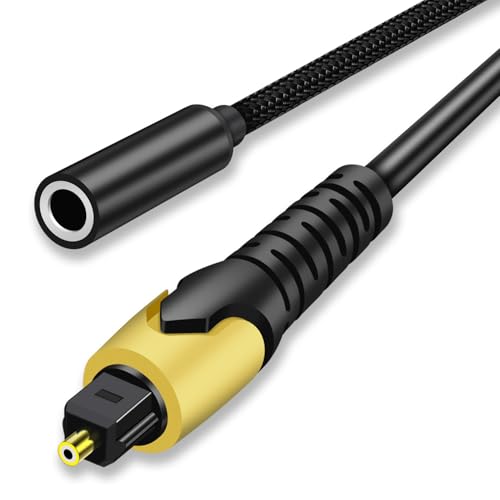
This model focuses on optical-to-analog conversion, best suited for TVs or players that output digital audio to headphones or receivers through a 3.5mm jack. It supports up to 192 kHz and 24-bit processing, ensuring high-resolution stereo output when the source is PCM. It is not reversible, so use only when you need optical-to-analog.
- Best for: devices that output digitally via Toslink and require an analog connection to speakers.
- Why selected: high sampling-rate support helps preserve audio detail for music and dialogue alike.
- Caution: Not a 3.5mm-to-optical converter; it only carries optical-to-analog playback.
PROZOR 192KHz Digital to Analog Converter

PROZOR provides a robust option for converting digital PCM signals to analog L/R and 3.5mm outputs. It is well-suited for home cinema setups or gaming consoles that require reliable, jitter-free analog audio. The device supports up to 192 kHz sampling rate and 24-bit depth, making it a strong choice when you need high-resolution stereo output from Toslink or coaxial sources.
- Best for: TVs or media players needing clean analog outputs to traditional speakers.
- Why selected: broad compatibility and high-resolution support enhance listening clarity.
- Caution: Optical output is not supported in some configurations; verify device compatibility with PCM/LPCM output.
DigitConvert 192K DAC Optical To Analog

DigitConvert emphasizes broad compatibility with digital inputs like Toslink or coaxial and outputs analog L/R and 3.5mm simultaneously. This makes it flexible for a multi-device setup such as PS4, Blu-ray players, or home theater systems. The product focuses on synchronization and stable transmission to ensure consistent sound without noticeable delays.
- Best for: households with multiple digital sources needing a single DAC solution.
- Why selected: offers simultaneous outputs for various analog destinations, simplifying wiring.
- Caution: Not designed for digital-to-analog on-the-fly from every source; check PCM/LPCM compatibility with your device.
Buying Guide: What to Consider When Choosing a 3.5mm To Optical Converter
- Source Type: Is your source PCM/LPCM or Dolby/DTS? Choose a device that explicitly outputs PCM/LPCM if your setup requires stereo audio.
- Output Format: Do you need Toslink optical only, or do you require both optical and RCA/3.5mm analog outputs?
- Sample Rate Support: Look for devices supporting 32–192 kHz and 24-bit for high-resolution audio compatibility.
- Cable Length and Clutter: Some models include integrated cables; others require separate cables. Choose based on desk or cabinet layout.
- Directionality: Confirm whether the converter is unidirectional (digital-to-analog or analog-to-digital). Many are one-way only.
- Compactness and Heat: For tight spaces, a compact, low-heat unit helps prevent clutter and overheating.
- Device Compatibility: Verify that your TV, soundbar, or receiver expects PCM/LPCM; some devices require specific audio formats.
FAQ
- Q: Can these convert 5.1 surround formats to 3.5mm? A: Most listed converters handle PCM/LPCM stereo. They generally do not decode Dolby Digital or DTS 5.1.
- Q: Do I need drivers or software to use these adapters? A: No, these are hardware adapters that pass audio signals through.
- Q: Will optical to analog work with all TVs? A: It depends on the TV’s audio output settings; ensure PCM/LPCM is selected for compatibility.
- Q: Can I use these to connect a PC to a soundbar? A: Yes, if the soundbar accepts optical input and the PC outputs PCM/LPCM over 3.5mm to optical in the adapter.
- Q: Are there any caveats with integrated cables? A: Some models include built-in cables to reduce clutter, but check length to avoid reach issues.
- Q: Is there a noticeable latency? A: These devices are designed for audio fidelity; latency is typically negligible for music and film viewing when used correctly.