
Quick Overview: If you’re replacing or upgrading a motherboard speaker connector, this guide reviews reliable 4-pin speaker connectors and related parts suitable for PC cases, internal buzzers, and amplifier-style terminal blocks. Below is a summary table of the selected products for quick comparison.
| Product | Brand | Connector Type / Key Feature |
|---|---|---|
| RuiLing Mini Plug Speaker 4 Pin Desktop Computer Case | RuiLing | Mini plug buzzer, 10-pack, 6cm wires |
| Eborsi 4 Pin 5.08mm Quick Speaker Connector | Eborsi | 4-pin 5.08mm Phoenix-style terminal block |
| Honbay 4 Pin Speaker Terminal Block | Honbay | 4-position spring-loaded terminal block |
| WEICHUANG Motherboard Speaker (5 PCS) | WEICHUANG | Internal BIOS mini plug buzzer, 4-pin female connector |
| MEETOOT Mini Plug Beep Alarm Buzzer (2pcs) | MEETOOT | 2.54mm pitch 4-pin female header mini speaker |
RuiLing 10-Pack Mini Plug Speaker 4 Pin Desktop Computer Case

This kit includes ten small internal buzzers designed for PC cases and motherboards. The construction mixes plastic and metal and uses red/black wires about 6 cm long. The packability makes it suitable for technicians who work on multiple builds or want spare parts on hand. Compatibility depends on the motherboard header layout and whether the system requires a mini plug or a simple 4-pin plug wire. The short wire length fits case front-panel routing but may require extension for nonstandard layouts.
Eborsi 4 Pin 5.08mm Quick Speaker Connector – Terminal Block

The Eborsi connector is a 5.08mm Phoenix-style 4-pin terminal block intended for amplifier outputs and certain audio equipment. It lists compatibility with 4-pin amplifier speaker outputs and common car audio amp models. For motherboard use, this connector is helpful when adapting speaker wires to rack or amp systems, or when you need a removable screw-clamp connection rather than a fixed plug. It’s a useful bridging component between PC speaker outputs and external audio hardware.
Honbay 4PCS 4 Pin Speaker Terminal Block
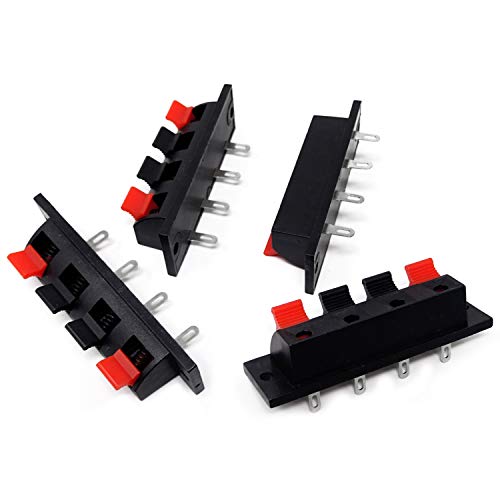
Honbay’s set of four 4-position spring-loaded terminal blocks offers a push-release clamp design for quick connections. These are practical when you prefer to use bare wire or banana-style terminations instead of proprietary mini plugs. They work well in test benches, custom enclosures, or situations needing frequent speaker swaps. The spring clamps accommodate a range of wire gauges and allow tool-free insertion and removal.
5 PCS Motherboard Speaker, PC Internal BIOS Mini Plug Buzzer

This bundle contains five internal buzzers with a 4-pin female connector and roughly 2.3-inch cable length. They are marketed for BIOS POST codes and motherboard status beeps. The wiring indicates red as positive and black as negative, and installation is typically plug-and-play into the front-panel speaker connector. These are suited to builders replacing a lost or failed case speaker where the header conforms to the stated plug type.
MEETOOT 2pcs PC Motherboard Mini Speaker Desktop Computer Case

MEETOOT offers two internal mini plug buzzers with a 2.54mm pitch 4-pin female header, about 6 cm wire length, and red/black cable. This format plugs directly into compatible motherboard speaker headers and is intended for diagnostic beep tones. The modest cable length and standard pitch make it appropriate for most ATX and micro-ATX front-panel speaker headers that accept a 4-pin arrangement.
Buying Guide: Choosing The Right 4 Pin Speaker Connector For Your Motherboard
When selecting a 4-pin speaker connector or internal buzzer for PC motherboards, evaluate the following factors to ensure compatibility and reliable operation.
Connector Type And Pitch
- Match The Header: Confirm your motherboard’s speaker or front-panel header pin count and pitch (e.g., 2.54mm) before buying.
- Mini Plug vs. Terminal Block: Internal buzzers typically use small 2- or 4-pin mini plugs, while audio adapters or amplifiers may use 5.08mm Phoenix or spring terminal blocks.
Function And Use Case
- BIOS Diagnostics: For POST beep codes, choose internal PC buzzers designed for motherboards rather than speaker terminal blocks.
- External Audio Systems: If connecting to an amplifier or external speaker system, use terminal blocks or banana plug adapters compatible with speaker outputs.
Cable Length And Wire Gauge
- Routing Needs: Short wires (around 6 cm) suit compact cases; longer runs require extensions or adapters.
- Current Capacity: For simple beepers, thin wires are adequate; for speaker outputs with higher power, choose thicker gauge or screw-clamp terminals.
Mounting And Accessibility
- Plug-and-Play: Standard 4-pin female headers offer quick installation into front-panel connectors.
- Serviceability: If you swap components frequently, spring-release or screw terminals simplify repeated connections.
Durability And Quantity
- Spare Parts: Multi-packs are handy for workshops or multiple builds.
- Material Considerations: Plastic housings are common; metal contacts and tinned wire improve longevity.
Compatibility Cross-Checks
- Header Labeling: Verify motherboard manual labeling for SPK, SPEAKER, or front-panel pins.
- Pin Orientation: Note polarity when relevant; many buzzers will sound regardless of polarity, but some devices rely on correct orientation.
- Adapters: If the connector types differ, plan for an adapter—e.g., mini plug to terminal block or banana plug adapters for bench testing.
Multiple Comparison Perspectives
- Cost vs. Quantity: Multi-item packs reduce replacement downtime but check connector type matches your header.
- Ease of Use vs. Flexibility: Plug-in buzzers offer the simplest install; terminal blocks offer the most flexible wiring options.
- PC Diagnostics vs. Audio Output: Use purpose-built motherboard buzzers for system beeps and terminal/banana options for speaker-level audio tasks.