
Best 4-Track USB Audio Interfaces for Home Studios
Choosing the right 4-track USB audio interface can simplify recording, livestreaming, and podcasting for home studios. This guide highlights five solid options and explains who each is best for, with practical reasons to help you compare quickly. Whether you’re a podcaster, guitarist, or multi-instrumentalist, these interfaces offer reliable inputs, latency-free monitoring, and easy DAW integration for Windows, macOS, or mobile setups.
| Product | Why It Stands Out |
|---|---|
| Behringer U-PHORIA UMC404HD Audiophile 4×4 | Solid four-input capability with MIDAS preamps and wide compatibility for recording and MIDI work |
| Behringer UMC404HD Audiophile 4×4 | Another four-input model noted for budget-friendly reliability and professional 24-bit/192 kHz sound |
| Zoom PodTrak P4 | 4 mic inputs plus built-in sound pads; ideal for remote podcasting and multi-person conversations |
| M-AUDIO M-Track Duo | Compact 2-in/2-out with USB-C and zero-latency monitoring; good for solo or small setups |
| Audient EVO 4 | High-quality preamps in a compact 2-in/2-out design with smart gain and easy setup |
Behringer U-PHORIA UMC404HD Audiophile 4×4

The Behringer U-PHORIA UMC404HD offers four inputs with Midas-quality mic preamps, delivering professional-grade sound for multiple microphones or instrument lines. It supports 24-bit/192 kHz recording to capture dynamic performances with clarity. This model is best for small bands, live streaming with several mics, or home studios needing reliable mix control and feedback-free monitoring. Caution: Some users prefer higher-end preamps for critical vocal work; plan a separate compressor for broadcast-grade polish if needed.
Behringer UMC404HD Audiophile 4×4
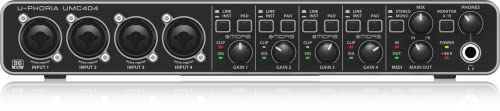
This version emphasizes four inputs with robust compatibility for macOS and Windows. It provides 24-bit/192 kHz fidelity and direct/USB monitoring options for low-latency tracking. It’s best for multi-track recording sessions where you need separate channels for several instruments or voices. Limitation: While feature-rich, it lacks some advanced onboard effects that higher-tier interfaces offer.
Zoom PodTrak P4 Podcast Recorder

The PodTrak P4 integrates four mic inputs with phantom power, four headphone outputs, and dedicated sound pads. It also acts as a 2-in/2-out USB audio interface, supporting remote interviews with smartphones and computers. Best for podcasters who need a portable, all-in-one recording kit. A potential limitation is that its primary strength is podcasting workflow, not music production, so use it primarily for spoken-word content.
M-AUDIO M-Track Duo HD USB-C

The M-Track Duo HD focuses on two input channels with USB-C connectivity and direct/USB monitoring. It suits solo vocal work, guitar, or bass tracks with reliable latency-free monitoring. Choose this if you want a compact, straightforward interface for streaming or simple home recordings. Limitation: It does not offer built-in multi-channel input expansion, so larger groups require an additional mixer or interface.
Audient EVO 4 USB Audio Interface

Audient EVO 4 delivers premium preamps and 24-bit/96 kHz conversion in a compact form. Its smart gain and simple controls help new users set optimal levels quickly. Best for solo producers, podcasters, or anyone prioritizing sound quality and ease of use. Caution: The EVO 4 remains a 2-in/2-out interface, so adding more mics requires mixing or upgrading to a larger model for additional inputs.
Buying Guide
What should you look for when choosing a 4-track USB audio interface?
- Input count and type: Count mic and line inputs, plus instrument options if you plan to record guitars or basses.
- Preamps and gain: Higher-quality preamps reduce noise and improve clarity on vocal tracks.
- Conversion quality: 24-bit/96–192 kHz offers better dynamic range for music and podcasts.
- Monitoring: Latency-free monitoring with USB/Direct switches helps during tracking.
- Connectivity: USB-C is common on newer devices; ensure compatibility with your computer and mobile devices.
- Portability vs. desktop use: Compact units are great for travel; larger models suit home studios with permanent setups.
- Software compatibility: Verify compatibility with your preferred DAW (Audacity, Pro Tools, Ableton, etc.)
FAQ
- What is a 4-track USB audio interface best for?
It’s ideal for recording up to four separate inputs, such as multiple vocalists or a small instrumental setup, while delivering low-latency monitoring and DAW integration. - Do these interfaces work with Mac and Windows?
Yes. Most listed models support macOS and Windows, with some also offering iOS compatibility in certain configurations. - Is 24-bit/192 kHz necessary for home use?
It improves dynamic range and detail, especially in music and multi-mic setups, but many home projects will sound excellent at 24-bit/96 kHz. - Should I prioritize built-in effects or clean monitoring?
For beginners, clean monitoring and reliable preamps are more important than built-in effects; effects can be added in the DAW. - What’s the difference between USB-C and USB 2.0?
USB-C offers newer efficiency and compatibility with modern devices; USB 2.0 remains compatible but may limit power and bandwidth on some systems. - Can I use these interfaces for podcasting?
Yes, especially models with multiple mics and headphone outputs, like the PodTrak P4 and Behringer four-input interfaces.