
Best 6 Pin DIN to RCA Adapters for Classic Audio/Video Setups
If you’re upgrading or repairing legacy audio/video connections, a 6 pin DIN to RCA adapter is the link between classic gear and familiar outputs. This guide highlights five reliable options for converting DIN connections to RCA signals, helping you choose based on connector pin count, channel capability, and build quality. The top picks suit different buyers: home theater enthusiasts restoring vintage amplifiers, DJs maintaining older mixing consoles, and IT pros integrating legacy equipment with modern displays.
| Product | Connector Type | Best For | Notes |
|---|---|---|---|
| Seadream 6-Pin S-Video Mini DIN to Dual RCA | 6-pin Mini DIN to 2×RCA | Compact spaces, simple S-Video to audio/video split | Short length; red for audio, yellow for video |
| ELNONE 5Ft 5Pin DIN to 4 RCA | 5-pin DIN to 4×RCA | Vintage multi-channel systems | Multi-channel support; well-sh shielded |
| ELNONE 6Ft 8 Pin DIN to 3 RCA | 8-pin DIN to 3×RCA | EU/Beol/B&O style equipment | Gold plated; durable build |
| CablesOnline 6ft 5-Pin DIN to 2-RCA | 5-pin DIN to 2×RCA | Bang & Olufsen/Naim setups | Gold-plated connectors; flexible jacket |
| PIIHUSW 8 Pin DIN to 3 RCA | 8-pin DIN to 3×RCA | European-style stereo systems | OFC conductors; EMI/RFI rejection |
Seadream 6-Pin S-Video Mini DIN to Dual RCA Cable
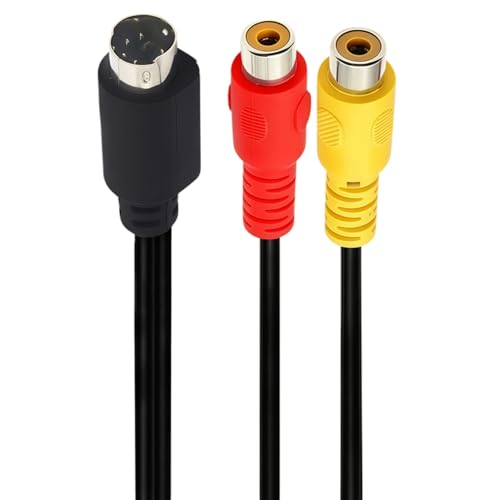
Connector Type: A 6-pin Mini DIN S-Video male plug feeds into dual RCA female jacks (red audio, yellow video). This adapter splits the S-Video 6-pin signal into separate audio and video outputs for compatible devices. The compact length (~0.25 meters) makes it ideal for tight setups and direct connections. Best for users who need a simple, space-saving solution for legacy S-Video to RCA connections. Limitation: It provides only basic A/V splitting; no added signal boost or shielding beyond standard jacket.
ELNONE 5Ft 5Pin DIN to 4 RCA

Best For: Vintage multi-channel audio setups and older equipment needing four RCA paths. The design includes four RCA lotus plugs (red/white/blue/yellow) and a 5-pin DIN male to 4×RCA male format. Benefits: high-purity copper wire core, double shielding, and plug-and-play use. Why selected: suitable for complex legacy systems with separate left/right channels or additional line-level connections. Caution: Confirm device input compatibility with the four RCA outputs before use to avoid mismatched channels.
ELNONE 6Ft 8 Pin DIN to 3 RCA

Best For: Equipment using DIN 8 connectors with three RCA outputs. Features double-layer shielding, gold-plated contacts, and a metal shell on the connectors to reduce EMI and RF interference. Selected for users seeking robust, long-lasting cables for high-fidelity connections in classic audio systems. Limitation: May be overkill for setups needing only stereo and a single video path; ensure you actually need three RCA outputs before buying.
CablesOnline 6ft 5-Pin DIN to 2-RCA

Best For: Classic Bang & Olufsen, Naim, and Quad stereo systems requiring two-channel RCA outputs. The cable advertises flexible but durable PVC jacket and 24K gold-plated connectors for stable signal transfer. It’s a solid choice for straightforward DIN-to-RCA stereo connections where minimal signal loss is desired. Caution: The listing emphasizes durability and gold-plating; verify connector compatibility with your exact DIN pinout to avoid mismatches.
PIIHUSW Din 8 Pin to 3RCA (3 M / 9.8 FT)

Best For: European-style stereo gear with Din 8 connectors and three RCA outputs. The cable uses Oxygen-Free Copper conductors and OFC shields to improve signal clarity and EMI/RFI rejection. It offers robust durability and easy plug-and-play setup. Pick this if your equipment requires high-fidelity DIN 8 to RCA connections. Limitation: Three RCA outputs may exceed the needs of simple two-channel systems; confirm the required channels before purchase.
Buying Guide
What matters most when buying a 6 pin DIN to RCA adapter?
- Connector compatibility: Ensure the DIN pin count (6, 5, or 8 pin) matches your device’s output. Also confirm the RCA configuration (2, 3, or 4 channels).
- Signal quality and shielding: Look for OFC conductors, gold-plated contacts, and multi-layer shielding to minimize EMI/RFI and signal loss.
- Length and flex: Short cables excel in tight spaces; longer cables are convenient for larger setups but may introduce more signal loss if not designed for high fidelity.
- Channel needs: If you only need stereo, prefer two RCA outputs. If you require multi-channel audio, select cables with three or four RCA connections.
- Durability: Metal shells, robust PVC jackets, and anti-bending designs improve longevity in frequent-use environments.
Common use cases
- Restoring vintage home theater or hi-fi systems with DIN outputs to modern RCA inputs on TVs or receivers.
- Connecting legacy CD players, VCRs, or turntables to older amplifiers or processors.
- Integrating European or British equipment that uses DIN connectors with standard RCA-equipped displays.
What to check before buying
- Device input/output compatibility with DIN and RCA pinouts.
- Required channel configuration (stereo vs. multi-channel).
- Need for shielding in environments with electrical interference.
FAQ
- What is a 6-pin DIN to RCA adapter used for?
It converts a 6-pin DIN signal into two RCA connections for standard audio and video outputs.
- Do these cables require drivers?
No. They are passive connectors and do not need drivers or software.
- Can I use any RCA cable with a DIN adapter?
Yes, as long as the RCA configuration matches your device inputs and you maintain proper channel alignment.
- Are more RCA outputs always better?
Not necessarily. Choose based on your device’s needs; extra outputs may be unused in two-channel setups.
- Will these work with modern HDMI TVs?
These adapters convert DIN to RCA only; they do not convert RCA to HDMI. You’d need additional converters for HDMI compatibility.
- What should I do if the picture or sound is unstable?
Check shielding and cable routing to minimize interference. Shorter, well-shielded cables often perform better in noisy environments.