
Best 7.1 Computer Speakers for Immersive Gaming and Desktop Audio
Answering the common buyer question: these 7.1 and surround-capable PC speaker kits deliver immersive sound for gaming, movies, and music. They’re best for gamers, home theater setups near a desk, and multimedia enthusiasts who want true multi-channel audio from a computer. The top picks below balance standalone sound quality, deep bass, and practical features like RGB lighting, wireless connections, and easy setup. A quick product table follows to help compare core specs at a glance.
| Product | Channel Type | Best For | Key Benefit |
|---|---|---|---|
| Logitech G560 | 7.1 DTS X | Gamers seeking positional audio | Integrated RGB lighting with game-driven sync |
| Logitech Z906 | 5.1 | Home theater on a desk | THX certified with high power |
| Edifier G2000 Pro | 2.0 with virtual 7.1 | Compact gaming desktop | Virtual surround via software |
| Klipsch ProMedia 2.1 | 2.1 | Premium desktop audio | Klipsch clarity with THX pedigree |
| ULTIMEA 7.1ch Sound Bar | 7.1 virtual | TV and PC hybrid setup | Aura lighting and wireless rear pairing |
Logitech G560 PC Gaming Speaker System with 7.1 DTS X

The Logitech G560 delivers a 7.1 DTS:X Ultra surround sound experience with 240 Watts peak power. It includes built-in LIGHTSYNC RGB lighting that reacts to in-game audio for synchronized visual effects. Best for gamers who want immersive, accurate positional audio and a striking visual setup on a desktop. A potential limitation is the sizable footprint and higher power draw, which may require a dedicated desk space.
Logitech Z906 5.1 Surround Sound Speaker THX
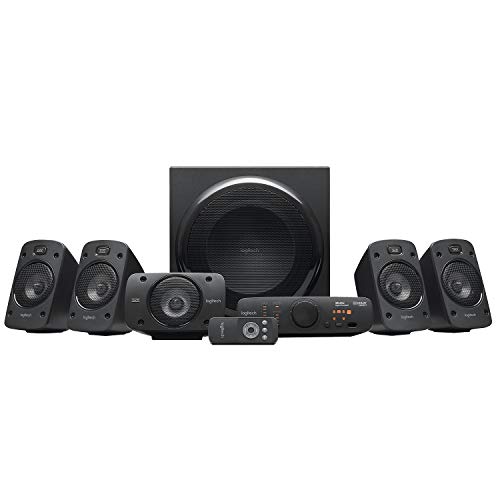
The Z906 provides a 5.1 digital surround sound experience with THX certification and a 165W subwoofer. It’s well-suited for desktop cinema-style listening and games that support multi-channel audio. Best for larger desks or living spaces where a full 5.1 setup is preferred; however, it lacks native 7.1 channels, which is a consideration if you specifically want 7.1.
Edifier G2000 Pro 2.0 RGB Gaming Speakers

Edifier G2000 Pro offers a compact 64W peak system with virtual 7.1 surround via USB and HECATE software. It includes 3-inch drivers, 270° RGB lighting, and multi-device compatibility (Bluetooth 5.4, USB-C, AUX). Best for a space-conscious gamer who wants a strong audio image and flexible connectivity; note that virtual surround may not perfectly replicate true 7.1 in all scenes.
ULTIMEA 7.1ch Sound Bar with Subwoofer

This 7.1-channel virtual surround sound bar is designed for TV and computer use. It emphasizes dialogue clarity with 3 main channels and four surround speakers, plus a wireless subwoofer for deep bass. Best for users seeking a clean desk setup without multiple satellite speakers; avoid this if you require true discrete rear speakers or a purely PC-focused 7.1 system.
Klipsch ProMedia 2.1 THX Certified

The Klipsch ProMedia 2.1 system pairs THX-certified performance with Klipsch horn-loaded satellites and a 6.5-inch down-firing subwoofer. Best for audiophiles who want accuracy, clarity, and impactful bass in a desktop package. The setup is straightforward, but room size and desk space should be considered for optimal speaker placement.
Amazon Basics Stereo 2.0 Speakers with USB Power

Amazon Basics 2.0 speakers offer a compact, budget-friendly option with USB-powered operation and in-line volume control. Best for portable or secondary PC setups where space, simplicity, and price matter most. Not a surround system, so choose this if you want minimal footprint and straightforward audio for daily tasks or casual gaming.
Buying Guide: Key Considerations When Choosing 7.1 or Surround PC Speakers
- Room size and desk space: Larger setups like G560 and Z906 require more space and may benefit from dedicated placement to maximize soundstage.
- Channel configuration vs. virtual surround: True 7.1 systems deliver more precise multi-channel audio, while virtual 7.1 can offer impressive effects with less hardware.
- Power and bass: Subwoofer presence and wattage influence depth of bass; ensure your desk can handle vibration without disruption.
- Connectivity: Look for USB-powered options for desk simplicity, Bluetooth for wireless flexibility, and wired connectors for lower latency gaming.
- RGB and aesthetics: If lighting matters, models like G560 integrate game-driven lighting; consider whether visuals align with your setup.
- Sound signature and use case: For gaming, prioritize accurate positional audio and clarity; for movies, cinema-like bass and surround depth matter more.
Frequently Asked Questions
- What is the difference between 7.1 and 5.1 speaker systems?
– 7.1 systems add two more rear channels for richer surround sound; 5.1 provides five main channels plus a subwoofer. Virtual 7.1 uses software to simulate extra channels. - Do I need a special sound card for 7.1 speakers?
– Not always. Many 7.1 kits work via USB, HDMI, or optical connections to the PC or monitor, but a dedicated sound card can enhance processing for some setups. - Is THX certification important?
– THX certification indicates tested, cinema-grade performance. It can be a meaningful indicator of sound fidelity in that system class. - Can these speakers be used with a TV or console?
– Some soundbars and compact 2.1/5.1 kits support multiple devices, including PCs, TVs, and consoles; verify input options and compatibility with your devices.