
Best 8 Channel Sound Card Solutions for PC Audio
Answering the need for immersive multi-channel PC audio, these 8-channel or higher sound cards optimize gaming, streaming, and media playback. This guide helps buyers choose based on connectivity, compatibility, and use case. The top picks suit gamers, content creators, and home theater setups with clear, multi-channel outputs and easy installation.
| Product | Channel Support | Interface | Best For | Notes |
|---|---|---|---|---|
| Creative Sound Blaster Audigy Fx Pro Hi-Res PCIe Sound Card | 7.1 | PCIe | PC gaming and home theater on desktops | High-res audio, versatile outputs |
| StarTech 7.1 USB Audio Adapter | 7.1 / 5.1 / 2 | USB | Laptops and desktops needing USB upgrade | External, bus-powered |
| Cubilux 7.1 USB Surround Sound Card | 7.1 / 5.1 | USB | Hi-Res music and movies on USB, portable | Aluminum housing |
| Fervit PCIe Sound Card 5.1 | 5.1 | PCIe x1 | Upgrading desktops for games and calls | Low-profile bracket available |
| DSYJ 7.1 Channel USB External Sound Card | 7.1 | USB | Budget USB 7.1 for PC or laptop | Simple 3.5mm outputs |
Creative Sound Blaster Audigy Fx Pro Hi-Res PCIe Sound Card

Best for desktop users seeking high-fidelity multi-channel output. This PCIe card delivers 32-bit/384 kHz playback and up to 120 dB SNR with discrete 7.1-channel analog outputs. It also offers SPDIF, headset, mic-in, and line-in connectivity for versatile setups. Choose this if you want robust, native PC audio with strong surround capabilities for gaming and media playback.
Limitation: PCIe compatibility depends on motherboard slots and available PCIe lanes. Ensure your PC has a spare PCIe slot and appropriate space for installation.
StarTech 7.1 USB Audio Adapter

Best for users needing a simple USB upgrade without opening a PC. This external sound card adds 7.1 channel output via USB with 3.5mm jacks, a headset port, line-in, and mic inputs. It supports 44.1/48 kHz for analog playback and 48 kHz for SPDIF digital output. Use this for laptops or desktops requiring a quick, plug-and-play solution.
Caution: SPDIF digital output is limited to 48 kHz; higher-res digital formats are not supported through SPDIF on this model.
Cubilux 7.1 USB Surround Sound Card

Best for Hi-Res music lovers and movie watchers who want broad compatibility. It supports 7.1 and 5.1 output along with 384 kHz/24-bit sample rates for headphones. The full aluminum housing helps isolate interference and reduce noise. Consider this if you value high-resolution playback and a durable build in a portable USB card.
Limitation: The 7.1 audio relies on USB bandwidth; heavy USB devices may affect performance on some systems.
Fervit PCIe Sound Card 5.1
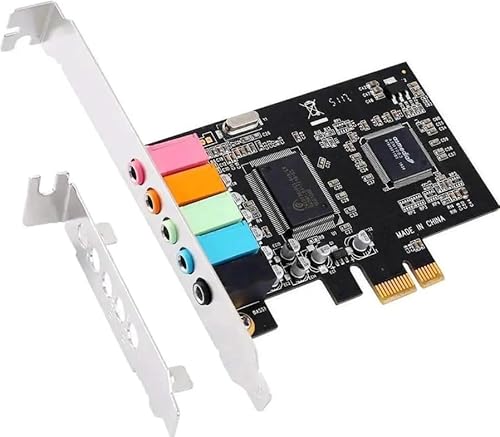
Best for desktop builds needing a stable 5.1 setup. This PCIe card uses the CMI8738 chipset for 3D stereo surround and supports Windows 11/10/8/7. It includes options for standard full-height and low-profile brackets, making it suitable for both ATX and mini cases. Use this if you want a compact internal upgrade with straightforward installation.
Limitation: Data indicates 5.1 output, not native 7.1; plan accordingly if you require true 7.1 surround.
DSYJ 7.1 Channel USB External Sound Card

Best for budget-conscious buyers needing 7.1 channel external audio. It uses USB 2.0 and provides stereo output, plus a mono microphone input. Choose this for basic gaming or media playback on a tight budget, while acknowledging limited advanced features and potential driver variability.
Limitation: USB 2.0 may cap bandwidth on high-demand tasks; performance can vary with system load.
Buying Guide
What to consider when choosing an 8-channel or multi-channel sound card:
- Connection type: PCIe cards offer lower latency and stability for desktops; USB cards suit laptops or upgrades without opening the PC.
- Channel support: 7.1 channels suit most immersive setups; 5.1 can be sufficient for budget builds.
- Sample rate and bit depth: Higher numbers enable crisper audio for hi-res streaming and games.
- Output compatibility: Ensure speaker systems, headsets, and SPDIF support your desired formats.
- Physical size and form factor: Low-profile brackets fit compact PC cases; full-size cards require standard slots.
- Driver and compatibility: Check Windows compatibility and driver availability for your OS version.
FAQ
- Q: Do I need an 8-channel card if I only have 5.1 speakers? A: A 7.1 or 8-channel card can still be used with 5.1 systems, but the extra channels may remain unused unless you have compatible speakers or virtualization software.
- Q: Are USB sound cards portable for laptops? A: Yes. USB cards are plug-and-play and do not require motherboard changes, making them ideal for laptops.
- Q: Is PCIe better than USB for audio quality? A: Generally, PCIe offers lower latency and direct motherboard integration, which can improve stability for desktop use.
- Q: Can SPDIF output support high-resolution audio? A: SPDIF often supports two-channel formats at higher fidelity; multi-channel formats may be limited by the device and standard.
- Q: Will these cards improve built-in motherboard sound? A: Yes, especially for gaming, media, and voice chat, by eliminating integrated-noise and offering dedicated DACs.