Best 8mm Camcorder Tape Players and Transfer Devices for Modern Viewing
The compact world of 8mm camcorder tapes can still be accessed with a range of modern transfer solutions. This guide highlights top options for playback, digitization, and watching vintage footage on today’s devices. Explore models that play 8mm, Video8, Hi8, and Digital8 tapes, plus reliable transfer devices to preserve memories in digital form.
| Product | Brand | Key Strength | Link |
|---|---|---|---|
| Sony Camcorder for 8mm Digital8 Hi8 Tape Transfer | Sony | All-in-one playback and USB/DVD transfer | Amazon |
| Sony Standard Grade 8mm Camcorder Cassette | Sony | Long recording time, reliable tapes | Amazon |
| Hi8 8mm VCR Video Cassette Recorder | Tech Collector | Built-in camcorder for playback and digitizing | Amazon |
| Sony Hi-8 HMPD 120 Minute Tapes | Sony | Higher picture quality and reliability | Amazon |
| VHS to Digital Converter (VIXLW) | VIXLW | Digitizes analog video to USB on PC/Mac | Amazon |
Sony Camcorder for 8mm Digital8 Hi8 Tape Transfer
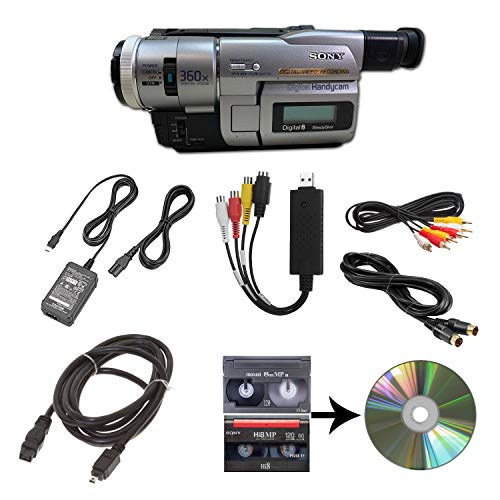
The Sony camcorder bundle is designed for playback across 8mm, Video8, Hi8, and Digital8 tapes and includes a USB capture device to transfer footage to computer files or burn them to DVD. It comes with a power supply and AV/S-Video cables for transfer or TV playback, offering a complete solution for converting legacy tapes. This option suits collectors who want an all-in-one device for viewing and digitizing without needing separate gear for capture.
Sony Standard Grade 8mm Camcorder Cassette

These standard 8mm camcorder tapes provide reliable 120-minute recording capacity typical for entry-level camcorders. They are suitable for long playback sessions and casual digitization projects when paired with a compatible player or transfer device. For projects focused on preserving older footage without needing premium tape performance, these cassettes offer a balanced option.
Hi8 8mm VCR Video Cassette Recorder

This Hi8 8mm VCR offers built-in playback and a pathway to digitization through USB adapters. It is designed to handle old 8mm tapes and Hi8 footage, enabling quick viewing and straightforward transfer to a PC for archival purposes. The device emphasizes convenience for those who want an integrated solution rather than a multi-step process.
Sony Hi-8 HMPD 120 Minute Tapes

Two-pack Hi-8 tapes deliver 120 minutes of recording time with improved picture quality over standard metal-p particle tapes. Depression Surfacing technology is cited to help tapes run smoothly, reducing potential issues during playback and transfer. These tapes are a practical choice for households maintaining older Hi-8 collections or preserving memories with better reliability.
VHS to Digital Converter (VIXLW)

This video capture device handles analog sources from VHS, VCR, Hi8, DV tapes, and other RCA or S-Video inputs to PC or Mac via USB. It supports RCA to USB conversion at HD 720p and is plug-and-play, requiring no separate power supply. This option is ideal for users who want a straightforward digitization path for a mix of legacy formats without needing a dedicated capture PC setup.
Buying Guide: Key Purchase Considerations
- Format compatibility: Confirm which tape formats you own (8mm, Hi8, Digital8, Video8) and ensure the device or camcorder supports playback or digitization for those formats. A single unit that covers multiple formats simplifies the process.
- Playback vs. digitization: Some devices emphasize direct playback, while others focus on transferring footage to a computer or DVD. Decide whether you primarily want to watch tapes on a TV or preserve them digitally for long-term storage.
- Signal quality and preservation: If you plan to digitize, consider devices with higher resolution capture (HD 720p or better) and stable signal paths to minimize noise and dropouts during transfer.
- Connectivity and compatibility: Check the available outputs (USB, AV, S-Video, HDMI) and ensure they work with your computer’s operating system and media software. Plug-and-play options reduce setup complexity.
- Tape condition and storage: Legacy tapes can degrade. Replace or complement aging tapes with higher-quality new stock if possible, and store reels upright in a cool, dry environment to preserve playback quality.
- Cost vs. value: If you own several formats, a versatile all-in-one unit can be more cost-effective than purchasing multiple players and adapters. If you only own a single format, a dedicated device may offer better performance.
- Future-proofing: A device with reliable drivers and broad format support helps protect your digitization investment as software ecosystems evolve.
- Brand reliability: Reputable brands with established support generally provide more dependable playback and transfer experiences, important for archival projects.
- Storage and backup: Plan for digital storage needs—high-capacity hard drives or cloud backups—to safeguard your digital copies after transfer.