
Best AM FM Clock Radio With iPod Dock for Any Nightstand
Looking for an AM/FM clock radio with an iPod dock or a modern charging dock? This guide highlights five top options that balance easy setup, clear display, and reliable alarms. Each pick is explained for the type of buyer it serves best—whether you want a classic dock for music, a smart Set clock for simple setup, or a multi-device charging station for a tech-filled bedside. The table below summarizes the key choices to help you compare at a glance.
| Product | Display | Special feature | Best for |
|---|---|---|---|
| Sony ICFCS10iP | Built-in dock for iPod/iPhone | Remote control | Apple device users who want easy dock access |
| Emerson CKS1900 | 0.9-inch Jade Green LED, dimmable | SmartSet auto time/date | Hands-off time setting, visibility at night |
| Emerson CKS1500 | 0.9-inch Blue LED, dimmable | SmartSet with DST | Two alarms and simple display |
| Ken-Tech AM/FM with USB/USB-C | LED display | Built-in charging ports and 2 outlets | Multi-device charging at bedside |
| Ken-Tech Digital Clock with Red LED | Bold red LED | AM/FM, loud alarm | Heavy sleepers needing a strong wake-up |
Introduction to the buyer’s goal: find a reliable AM/FM clock radio with docking or charging capability for the bedside. This guide focuses on models that offer straightforward controls, clear time displays, and practical alarm options. It also highlights who benefits most from each option, whether you need a wired dock for an iPhone, a smart time-set feature for busy mornings, or a charging hub for multiple devices. Read on to compare five relevant picks and make an informed buying choice.
Sony ICFCS10iP AM/FM Clock Radio with Dock
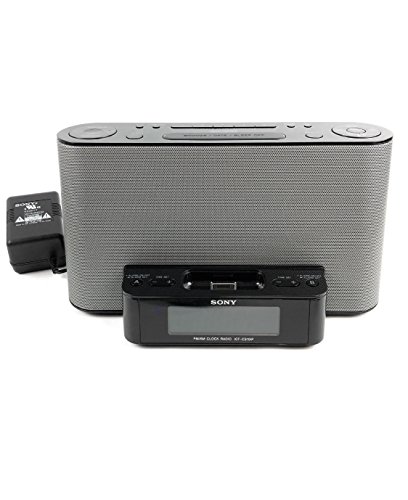
The Sony ICFCS10iP combines AM/FM radio with an integrated dock for iPod and iPhone devices. It supports playback from Apple devices while offering a dedicated alarm function and a convenient remote control. Best for Apple users who want a compact dock-and-radio setup in a single unit. A potential limitation is reliance on device compatibility with older iPod/iPhone models when used with legacy docks.
Emerson SmartSet Dual Alarm Radio CKS1900
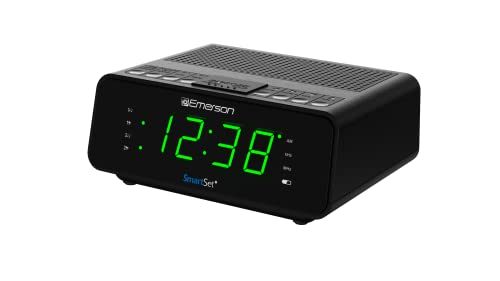
Emerson’s CKS1900 uses SmartSet automatic time and date setting to simplify setup after power events. It features a large Jade Green LED display with a four-level dimmer for comfortable nighttime viewing and stores up to 20 radio presets. Best for users who want easy time setup, readable nighttime display, and convenient station memory. Limitation: some users may prefer a larger display for very bright bedrooms, as even with dimming, visibility varies by room lighting.
Emerson SmartSet CKS1500 with DST Auto Time

This Emerson model also provides SmartSet automatic time setting, with dual alarms and a 0.9-inch Blue LED display that offers four-level dimming. It’s especially suitable for users who want two independent alarms and a compact, easy-to-read display. A potential drawback is the smaller display size compared to larger bedside clocks, which may affect readability from across a room.
Ken-Tech Digital Alarm Clock With USB-C and USB-A Ports

Ken-Tech’s model combines an AM/FM clock radio with a practical charging hub, including USB-C and USB-A ports and two AC outlets. It suits a multi-device bedside setup where charging devices while waking to radio is a priority. Limitations include potential crowding on small nightstands due to the additional outlets, and users should verify power compatibility for larger devices.
Ken-Tech Digital Clock With Red LED Display

This Ken-Tech option uses a bright red LED display designed for easy time reading, especially in high-noise environments or for heavy sleepers. It offers a straightforward alarm setup with both buzzer and radio options. Best for those who prioritize a strong, glare-free, high-contrast display and a reliable wake-up signal. Limitation: fewer advanced display features than some SmartSet models.
Additional options like the iHome iDL95 or Sonnet charging-focused models can suit users seeking broader device compatibility or higher loudness, but the five selections above balance simplicity, display clarity, and practical docking or charging features for most nightstands.
Buying Guide
What should you consider when choosing an AM/FM clock radio with a dock or charging station?
- Dock compatibility: If you own an iPod or iPhone, ensure the dock supports your specific device model and charging needs. Some docks are legacy, while others support newer Apple devices.
- Display readability: Consider LED size and color (blue, jade green, or red). A dimmable display helps avoid waking you during sleep.
- Alarm flexibility: Look for dual alarms, radio or buzzer wake options, and a reliable snooze length. This matters for shared or irregular schedules.
- Time-setting convenience: SmartSet or auto time settings simplify setup after outages and during DST changes.
- Charging and outlets: If you use multiple devices (phones, tablets, lamps), a model with USB ports and AC outlets can reduce clutter.
- Reception quality: A built-in AM/FM tuner should provide stable reception. Consider units with simple tuning and preset memory for quick access.
- Size and placement: Ensure the unit fits your bedside table and won’t crowd other essentials. Consider display brightness and button layout for nighttime use.
Frequently Asked Questions
- What is the best AM/FM clock radio with a dock for iPhone users?
- The Sony ICFCS10iP offers an iPod/iPhone dock along with remote control, making it a practical pickup for Apple device owners seeking a compact, docked setup.
- Do SmartSet clocks automatically adjust for DST?
- Yes. Emerson SmartSet models automatically set the correct time, date, and DST adjustments, which helps during time changes and outages.
- Should I choose a model with multiple alarms?
- Dual-alarm models are useful for couples or households with different wake times, ensuring one alarm does not disturb the other.
- Are USB charging ports important in a clock radio?
- USB-C and USB-A ports let you charge phones and tablets at the bedside, reducing clutter and keeping devices ready for use.
- Is a high-contrast display necessary for night use?
- Yes. Large digits and color contrast improve readability in dark rooms, with dimming options to prevent glare.