
Best Analog to MP3 Converter Options for Preserving Old Recordings
Discover practical ways to convert vinyl, cassette, and other analog audio into high‑quality digital MP3 files. This guide highlights five reliable options, suited for different needs—from casual archiving to simple home use. Whether you’re preserving a family’s memories or digitizing a music collection, these devices offer straightforward, plug‑and‑play workflows and clear compatibility information to help you choose.
Buyer profiles:
– Casual collectors seeking quick MP3 copies for personal listening will favor easy setup and direct USB capture.
– Home archivists want reliable transfer from multiple analog sources with compatible software.
– Tech‑savvy users may prefer devices that include or work well with software like Audacity for editing.
– Those who only need portable, standalone USB–style digitizing without a computer will lean toward USB‑only recorders.
Summary table of selected products:
| Product | Input Options | Best For | Notes |
|---|---|---|---|
| DigitPro USB 2.0 Audio Capture Card | 3.5mm, RCA L/R | Casual to intermediate digitizers with both Mac/Windows compatibility | Plug and Play; Windows and Mac compatibility notes |
| DriverGenius AudioXfer USB Audio Capture Card | 3.5mm, RCA L/R | Users who want simple capture with included software guidance | Audacity mentioned; 64‑bit Mac note |
| Lwuey Music Digitizer | 3.5mm, RCA L/R | Compact, portable digitizing on the go | Remote control enabled; lightweight |
| Analog to Digital MP3 Audio Digitizer Recorder Player | 3.5mm, RCA | Stand-alone MP3 capture without PC | USB/SD card storage; portable |
| Fly Kan USB 2.0 Audio Grabber | Dual RCA, 3.5mm (USB‑C adapter included) | Modern devices with USB‑C needs | Versatile inputs; plug‑and‑play |
DigitPro USB 2.0 Audio Capture Card

This device supports analog audio input via 3.5mm and RCA L/R connectors and records directly to USB for PC or Mac. It can convert recordings into MP3 or WAV formats and is designed for cassette tapes, LPs, and radio sources. Best for casual users who want a straightforward way to digitize without extra power supplies or complex setup. A limitation is Mac compatibility issues noted for newer macOS versions in some configurations.
DriverGenius AudioXfer USB Audio Capture Card

Ideal for users who want to easily capture live audio on a PC and convert analog sources to MP3 or WAV. It features 3.5mm and RCA inputs and includes or references compatible recording software. Best for home archivists who value a plug‑and‑play experience and straightforward file outputs. A noted limitation is the need to use Audacity version guidance for Mac users on 64‑bit systems.
Lwuey Music Digitizer

Best for portable digitizing of tapes and records with convenient remote control. It converts to MP3 files and records to a USB drive or SD card for standalone use. Choose this if you want a compact, battery‑free workflow that doesn’t rely on a computer for storage. A potential limitation is that high‑end editing features are not integrated, so further editing may require a computer or software after transfer.
Analog to Digital MP3 Audio Digitizer Recorder Player
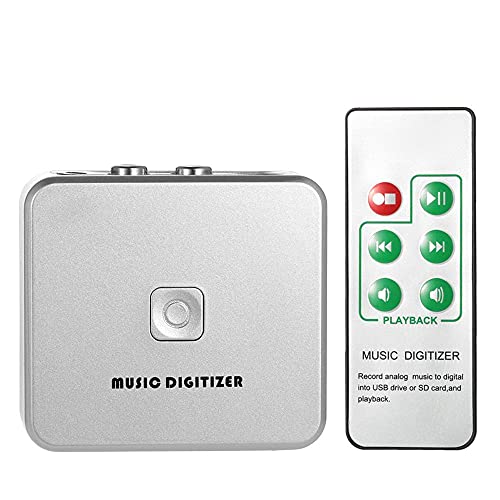
This 2‑in‑1 MP3 recorder and player captures from RCA L/R and 3.5mm inputs, saving directly to a USB drive or SD card. It is best for users who want a standalone device not depending on a computer. It supports routing from multiple analog sources and is suitable for quick digitizing, though file management and editing are less flexible without a computer or dedicated software.
Fly Kan USB 2.0 Audio Grabber

Best for mixed device setups and modern ports. It offers dual RCA and 3.5mm inputs, and includes a USB‑C adapter to support USB‑C devices. This makes it a strong choice for users with newer laptops or desktops who want one device to cover a variety of analog sources. Note that inputs cannot be used simultaneously; plan your workflow accordingly.
HopCentury Music Digitizer CD Recorder

Best for those who want a USB‑based MP3 capture without relying on a computer, plus SD card storage. It supports 3.5mm and RCA inputs for various legacy devices and records directly to USB or SD. This is suitable for standalone digitization and quick checks of recorded MP3s, though long editing requires external software.
Audio Converter — Software Suite for Windows
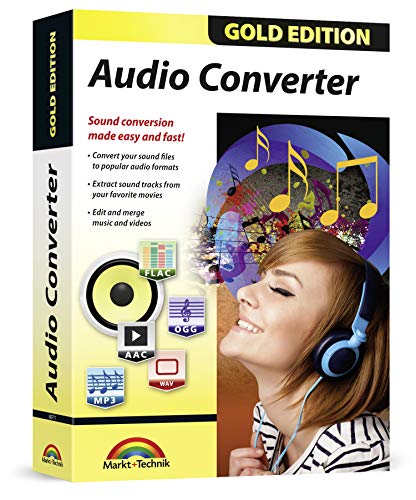
Best for users who need broad audio format support and editing tools on Windows. This package emphasizes conversion between many formats, including MP3, WAV, AAC, FLAC, and more. Choose this if you want flexible post‑processing, trimming, and format options after digitizing, but note this is software rather than a standalone hardware capture device.
Buying Guide
What should you consider when choosing an analog to MP3 converter?
- Source compatibility: Ensure the device supports your expected inputs (3.5mm, RCA L/R, or both) and whether it can handle turntables with or without a preamp.
- Output format and storage: Decide if you prefer MP3 for universal playback or WAV for higher fidelity; check whether the unit writes directly to a USB drive, SD card, or requires a computer.
- Connection to devices: If you use modern laptops or phones, look for USB‑C compatibility or adapters. Some devices include USB‑C adapters for convenience.
- Software integration: Consider whether bundled software (like Audacity) is included or recommended, and whether you need cross‑platform support (Windows and Mac).
- Standalone versus computer‑dependent: Some models function entirely standalone with USB or SD storage, while others require a computer for actual recording and editing.
- Ease of use: For beginners, plug‑and‑play devices with clear indicators and simple controls are ideal; more advanced users may want flexible routing and post‑processing features.
Practical tips for best results
- Use high‑quality cables and connect the source to the line input rather than microphone input when possible for better audio quality.
- Set the target format (MP3 at 192–320 kbps is a common balance of size and fidelity) before recording.
- If unsure about your Mac compatibility, check whether Audacity 2.3.1+ and the proper LAME encoder are available for your macOS version.
- Test a short recording first to verify levels and avoid clipping or distortion.
FAQ
- Do these devices require a computer to work? Some do, some are standalone; check each product’s storage options and whether it records directly to USB/SD or needs a PC.
- Can I digitize vinyl with these tools? Yes, most support RCA inputs suitable for turntables and line outputs, with or without a preamp depending on the model.
- Is Audacity compatible with all capture devices? Audacity is commonly used; verify the version and any necessary encoders for your OS.
- What formats are typical outputs? MP3 and WAV are standard; some devices support USB/SD storage of MP3 files directly.
- Are there any compatibility caveats? Some devices have Mac OS version limitations or require specific software setups for optimal results.
- Which option is best for a portable setup? The standalone digitizers with USB/SD storage are typically most portable for quick on‑the‑go transfers.