
Best Audio Cords From Laptop to TV for Clear, Reliable Sound
Finding the right audio connection from a laptop to a TV helps you enjoy movies, games, and presentations with better sound. This guide selects five reliable options that support audio over HDMI or analog-to-digital converters. It’s best for users who want simple, cable-based setups without Wi‑Fi or casting. The top picks suit travelers, classroom presenters, and home theater enthusiasts who need straightforward plug‑in solutions. Below is a quick summary of the featured products to help you compare at a glance.
| Product | Type | Best For | Key Benefit |
|---|---|---|---|
| VGA to HDMI Adapter | Laptop or PC with VGA output to HDMI TV | Integrated USB audio, 1080p support | |
| 3.5mm Aux Cable | Long-distance audio to speakers or TV | Long length, gold plating, sturdy build | |
| 3.5mm to RCA Cable | Older TVs or receivers | Right-angle design, Bi-directional | |
| DisplayPort to HDMI Cable | DP-enabled laptops to HDMI displays | Unidirectional, 4K/1080p support | |
| USB-C to HDMI/MHL Cable | USB-C devices to HDMI displays | 4K capability, braided design |
BENFEI VGA to HDMI Cable With Audio

The BENFEI VGA Source to HDMI cable converts a computer’s VGA output to an HDMI monitor or TV and includes an integrated USB audio channel. It supports up to 1920×1080@60Hz (1080p) and is best for users with legacy VGA laptops who need to display video with synchronized audio on an HDMI display. This is a unidirectional adapter, so use it from VGA to HDMI only, not HDMI to VGA. Ideal for students or professionals presenting from older systems to modern screens.
Best for: Users with a VGA-equipped laptop who want a simple, compact solution to mirror video and carry audio to an HDMI display. Not suitable for HDMI sources feeding VGA displays.
Caution: The conversion is unidirectional; do not attempt HDMI-to-VGA playback.
CLAVOOP Aux Cable 20ft Long

The CLAVOOP 20-foot auxiliary cable uses a 3.5mm stereo connection with gold plating and a durable copper core for stable audio transfer. The 20-foot length supports long-distance connections, such as from a laptop placed away from a TV or speaker setup. The cable features a rotatable housing and a stepped-down jack to prevent accidental disconnections, making it suitable for portable rigs, conference rooms, or home entertainment spaces.
Best for: Long-distance audio runs where staying connected without signal loss matters. Better for analog audio than for digital formats.
Caution: This is an analog 3.5mm cable; it does not transmit digital audio or video signals.
CableCreation 3.5mm to RCA Cable 10FT
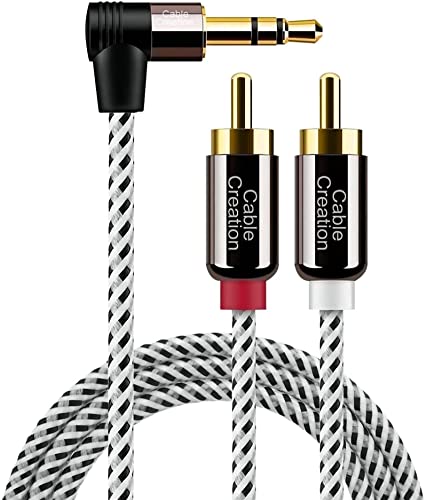
This 3.5mm to RCA cable provides a bi-directional signal path between devices with a 3.5mm output and RCA-enabled speakers or receivers. The right-angle 3.5mm connectors help save space on the back of devices and reduce strain on ports. It’s suitable for connecting smartphones, laptops, or tablets to older stereo systems or TVs that accept RCA inputs, making it a practical choice for mixed-era setups.
Best for: Users with older TVs or AV receivers that rely on RCA inputs who need a compact, easy-to-route connection. Choose this if you have a 3.5mm source and RCA audio destination.
Caution: Ensure your TV/receiver supports RCA audio input in the required channel configuration (stereo left/right).
Amazon Basics DisplayPort to HDMI Cable

This unidirectional DisplayPort to HDMI cable is designed to connect a DP-enabled computer to an HDMI display. It supports resolutions up to 4K at 30Hz and 1080p at higher refresh rates, depending on the source and display capabilities. It’s a straightforward option when you have a laptop with DisplayPort output and want to mirror or extend your screen to a TV or monitor.
Best for: Users with DisplayPort laptops seeking a simple DP-to-HDMI route for high-definition video and audio to an HDMI TV. Not compatible with HDMI sources feeding DisplayPort displays.
Caution: This cable is not USB-A compatible and is one-way—from DisplayPort to HDMI.
TASUMATO USB C to HDMI MHL Cable

The TASUMATO USB-C to HDMI/MHL adapter enables USB-C devices to mirror or extend content to HDMI displays, supporting up to 4K at 2160p with audio. It is designed for USB-C laptops, tablets, and phones that output video. This cable emphasizes a braided design and a compact form factor for travel and on-the-go use. It connects directly from the USB-C source to an HDMI display for screen sharing or presentations.
Best for: Users with USB-C laptops or phones who need reliable 4K HDMI output without wireless casting. Choose this if you require a braided, durable cable with a compact profile. Not a dongle for non-USB-C ports.
Caution: Ensure the USB-C port supports video output (DisplayPort Alternate Mode) to enable HDMI output.
Buying Guide
What connection type do I need for my device?
- Use HDMI-based adapters if your device outputs HDMI or you need to carry both video and audio over a single cable.
- Choose VGA-to-HDMI for legacy laptops with VGA outputs but modern TVs. Remember audio requires a separate path unless the adapter adds USB audio.
Is the adapter unidirectional important?
- Yes. Many adapters only convert in one direction (e.g., DisplayPort to HDMI or VGA to HDMI). Using them in the reverse direction will not work.
- Check the product notes for directionality before purchasing.
Do I need a long cable or a short one?
- Long cables help when devices sit far apart; however, longer cables can introduce signal loss if the quality is low. Look for gold-plated connectors and well-shielded cables for better durability and signal integrity.
What about audio specifically?
- Some VGA adapters include USB audio support to embed audio with video. If your setup relies on a separate audio path, plan for speakers or an external soundbar connected to the TV or HDMI display.
Should I worry about 4K vs 1080p?
- If your TV or projector supports 4K but your laptop only outputs up to 1080p, the adapter will still work at 1080p. For future-proofing, consider cables that support 4K where your devices allow it.
Quick FAQ
- Can I use VGA to HDMI adapters with audio if my laptop lacks an audio output?
Yes, some adapters include a USB audio channel to carry sound to the HDMI display. - Are these cables plug-and-play?
Yes, most require no extra software; they work as wired connections once plugged in. - Will USB-C to HDMI cables work with any USB-C laptop?
They require a USB-C port that supports video output (DisplayPort Alt Mode). - Do these cables support 4K?
Some do; check the product specifications for the maximum resolution and refresh rate. - Do I need an HDMI cable in addition to adapters?
Many adapters require a separate HDMI cable for the final link to the display.