Best Android Phone Audio Interfaces for Mobile Recording
Looking for an audio interface that works with Android phones for recording, streaming, or practice? This guide highlights five top options suited to different needs, from ultra-portable direct-monitoring devices to versatile USB-C interfaces with multi-inputs. Best for guitarists, podcasters, and content creators who want low-latency monitoring and quick setup.
The following quick comparison helps identify who each product is best for and why. Consider device compatibility, the number of inputs, monitoring options, and whether plug-and-play simplicity or raw control is your priority.
| Product | Best For | |
|---|---|---|
| JOYO MOMIX CAB | Mobile guitar recording on the go | Direct monitoring, 6.35mm input, USB-C/Lightning, pocket size |
| Synido 2×2 USB-C Audio Interface | Multi-input recording and streaming | 24-bit/48kHz, XLR/Line, three monitoring modes |
| Ueteto Audio Interface | Guitar practice and basic live streaming | Plug & Play, USB-C/OTG compatibility, no driver |
| Bolanle DAC USB OTG | Mobile live streaming with multiple outputs | 3.5mm/6.35mm outs, USB-C OTG, monitor and stream controls |
| M-AUDIO M-Track Duo | Versatile guitar/vocal recording + podcasting | Dual inputs, 48kHz, monitoring options, bundled software |
JOYO MOMIX CAB: Direct Monitoring for Phones

The JOYO MOMIX CAB is a direct-monitoring audio interface designed for Android and iOS devices. It passes the guitar’s clean signal directly to headphones with zero latency, while also sending the signal to the phone for recording. This makes it ideal for dry guitar tracks, practice with backing tracks, or live streaming. Important: the dry signal cannot be muted, so it’s not suited for real-time software amp sims or effects processing.
Best for: guitarists who need immediate monitoring without latency and simple plug-and-play use. Choose this if you want a pocket-sized, driver-free solution and you mainly record dry guitar tones.
Limitation: no built-in processing or mute for the dry signal; avoid this if you require on-device amp sims or heavy effects in real time.
Synido 2×2 USB-C Audio Interface

The Synido 2×2 interface provides two input channels with 24-bit/48kHz fidelity. It offers three monitoring modes (Stereo, Mix, USB) to adapt to recording, live broadcasting, and post-production. Its built-in design supports XLR and 6.35mm inputs with intuitive LED level indicators. This model emphasizes flexible monitoring and efficient switching between line, instrument, and mic configurations.
Best for: content creators who need reliable multi-input recording and flexible monitoring for live streams. Choose this if you require distinct monitoring modes and clear visual level cues to manage loud signals.
Limitation: not all apps may expose full control via mobile devices; ensure your app supports the device’s input configuration before relying on complex routing.
Ueteto Portable Audio Interface

The Ueteto interface emphasizes plug-and-play use without drivers, with broad compatibility for iPhone, iPad, and Android devices via USB-C and Lightning adapters. It is compact and battery-free, designed for quick, simple recording. It notes compatibility limitations with some apps and emphasizes OTG activation for Android devices.
Best for: guitar beginners or casual mobile recorders who want a compact, no-fuss device that simply records without post-editing or mixing. Choose this if you prioritize portability and ease of use over advanced routing options.
Caution: confirm app compatibility and OTG settings on your Android device to avoid connection issues.
Bolanle DAC USB OTG Audio Interface
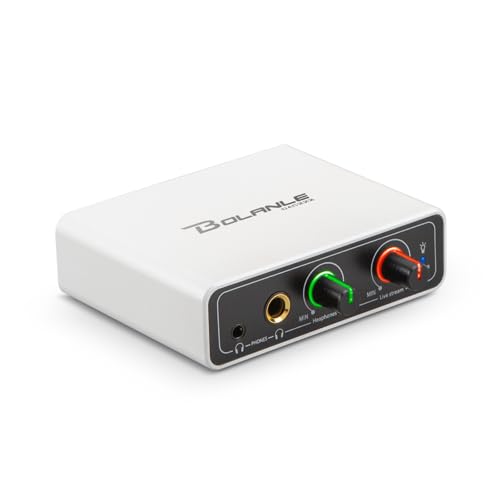
The Bolanle interface is aimed at live streaming with a mobile setup. It provides 3.5mm and 6.35mm headphone outputs for zero-latency monitoring and a USB-C OTG connection to phones for streaming apps. Separate monitor and live-stream controls help dial in the balance between what you hear and what goes to the audience.
Best for: streamers and DJs who need reliable real-time monitoring and adjustable balance between monitoring and streaming audio. Choose this if your workflow includes direct phone streaming across social platforms.
Limitation: it emphasizes live streaming control; if you only record locally, simpler interfaces may suffice.
M-AUDIO M-Track Duo USB Interface

The M-AUDIO M-Track Duo offers dual input channels with XLR/Line/Instrument options and phantom power. It is a versatile solution for podcasting, guitar/vocal recording, and streaming. It includes a 1/4-inch headphone output and stereo outputs for monitoring, along with a USB/Direct switch for zero-latency monitoring. It supports Mac and PC and comes with a software suite.
Best for: users who want a flexible, all-around interface that can handle multiple input types and provides robust monitoring options with software support. Choose this if you plan to mix multiple sources or need phantom power for condensers.
Limitation: may be more than needed for solo guitar or simple phone-recording tasks; consider if you need the added inputs and software.
Buying Guide
What to consider when choosing an Android-friendly audio interface:
- Input options: Do you need a single guitar input, or multiple channels for guitar plus vocals or a podcast setup?
- Monitoring: Is direct monitoring important to you, or can you tolerate a small latency for more features?
- Power and portability: Do you need battery-free plug-and-play, or is a powered option acceptable?
- Compatibility: Confirm USB-C or Lightning compatibility with your device and preferred recording apps.
- Portability vs. features: Ultra-portable devices are easier to carry; feature-rich interfaces offer more control.
FAQ
- Do Android phones require drivers for these interfaces? No, many of these are plug-and-play and do not require drivers on compatible Android devices.
- Can I monitor while recording on Android? Yes, several models provide zero-latency monitoring or clear monitoring paths.
- Is phantom power needed for my guitar or microphone? If you use dynamic microphones, usually not; condenser mics may require phantom power on some models.
- Will these work with iPhones or iPads? Some models support iOS with adapters; check the product’s compatibility notes.
- Can I use these for streaming apps like YouTube or TikTok? Many interfaces support streaming; ensure your app allows external audio input routing.
- What if an app doesn’t see my interface? Try unplugging and re-plugging, verify OTG settings on Android, and ensure the device is recognized as an audio input.