Best Audio Interfaces That Are iOS Compatible for Quick Mobile Recording
If you need an audio interface that works seamlessly with iPhone or iPad, you’re looking for models that offer plug-and-play simplicity, reliable preamps, and low-latency monitoring. This guide highlights five clear choices that are well-suited for mobile creators, podcasters, and musicians who record with iOS devices. Each option prioritizes ease of use on iOS while delivering solid studio-quality results for vocals, guitar, and podcasts.
Overview at a glance: the following table summarizes the five recommended models, what they’re best for, and a quick strength takeaway for iOS users. This helps you compare at a glance before diving into detailed sections.
| Product | Best For | Why It Stands Out |
|---|---|---|
| IK Multimedia iRig 2 | Mobile guitarists on iOS | Guitar input with direct iOS compatibility and easy app routing |
| HOSONGIN USB Audio Interface | Beginner podcasters and singers | Plug-and-play, straightforward setup for iOS devices |
| PIYONE Audio Interface 2×2 | Multi-instrument recording on iOS | USB-C with iOS compatibility and clear LEDs for visibility |
| TISINO Audio Interface | All-in-one podcasting kit on iOS | 48V phantom power and zero-latency monitoring |
| KYXAIN Guitar Audio Interface | Live streaming with iOS devices | Type-C and Lightning compatibility for flexible iOS use |
IK Multimedia iRig 2 Portable Guitar Audio Interface
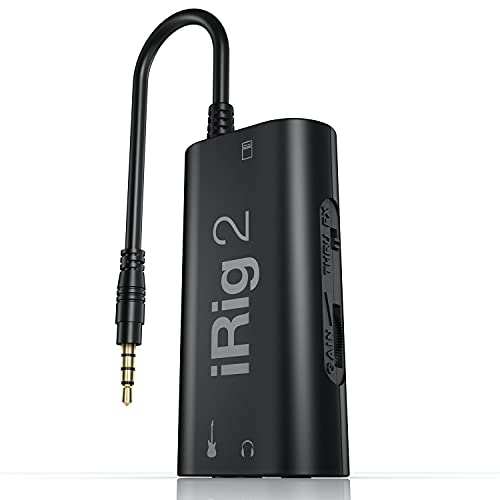
The IK iRig 2 is designed for guitarists who want plug-and-play compatibility with iOS devices. It features a dedicated guitar input and a 1/4″ output that can connect to amplifiers, making it ideal for mobile practice, demos, and quick takes on an iPhone or iPad. The device emphasizes a simple, direct path from guitar to iOS apps, with an adjustable gain control for consistent tones. Best for players prioritizing guitar-centric rigs on iOS.
- Best for guitar-focused mobile recording and performance
- Better for guitarists who need a straightforward interface without extra mic inputs
- Avoid if you require multiple mics or instrument types in one box
Limitations: It emphasizes guitar input and basic audio routing, so multi-mic setups or high-channel recording aren’t its primary strengths. This keeps the unit compact and affordable for iOS users.
HOSONGIN USB Audio Interface for Beginners

The HOSONGIN interface is pitched to new creators seeking a straightforward setup for iOS devices. Its 24-bit/192kHz recording quality supports crisp vocal and instrument capture, with a simple plug-and-play workflow that reduces setup time. This makes it well-suited for beginners who want polished results for podcasts or music without wrestling with drivers or software. Best for newcomers who value quick, reliable iOS compatibility.
- Best for first-time users who want a fast start on iOS
- Better for solo vocals or single-instrument recording with minimal fuss
- Avoid if you need complex routing or multiple input types in one device
Caution: While easy to use, it may offer fewer advanced inputs than pro-grade interfaces, which could limit future expandability.
PIYONE Audio Interface 2×2

The PIYONE 2×2 interface is built for high-fidelity recording with 24-bit/192kHz capability. It uses USB-C for fast data transfer and bus power, making it convenient for iOS devices that support USB-C or adapters. With XLR/TRS combo inputs and robust gain controls, this model suits creators who need solid studio-like sound on the go. Best for users who want a compact, stylish, mid-range option for iOS recording.
- Best for multi-input recording on iOS platforms
- Better for users who want a modern, illuminated control layout
- Avoid if you require built-in phantom power for all mic types unless noted
Caution: While USB-C is versatile, ensure your iOS device supports the necessary adapters for full compatibility.
TISINO Audio Interface 24Bit/192kHz

The TISINO interface is positioned as an all-in-one kit for podcasting and music on iOS. It provides 48V phantom power, 2 combo inputs, and zero-latency monitoring—features that help podcasters and musicians capture clean tracks with minimal latency. The inclusion of a dedicated headphone output supports real-time monitoring, which is beneficial for vocalists and instrumentalists recording on iOS. Best for creators who want a ready-to-record starter package for iOS workflows.
- Best for podcasting and mobile music creation on iOS
- Better for users who want built-in phantom power and direct monitoring
- Avoid if you need more than two inputs or extensive DSP features
Caution: The built-in phantom power is helpful, but verify your microphone’s requirements and iOS compatibility with cables/adapters before recording.
KYXAIN Guitar Audio Interface

The KYXAIN device focuses on mobile live streaming and guitar-centric recordings. It supports Type-C for modern devices and comes with a Lightning adapter for iOS compatibility, making it flexible for iPhone and iPad use. Its compact form and 1/4″ instrument input are ideal for live streaming or quick guitar captures during on-the-go sessions. Best for mobile guitarists who want convenient iOS compatibility and a simple setup.
- Best for iOS live streaming and guitar recording
- Better for quick, on-the-go sessions with minimal setup
- Avoid if you need multiple XLR inputs or professional-grade studio features
Caution: The simplified feature set means fewer options for vocal mics or multiple simultaneous instruments if your project grows.
Buying Guide: Key Considerations for iOS-Compatible Interfaces
What to prioritize when choosing an iOS-ready audio interface:
- Device compatibility: Check whether the interface supports your iOS device via USB-C or Lightning adapters. Some models offer direct Lightning connections or include adapters for modern iPads and iPhones.
- Inputs and outputs: If you plan to record vocals and a guitar at the same time, look for at least one XLR input plus a 1/4″ instrument input. For podcasts, multi-mic capability and headphone monitoring matter more.
- Power requirements: Some interfaces are bus-powered, which is ideal for portability. Others require an external power source; confirm what your iOS setup can support.
- Latency and monitoring: Zero-latency monitoring helps during performance and live recording. Consider interfaces with direct monitoring or low-latency DSP features.
- Audio quality: Aim for 24-bit/192kHz if you want studio-like fidelity for vocals and instruments, particularly for music production and podcasting.
- Build and portability: If you travel often, a compact, durable design with simple controls reduces setup time and hassle.
Frequently Asked Questions
- What makes an audio interface iOS compatible? – It must connect to iOS devices via compatible ports (USB-C or Lightning) and work with iOS drivers or class-compliant hardware that does not require complex software.
- Do I need a power supply for iOS use? – Many interfaces are bus-powered via the iOS device, but some models may require external power for full functionality or phantom power for certain mics.
- Can I use these interfaces with apps like GarageBand or Scribble? – Yes, most of these interfaces are designed for compatibility with common iOS recording apps, enabling straightforward recording and monitoring.
- Is latency a concern on mobile devices? – Latency can be an issue, but interfaces with zero-latency monitoring or direct monitoring help minimize it for real-time performance.
- Should I choose a single-input or multi-input interface for iOS? – If you only record vocals or a single instrument, a 1-2 input model may suffice. For podcasts or multi-instrument recording, choose two or more inputs.
- Are phantom power interfaces necessary for iOS recording? – If you plan to use certain condenser mics, phantom power is essential. Verify mic compatibility with the interface you choose.