
Best Audio Interfaces With Balanced Outputs for Studio Quality Recordings
Answering the need for clean, balanced outputs, this guide highlights five interfaces that offer true balanced 1/4″ outputs or clearly balanced monitoring paths. Ideal for home studios, podcasters, and musicians seeking low-noise paths, these selections emphasize clarity, low latency, and reliable headroom. Each pick targets different setups—from compact USB-C accessories to more feature-rich 2-in/4-out devices—so you can match your workflow and budget.
Overview of chosen products:
- OseTub USB Audio Interface (AR007-4 Line Outputs) – Best for multi-out studio monitoring and DAW work.
- XTUGA Q-12 – Best for plug-and-play PC/Mac users needing reliable balanced outs.
- Behringer U-PHORIA UMC404HD – Best value for 4-in/4-out with Midas preamps.
- Focusrite Scarlett 2i2 4th Gen – Best for small setups needing auto gain and studio-grade converters.
- Solid State Logic 2 MKII Plus – Best for producers who want premium 2×4 I/O with high-end conversion.
OseTub AR007-4 Line Outputs Audio Interface

The AR007-4 offers two XLR/1/4″ combo inputs and two balanced 1/4″ TRS outputs, plus two additional balanced 1/4″ TRS line outs. It supports up to 24-bit/192kHz, delivering clean preamps and low-noise performance. Best for musicians and podcasters who need multiple, independent outputs for on-stage monitoring or sub-mwoofer routing. The two direct monitoring modes help track with near-zero latency.
Best for: Home studios requiring multiple balanced outputs and straightforward USB connectivity. Choose this if you want precise, independent monitor paths and a compact footprint.
Caution: While it provides multiple line outs, the setup may feel limited if you need onboard DSP or advanced software routing.
XTUGA USB Audio Interface Q-12

The Q-12 provides reliable dual inputs with 16-bit/48kHz resolution, switchable 48V phantom power, and zero-latency direct monitoring. It is a simple, plug-and-play option for PC users who need balanced outs for accurate monitoring. It emphasizes ease of use and portability without sacrificing essential balance paths.
Best for: Beginners or mobile creators who want a dependable, no-friction interface with clear balanced monitoring paths.
Caution: The 16-bit/48kHz spec may be limiting for projects needing higher resolution or more dynamic range than some peers offer.
Behringer U-PHORIA UMC404HD Audiophile 4×4

The Behringer UMC404HD delivers 4 inputs and 4 outputs with Midas mic preamps and 24-bit/192kHz recording quality. It’s a strong value option for small studios needing multiple balanced outputs and reliable performance across DAWs. The interface is compatible with common recording software and supports versatile routing for monitoring and playback.
Best for: Budget-conscious studios or beginners seeking four analog outputs with robust preamps and flexible software compatibility.
Caution: Some users report driver or software quirks on certain systems; ensure driver installation aligns with your OS before full use.
Solid State Logic 2 MKII Plus USB-C Audio Interface 2×4
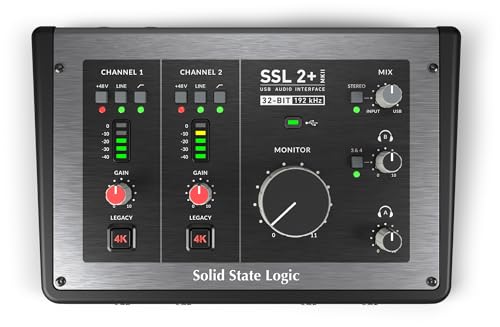
The SSL 2 MKII Plus offers 2 mic preamps and 4 line outputs, with 32-bit/192 kHz AD/DA converters and premium circuitry designed for accuracy and headroom. It targets producers and engineers seeking premium sound with robust analog enhancement features. The interface supports bus power and is compatible with Mac and Windows, appealing to users who prioritize studio-grade performance in a compact form factor.
Best for: Pro-style home studios or podcasters who want SSL-quality conversion and clean, balanced monitoring paths.
Caution: Higher-end features come with a larger footprint and a higher price point than entry-level models.
Focusrite Scarlett 2i2 4th Gen USB-C Audio Interface

The Scarlett 2i2 4th Gen introduces updated mic pres and auto Gain for consistent levels, plus Auto Gain and Clip Safe monitoring. It provides 2 inputs and 2 outputs with high dynamic range and Focusrite’s renowned converter quality. The USB-C connection supports modern workflows, and the low-latency monitoring helps keep performances tight.
Best for: Solo artists or small project studios needing reliable, easy-to-use interface with strong preamps and automatic gain features.
Caution: While compact, it supports up to 2 inputs—expansion may be needed for larger setups requiring more channels.
Buying Guide: Balancing Choices For Your Studio
- Number of inputs/outputs: If you need multiple balanced outputs for reference or multiple monitors, look for at least 2 balanced line outs per device and consider models with 4×4 I/O for expansion.
- Balanced connectivity: Ensure the unit provides true balanced TRS outs to minimize noise and hum in long cable runs. XLR inputs are useful, but balanced line outputs are essential for monitoring.
- Preamps and converters: Look for reputable mic preamps and 24-bit/192kHz converters for higher dynamic range and clarity in vocal and instrument recordings.
- Latency and monitoring: Direct monitoring options with zero-latency paths help performers stay in time. Check if the interface offers latency-free monitoring or software monitoring with low delay.
- Compatibility and power: USB-C interfaces often negotiate power and data efficiently. Verify compatibility with your computer’s OS and DAW, and confirm whether bus power is sufficient for your setup.
- Software ecosystem: Some brands bundle control software or DAW integration. Consider whether bundled software adds value to your workflow without complicating setup.
- Footprint and build: If you travel or have a small desk, prioritize compact designs with solid metal enclosures and simple front-panel controls.
Frequently Asked Questions
- What is a balanced output, and why does it matter?
Balanced outputs use TRS or XLR connections to cancel noise over long cables, which improves monitoring clarity and reduces hum in studio setups. - Do I need 4-in/4-out to have balanced monitoring?
Not always. At minimum, ensure you have at least two balanced outputs for stereo monitoring, but more outputs help with complex mixes and dedicated cueing. - Is USB-C essential for modern interfaces?
USB-C provides robust power and fast data transfer; many newer interfaces use USB-C for compatibility with current laptops and desktops. - Can I use any interface with my DAW?
Most interfaces are DAW-agnostic, but verify driver compatibility with your specific OS and DAW version for best results. - What is direct monitoring vs. latency-free monitoring?
Direct monitoring routes the input signal to the output without passing through the computer, avoiding latency during playback and tracking. - Are premium preamps worth it for home studios?
Higher-quality preamps deliver cleaner gain and lower noise, which can improve vocal and instrument recordings, especially with sensitive microphones.