Best Audio Interfaces With Multiple Outputs for Every Studio
Looking for an audio interface with multiple outputs? The options below cover 4‑to‑4 and 2‑to‑2 setups, prioritizing clear preamps, reliable drivers, and practical I/O layouts. This guide helps musicians, podcasters, and content creators choose a model that matches their workflow and monitoring needs. The top picks emphasize multiple outputs for easy headphone routing, studio monitoring, or external processors.
| Product | Outputs | Best For |
|---|---|---|
| Behringer U-PHORIA UMC404HD | 4×4 USB Audio/MIDI | Pro studios needing four outputs and reliable MIDAS preamps |
| OseTub USB Audio Interface AR007 | 4 Line Outputs, 2 Line Inputs | Home studios requiring separate lineouts and direct monitoring |
| M-AUDIO M-Track Duo HD | 2 In / 2 Out | Podcasters and creators needing portable 2×2 with DAW compatibility |
| PIYONE Audio Interface Q2 | 2×2 USB-C, 24-bit/192kHz | Mac/PC users seeking bus-powered import with visual gain indicators |
| Depusheng USB Audio Interface | 4 In / 4 Out | Budget-friendly multi‑out production and recording |
Note: Each model supports direct monitoring and ASIO or class-compliant operation for broad DAW compatibility. The right choice depends on how many final mix outputs you need, whether you require phantom power, and how important latency is for real-time processing.
Behringer U-PHORIA UMC404HD Audiophile 4×4

Behringer’s UMC404HD provides four analog outputs and four analog inputs with Midas preamps, offering a solid balance between price and professional features. It supports 24-bit/192 kHz recording and works with major DAWs. Best for users who need multiple outputs and reliable performance at a budget-friendly price. Choose this if you need four separate monitor or line outputs for complex routing; avoid if you require advanced DSP or embedded effects.
OseTub USB Audio Interface AR007

OseTub AR007 offers 4 line outputs and 4 inputs with 24-bit/192 kHz resolution. It includes two direct monitoring modes for low-latency playback and supports XLR/1/4″ inputs, making it versatile for vocal recording and instrument feeds. Best for multi-output setups where real-time monitoring and clean preamps matter. Choose this if you need two separate monitor paths and straightforward operation; note that the monitoring modes are simple switches rather than software routing.
Depusheng USB Audio Interface 4 Channel

Depusheng provides a 4-in/4-out USB interface with ASIO compatibility, 24-bit/192 kHz capability, and +48V phantom power for condenser mics. It’s suitable for home studios needing multiple outputs and flexible input options. Best for beginners and hobbyists expanding to a multi-output setup. A limitation to be aware of is driver maturity on some platforms; confirm driver support for your DAW and OS version before purchase.
M-AUDIO M-Track Duo HD
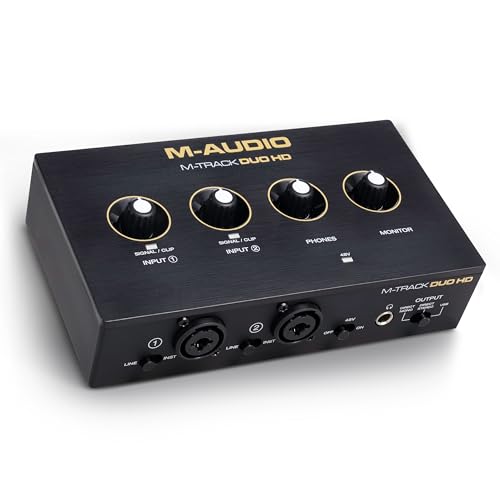
M-AUDIO M-Track Duo HD focuses on 2-in/2-out USB-C connectivity with 24-bit/192 kHz resolution and a compact form factor. It’s ideal for podcasters or small studios needing a straightforward two-channel interface with Direct Monitoring and software suite included. Best for solo creators who want clean, portable I/O; better for minimal routing than multi‑output tracking. Consider if you’ll later need more than two outputs, as you’ll eventually require an upgrade to a multi-output model.
PIYONE Audio Interface Q2

PIYONE Q2 offers a stylish 2×2 USB-C interface with bus power and 24-bit/192 kHz fidelity. It is class-compliant for easy Mac/PC plug‑and‑play use and features illuminated gain controls for visibility. Best for users seeking a compact, stylish multi-output option with straightforward setup. Choose this if you want a clean, modern design that remains easy to use; avoid if you need more than two outputs or advanced DSP features.
Buying Guide: Key Purchase Considerations
- Output count and routing: Determine how many distinct outputs you need for monitors, headphone mixes, and external processors. Four outputs provide flexible monitoring; two outputs are simpler but limit routing.
- Conversion quality and latency: Look for devices offering 24-bit/192 kHz and low-latency monitoring. These specs impact tracking fidelity and real-time monitoring.
- Preamp quality and phantom power: Check for usable mic preamps and +48V phantom power if you plan to use condenser mics. Midas or Air modes can add presence to vocal or guitar tracks on some interfaces.
- Driver support and compatibility: Ensure ASIO support for Windows or class-compliant operation for macOS. Compatibility with your DAW is essential for stable recording sessions.
- Portability vs. desktop use: USB-C interfaces tend to be compact and powered by bus power, suitable for mobile setups. Larger multi‑output units fit desktop studios with dedicated power.
FAQ
- What does “4×4” mean in an audio interface? It means four inputs and four outputs on the device, allowing more parallel routing for mics, instruments, and monitors.
- Do I need ASIO drivers? For Windows, yes; ASIO provides low-latency, reliable performance. macOS users typically rely on class-compliant devices.
- Can I use these interfaces with iPads or phones? Some interfaces support iOS via USB-C or camera adapters; check device compatibility and driver support for mobile use.
- Is phantom power required for all mics? Only for condenser mics that require external power. Dynamic mics do not require phantom power.
- Is latency a concern with multi-output interfaces? Latency matters for real-time monitoring. Choose interfaces with direct monitoring or low-latency drivers if you need real-time feedback.
- Can I mix headphone and main monitor outputs? Yes, many interfaces provide separate headphone outputs and main monitor outs, enabling flexible monitoring setups.