
Best Audio Jack With Switch: Easy 3.5mm and RCA Audio Switching Solutions
Answering the need for quick, reliable selection between multiple audio sources or outputs, these 3.5mm and RCA switchers let you route sound without re-plugging cables. Best for home offices, gaming setups, and personal multimedia rigs, these devices help you pick between headphones, speakers, phones, or PCs with a single button press. The top options below emphasize ease of use, solid build, and compatibility. Use the summary table to compare core capabilities at a glance.
Summary Table: The following table lists five top 3.5mm and RCA audio switchers. Columns cover product, best use case, input/output configuration, and notable notes for buyers.
| Product | Best For | Input/Output | Notes |
|---|---|---|---|
| COOIDEA 3.5mm Switcher | Users needing 2 outputs or 2 inputs to 1 output | 1×2 or 2×1, 3.5mm | Gold-plated jack, plug-and-play |
| SPRODIO 2 Way M201 | Two sources to one output or one source to two outputs | 2×1 or 1×2, 3.5mm | Simple A/B toggle |
| WLTASUY 2 in/1 out | Compact, bidirectional switching | 2×1 or 1×2, 3.5mm | One-meter cable included |
| ESWN DNXB 3.5mm Switch | Easy, space-saving option | 2×1 or 1×2, 3.5mm | One-click switching |
| BolAAzuL 4-Port Bi-Directional | Multiple device routing with RCA and 3.5mm options | 4 ports, 3.5mm or RCA | Lossless passive design |
COOIDEA 3.5mm Stereo Audio Switcher

The COOIDEA switcher provides flexible 1×2 or 2×1 configurations for 3.5mm audio. It is plug-and-play with no power needs, making it ideal for desks, small studios, or living rooms where quick routing between speakers and headphones is needed. Its low-impedance design helps preserve audio fidelity and reduce cable noise, while gold-plated contacts ensure reliable connections. Best for buyers who want a straightforward, high-fidelity switch without extra cables or power requirements.
Who it’s best for: users with two playback devices (speakers and headphones) or two input sources (phone and PC) who want simple switching. Limitations: the device supports standard 3.5mm stereo only and may not accommodate TRRS microphone configurations without an adapter.
SPRODIO 2 Way In-Line 3.5mm Audio Switch

The SPRODIO solution supports 2×1 and 1×2 configurations, enabling you to route two sources to one output or a single source to two outputs. This simple A/B toggle approach makes it easy to choose between a computer, TV, or MP3 player to drive speakers or headphones. Best for budget-conscious setups where quick, reliable switching is needed without digital processing. Caution: two outputs are not simultaneous in 2×1 mode, and there is no power requirement.
Generic SPRODIO 2 Port 3.5mm Stereo Switch Box

This 2-port 3.5mm stereo switch offers a robust toggle switch in a compact form. It supports 2 in 1 out or 1 in 2 out configurations and uses a durable 6A-rated toggle switch. Best for small offices or home offices needing a reliable, manual selector. Limitation: no content protection or active amplification; it is a passive switch, so output levels follow the source.
3.5mm Audio Switcher, 2 in 1/1 in 2 Out

This bidirectional 3.5mm switcher enables easy toggling between two playback devices or between two sources. It includes a one-meter cable for convenient setup and requires no external power. Best for users who want a compact, plug-and-play option with straightforward one-button switching. Limitation: some setups may benefit from a longer or bundled cable for larger desks.
Antec 2 Port 3.5mm Stereo Manual Switch
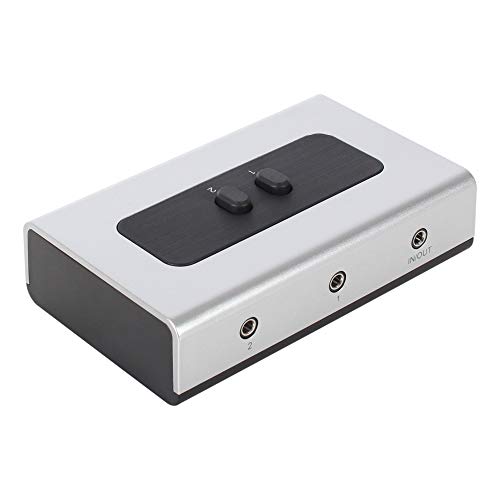
The Antec model features a high-quality rotary switch and two 3.5mm stereo ports with no software needs. It is designed for easy installation, hot-swappable use, and a compact footprint. Best for small setups where a reliable, manually operated device is preferred. Caution: cable not included, so plan on sourcing compatible cables separately.
ESWN DNXB 3.5mm Bidirectional Switch

This 3.5mm bidirectional switch provides easy one-click switching between two playback devices or two sources. It is designed for compact desks and supports most 3.5mm audio devices. Best for users who want a simple, space-saving solution. Limitation: built-in cable length is fixed and may not suit all layouts.
BolAAzuL 4-Port Bi-Directional Switch

This four-port bi-directional switch provides flexible routing options for 3.5mm and RCA configurations. It supports connecting multiple sources to one speaker or routing one source to multiple outputs, with the clear note that only one output plays at a time. Best for multimedia setups requiring more routing options, such as gaming consoles, PCs, TVs, and headphones. Limitation: passive design means no amplification or active control beyond the switch.
Buying Guide
What should you consider when choosing an audio switch?
- Number of inputs and outputs: Decide whether you need 2×1, 1×2, or 4-port configurations to fit your devices.
- Channel type: Most switches support 3.5mm stereo; RCA options are available for home theater setups. Ensure compatibility with your devices (PC, phone, TV, speakers).
- Power needs: Many models are plug-and-play with no external power. If you require higher fidelity or longer runs, check for impedance and cable quality requirements.
- Build and durability: Look for gold-plated contacts, quality toggle or button switches, and a compact form factor suitable for desks or cabinets.
- Cable management: Some units include cables; others require you to supply them. Consider the length you need for your setup.
- Latency and signal integrity: Passive analog switches preserve the original signal but may introduce minimal loss; avoid switching points that cause crackling or static.
FAQ
- What is a bidirectional audio switch?
- Do I need power for these switches?
- Can I use a 3.5mm switch with a microphone?
- Will switching affect audio quality?
- What devices can I connect?
- Is a separate cable needed?
It allows you to route audio in either direction: one input to multiple outputs or multiple inputs to a single output, depending on the model.
Most listed models are plug-and-play and do not require power. Some higher-end setups may benefit from powered options for longer cable runs or to preserve signal strength.
Some switches support TRRS configurations, but most are optimized for stereo playback. Check compatibility with your mic and headset if you plan to use a combined mic and headphone jack.
Quality varies by design. High-quality metal switches with gold-plated contacts tend to minimize noise and preserve fidelity compared to basic plastic toggles.
Typically smartphones, PCs, game consoles, Blu-ray players, speakers, headphones, and soundbars with 3.5mm or RCA connections. Ensure the ports match your devices.
Some products include a short cable in the package; others do not. Plan for the necessary length to reach your speakers or headphones comfortably.