
Best USB C to 3.5mm Aux Cables for Cars Without Aux Ports
When your car lacks a traditional auxiliary port, a USB-C to 3.5mm aux cable is a practical solution. This guide highlights five top options, explaining who they’re best for, and what to watch out for. The best picks are grouped by compatibility, durability, and sound quality, helping you choose the right cable for your device ecosystem—whether you drive a modern Android, an iPhone, or a laptop that uses USB-C for audio.
| Product | Best For | Why It Stands Out |
|---|---|---|
| Seulliya USB C to 3.5mm | Android and iPhone users needing stable DAC audio | Hi-Fi sound with built-in DAC and universal 3.5mm compatibility |
| MORELECS Aux to USB C | Cars with 3.5mm jacks, one-way audio | Plug-and-play with broad device compatibility; simple setup |
| Seulliya Lightning to 3.5mm | iPhone users seeking MFi certification | Apple MFi certified, high durability and DAC for crisp sound |
| CableCreation USB C to 3.5mm | Users needing charging while listening | Supports USB-A to USB-C charging up to 18W |
| UUOLOV USB C to 3.5mm | New iPhone models and latest USB-C devices | DAC-enabled for high-fidelity audio with compatibility across recent iPhone models |
Seulliya USB C to 3.5mm Aux Cable for Type C Devices

This cable connects USB C devices to any 3.5mm AUX input on car stereos, home systems, or headphones. It supports up to 16-bit/48 KHz performance with a built‑in DAC decoding chip for stable, high-fidelity sound. Best for Android users and iPhone owners who want a straightforward, plug-and-play solution without drivers or apps.
Who it’s best for: Android and iPhone users who want simple, reliable wired audio in vehicles or on speakers with a 3.5mm jack. Choose this if you prioritize Hi-Fi sound and easy setup over extra features. Caution: Some newer car systems may have limited compatibility with USB-C to 3.5mm adapters in certain configurations; check your vehicle’s AUX input compatibility.
MORELECS Aux to USB C Braided Cable (3.3FT)

Designed for cars with 3.5mm AUX jacks, this one-way cable streams audio from USB-C devices to car stereos and speakers. It does not support calls or inline controls, making it a clean option for music lovers using phones or tablets with USB-C. Best for users who want a reliable, no-nuss setup without microphone features.
Who it’s best for: Those who need a straightforward audio path from USB-C devices to a car or home stereo. Limitations: Not suitable for calls or using a 3.5mm input as a source for USB-C headsets, and not compatible with cars that lack a typical 3.5mm AUX port.
Seulliya Lightning to 3.5mm AUX (Apple MFi Certified)

This 3.5mm AUX cable for iPhones uses an Apple MFi certified chip to ensure stable connectivity with 3.5mm inputs in cars or home audio. It includes a built-in DAC for clean, Hi-Fi sound. Best for iPhone users who demand reliable compatibility and durability.
Who it’s best for: iPhone owners who want a durable, Apple-verified connection to car stereos or speakers. Caution: Works with Lightning models; not compatible with USB-C or older iPhone tech that uses different connectors.
CableCreation USB C to 3.5mm with USB Charging
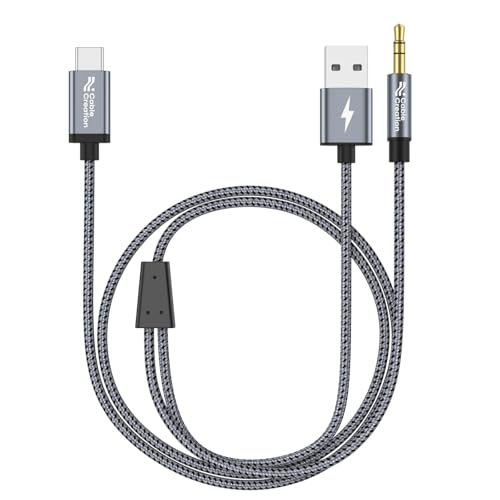
This cable combines audio transmission with USB-C charging, supporting up to 18W PD charging while playing audio through 3.5mm jacks. It’s a versatile choice for on-the-go listening in cars where you want to keep your device charged. Best for drivers who use USB-C devices and want to minimize cable clutter.
Who it’s best for: Users who need both audio output and charging in one cable. Caution: Max charging is 18W; not intended for charging laptops or high-power devices.
UUOLOV USB C to 3.5mm Aux for New iPhone and Android

This cable targets newer iPhone and iPad lines and a broad set of USB-C devices. Built with a DAC for stable sound and compatibility with many 3.5mm inputs, it aims to deliver high-fidelity audio for cars, home systems, and headphones. Best for users with the latest iPhone models or USB-C devices seeking broad compatibility.
Who it’s best for: Owners of newer iPhone models and USB-C devices who want consistent, high-quality wired audio. Caution: Check your car’s AUX input compatibility for newer USB-C adapters in some setups.
Buying Guide: Choosing the Right USB C to 3.5mm Cable for Cars Without Aux
- Purpose and compatibility: If you primarily listen to music, prioritize DAC quality and low latency. If you need to charge while listening, consider cables that support charging.
- Platform and device ecosystem: For iPhone users, look for MFi certification to ensure stable operation. For Android and other USB-C devices, ensure the DAC supports your typical audio formats.
- One-way vs. two-way: Some cables are one-way (USB-C to 3.5mm). Confirm you’re not expecting input from 3.5mm back into USB-C.
- Durability and design: Look for braided cables, flex coatings, and strain relief if you frequently plug/unplug or coil the cable in a vehicle.
- Sound quality benchmarks: Seek cables with built-in DACs that support higher sample rates when your car stereo or speakers can handle it, such as 24bit/96kHz or better.
Frequently Asked Questions
- Do USB-C to 3.5mm cables require drivers?
No. Most USB-C to 3.5mm adapters are plug-and-play and do not require software or drivers.
- Can I charge my phone while using a USB-C to 3.5mm cable?
Some cables support charging; check the specific product’s charging capability. If it supports charge, it will indicate PD or QC compatibility and wattage.
- Will these cables work with a car that has only Bluetooth?
Yes, if your car supports 3.5mm AUX inputs or has an appropriate line-in, you can use a USB-C to 3.5mm cable for wired audio.
- Is MFi certification necessary for iPhone use?
While not strictly required, MFi certification can improve reliability and reduce the chance of “accessory not supported” errors on iPhones.
- What should I look for in DAC quality?
Look for a dedicated DAC chip specification (for example, Realtek or similar) and support for higher sampling rates to achieve clearer, more accurate sound.
- Are these cables compatible with laptops or tablets?
Some are; verify the device’s port availability and confirm whether the device supports USB-C audio output through 3.5mm jacks.