
Looking For The Best Aux Speaker For Your Monitor? This guide compares compact USB/aux speakers and soundbars designed for desktop monitors, highlighting connectivity, size, sound features, and lighting. Below is a quick summary table of the selected products to help you scan options fast.
| Product | Key Features | Power/Connection |
|---|---|---|
| Amazon Basics Stereo 2.0 Speakers | In-line volume, simple 2.0 stereo | USB-powered, 3.5mm Aux |
| LENRUE G11 Computer Speakers | Compact under-monitor fit, touch lights, distortion-free | USB-C/USB Powered, 3.5mm Aux |
| SOULION R50 Bluetooth Soundbar | LED modes, Aux & Bluetooth, USB power | USB-powered, 3.5mm Aux, Bluetooth |
| Bluedee Bluetooth Soundbar | Dual drivers, Hi‑Fi, 3.5mm and Bluetooth | USB Powered, 3.5mm Aux, Bluetooth 5.0 |
| OGUPGX Monitor Clip Speakers | Clip-on design, loud sound, plug-and-play | USB-powered (no aux), USB-C adapter included |
Amazon Basics Stereo 2.0 Speakers For PC Or Laptop

The Amazon Basics Stereo 2.0 speakers are a straightforward option for adding external audio to a monitor setup. They provide a USB-powered design that draws power from the computer and include a 3.5mm Aux input for audio. An in-line volume control makes quick level adjustments easy. These speakers are compact and intended for basic desktop audio needs where simplicity and compatibility are priorities. They work well when you need a no-frills upgrade over built-in monitor speakers.
LENRUE G11 Computer Speakers With Touch Lights

LENRUE G11 targets desktop users who want a compact under-monitor footprint. Features include surge stereo sound using multiple amplifier ICs for reduced distortion, and a touch control to toggle angular game-style lights. The design keeps cables together to minimize clutter. Connectivity is oriented to USB (power) and common 3.5mm aux for audio compatibility. This unit fits neatly beneath most monitors without occupying much desk area.
SOULION R50 Bluetooth Computer Sound Bar

The SOULION R50 is a small soundbar that supports USB power and a 3.5mm Aux input, plus Bluetooth for wireless sources. It offers four dynamic LED lighting modes and a mode button to switch between Aux and Bluetooth. The unit is marketed for broad device compatibility (PC, laptop, tablet, smartphone). The LED options and mode switching make it suitable for users who want both wired aux convenience and occasional wireless streaming.
BLUEDEE Bluetooth Soundbar With Hi-Fi Stereo
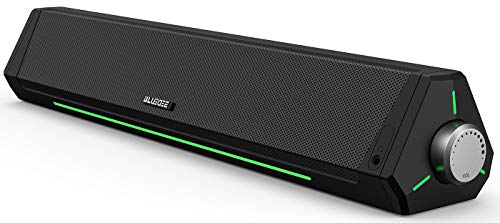
Bluedee’s soundbar emphasizes Hi‑Fi dual drivers and dual diaphragms for a balance of highs and bass, aided by anti-magnetic tech to reduce static. It supports 3.5mm aux and Bluetooth 5.0, plus USB power. Gentle ambient light strips provide a subtle visual accent. This model suits users who want improved audio fidelity from a compact soundbar while keeping the option of wired aux input for direct monitor connection.
OGUPGX Monitor Clip Speakers With Loud Sound

OGUPGX offers a unique clip-on speaker design that mounts directly to monitor bezels, saving desk space. Built around 1.4‑inch magnetic drivers, they are described as providing loud sound for their size. These are primarily USB-powered plug-and-play units and include a USB-C to USB adapter. Note that this model emphasizes direct USB audio (no 3.5mm aux required), so check compatibility with your monitor or PC audio outputs.
Buying Guide: Choosing The Right Aux Speaker For Your Monitor
When selecting an aux speaker for a monitor, consider these key factors to match the speaker to your workspace and listening needs.
Connection Types
- 3.5mm Aux — Highest compatibility with monitor headphone jacks and older devices. Good for simple wired setups with minimal latency.
- USB Power vs USB Audio — Many speakers use USB only for power and still require the 3.5mm jack for audio. Others accept USB audio or Bluetooth. Verify whether the speaker expects USB for power only or for data as well.
- Bluetooth — Offers wireless convenience for mobile devices, but introduces potential latency for video unless low-latency codecs are supported.
Form Factor And Placement
- Under-monitor soundbars — Low profile, designed to sit under the monitor without blocking the screen. Good for tidy desks.
- Clip-on speakers — Attach to monitor bezels to free desk space; check bezel thickness and clip capacity.
- Desktop stereo units — Stand-alone left/right speakers deliver wider stereo imaging but occupy more surface area.
Sound Quality Considerations
- Drivers And Bass — Small desktop speakers have limited bass; look for units with bass ports or dual drivers if deeper low end is important.
- Amplification And Distortion — Features like multiple amplifier ICs or dedicated amplifiers help reduce distortion at higher volumes.
- Intended Use — Prioritize clarity for voice/video calls, stereo imaging for music, or fuller output for casual gaming and movies.
Controls And Features
- Volume Controls — Rotary knobs or in-line volume controls offer quick adjustments; keyboard or software control may also be possible.
- Lighting — RGB or LED modes add aesthetics but are optional for pure audio-focused setups.
- Plug-and-Play — For fast setup, choose speakers that do not require drivers or extra software.
Compatibility And Ports
- Confirm that your monitor or PC has the required 3.5mm output or supports USB audio if the speaker expects digital USB input.
- Check whether the speaker draws power from the monitor USB port or must connect directly to the PC USB port for stable power.
- For laptops or tablets, verify whether Bluetooth pairing is available if you prefer wireless playback.
Comparison Perspectives
- Desk Footprint — Choose soundbars or clip-on units to save desk space; stereo bookshelf units occupy more surface area but can offer broader soundstage.
- Feature Balance — Decide whether lighting, Bluetooth, or extra bass ports matter more than pure plug-and-play simplicity.
- Use Case — For conference calls prioritize speech clarity; for media or gaming prioritize stereo balance and dynamic range.