
Best Bluetooth Speakers for Mac: Top Picks for Desktop, Travel, and More
Discover the best Bluetooth speakers for Mac that deliver clear, balanced sound whether you’re coding, video conferencing, or streaming your favorite tunes. This guide highlights five versatile options suited for different use cases—from compact desktop setups to rugged outdoor listening. Each pick is explained with who it’s best for and why, plus practical cautions to consider before you buy.
| Product | Best For | Why Pick |
|---|---|---|
| Logitech Z207 2.0 | Desktop and multi-device use | Easy Bluetooth pairing and device switching via Easy-Switch |
| Anker Soundcore 2 | Outdoor and travel | IPX7 waterproof, long 24-hour playback |
| Bose SoundLink Flex (2nd Gen) | Portable, high-fidelity listening | Bold, balanced sound with durable design |
| Creative Pebble V3 | Budget-friendly desk setup | USB-C powered, compact, clear dialog processing |
| OHAYO 60W Computer Speakers | Gaming and multimedia desks | High power, compact bookshelf form factor |
Logitech Z207 2.0 Stereo with Bluetooth

Best for: Mac users who want a simple, versatile desktop audio solution that can switch between multiple devices. These speakers offer Bluetooth wireless and 3.5mm inputs for easy connection to a Mac and other devices. The dual-driver design provides clear midrange with bass reinforcement from the passive radiator. Use case: home office, shared workspace, or any desk setup needing easy device switching.
Why chosen: The Easy-Switch technology lets you switch audio between a Mac and another device without reconnecting. This is helpful for video calls on a Mac while streaming music from a phone. Caution: Use the 3.5mm cable option if Bluetooth pairing is unstable in busy wireless environments.
Anker Soundcore 2 Portable Bluetooth Speaker

Best for: Mac users who need a rugged, long-lasting speaker for outdoor use or travel. It’s IPX7 waterproof and offers an impressive 24 hours of playtime on a single charge. The 12W output with dual neodymium drivers provides punchier bass without distortion at moderate volumes.
Why chosen: The outdoor-ready design and long battery life make it a reliable companion for patios, picnics, and camping near a Mac setup. Caution: It’s a compact, 2.0 system, so bass can feel less impactful at very high volumes compared to larger desk setups.
Bose SoundLink Flex (2nd Gen)
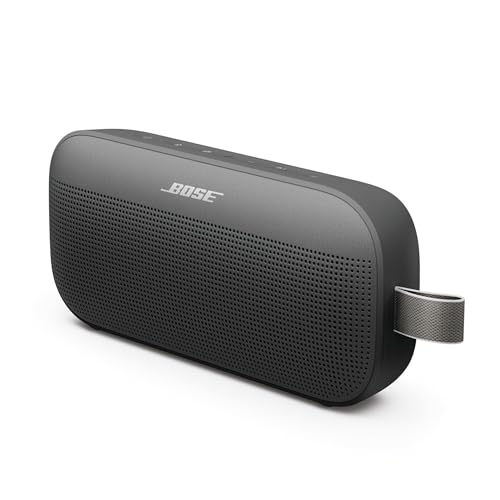
Best for: Mac users seeking premium portable audio with high-fidelity sound, balanced mids, and deep bass for travel or beach days. Its rugged, waterproof design supports outdoor adventures without compromising audio quality.
Why chosen: Bose delivers clear, powerful audio with good spatial cues in a compact form factor. Caution: While durable, its price may be higher than budget options, and performance is best in moderate volumes rather than room-filling levels indoors.
Creative Pebble V3 USB-C Desktop Speakers

Best for: Mac users needing a neat, budget-friendly desk setup with USB-C power. The 8W RMS output is ample for everyday tasks, and Clear Dialog Processing helps when watching videos or participating in calls.
Why chosen: The Pebble V3 uses a single USB-C connection, keeping desk clutter low. Caution: Maximum volume and bass drop may be modest compared with larger 2.0 systems.
OHAYO 60W Computer Speakers

Best for: Gamers and multimedia enthusiasts who want louder, more impactful audio from a compact bookshelf-style speaker pair. The configuration promises distortion-free sound at higher volumes and a robust 60W total output.
Why chosen: It balances desktop space with higher power output, delivering strong performance for action-packed games and movies. Caution: It is a 2.0 system, so it lacks a dedicated subwoofer for deep bass extension compared with larger setups.
Buying Guide
What matters most when choosing Bluetooth speakers for a Mac:
- Connectivity: If you often switch between devices, look for multi-input options or Easy-Switch features.
- Portability vs. power: Portable speakers suit outdoors and travel; larger desktop systems provide fuller bass and higher volume.
- Battery life: For wireless use away from power, prioritize long playback on a single charge.
- Water resistance: IP ratings matter for outdoor or desk spill-prone environments.
- Sound signature: Consider the balance of treble, mids, and bass and whether you need dialogue clarity for calls or videos.
- Desk aesthetics and size: Ensure the speaker footprint fits your workspace and looks cohesive with your Mac setup.
Frequently Asked Questions
- Do all Bluetooth speakers work with Macs out of the box?
Yes. Most Bluetooth speakers pair via standard Bluetooth profiles. Some models offer additional inputs for wired connections.
- Is USB-C power required for Mac compatibility?
Not required, but USB-C powered speakers reduce desk cabling on newer Macs that support USB-C or Thunderbolt.
- Which speaker is best for video calls on a Mac?
Speakers with clear dialog processing or good midrange performance help voices come through clearly in calls.
- Can I use these speakers with Windows or iPad?
Yes. Most listed models support multi-device pairing and work across platforms including Windows and iPadOS.
- Should I choose a 2.0 system or a soundbar for Mac?
2.0 speakers are compact and simple; soundbars provide wider soundstage for monitors, but require more desk space and power.
- Is water resistance important for a desk setup?
Only if the speaker is placed where splashes or spills could occur, or if you’ll use it outdoors near a Mac.