
A home theater package can accept music over Bluetooth while its subwoofer connects by a cable or a separate wireless link. Those connections solve different problems. Understanding them before buying is more useful than comparing the biggest wattage number or assuming that any wireless subwoofer will pair with your television.
The four options below are complete speaker packages with Bluetooth source input and an included subwoofer. They range from a compact soundbar arrangement to a system with separate room speakers. This guide helps you choose an appropriate layout, identify the connection your TV actually provides, and decide what must be checked before installation. It does not present listening-test results or promise the same bass response in every room.
First decide whether you need a complete system
If you are replacing television speakers, a soundbar and its supplied subwoofer give you a defined package to evaluate. The bar handles incoming audio and works with the matching sub. You need to check the TV connection, the space for both components, power requirements, and whether the controls suit everyday watching.
If you already own a receiver and speakers, your task may instead be adding a compatible powered subwoofer to that system. That is a different purchase. A receiver’s subwoofer output, crossover setup, and the proposed sub’s input matter more than whether the receiver can receive music from a phone over Bluetooth.
A Bluetooth-capable soundbar does not make an unrelated subwoofer compatible. The wireless link between a bar and its supplied sub can be proprietary, and an analog subwoofer requires a suitable audio output. Do not assume that a USB port, a Bluetooth button, or a similar brand name establishes that connection. The recommendations here are packages, not interchangeable low-frequency accessories.
Write down the components you already have before ordering. If you plan to keep an existing soundbar, look for its documented subwoofer support first. If no compatible connection exists, buying a standalone sub may leave you with equipment that cannot work together. Avoid building a shopping list around a port or pairing feature that has not been confirmed.
Understand the three connections in the room
Source to sound system
Bluetooth is one way to send source audio to a system. It is convenient for music from a compatible phone or computer. Television use also depends on whether the TV supports Bluetooth audio output and on the behavior of the specific combination. A television may have Bluetooth for some accessories without providing the audio workflow you want.
HDMI ARC or eARC and optical connections are separate alternatives for TV sound. Match a supported output on the television to an actual input on the sound system. Do not buy an HDMI cable for a bar that has only optical and AUX inputs, and do not assume every HDMI socket on a TV is an ARC port.
Soundbar to subwoofer
A wired sub connects to its system through the specified lead. Its placement is limited by that cable route, but the connection does not require you to pair a separate wireless receiver. Check the supplied cable length and connector before assuming a generic extension will work.
A wireless sub reduces the audio cable between the bar and the sub. It still needs its specified power connection and must operate with the intended system. It is not automatically a Bluetooth music speaker. Find a location that works for power, ventilation, and the manufacturer’s pairing requirements, rather than buying solely for a wire-free photograph.
Amplifier to separate room speakers
A package with rear speakers needs a practical route to those speakers. Bluetooth at the source does not remove speaker cables elsewhere in the system. Consider doors, children, pets, furniture movement, and any restrictions on wall mounting. If you cannot manage the rear-speaker routes, a compact front package may be a more realistic choice.
Choose a package by layout and input
ULTIMEA Poseidon M60: a bar and wired subwoofer

The ULTIMEA Poseidon M60 combines a soundbar with a wired subwoofer. Its selected listing describes five drivers inside the bar, including side-firing drivers, and Bluetooth input. That is a compact arrangement without separate rear speaker boxes; the advertised 5.1-channel designation should not be mistaken for five speakers placed around the room.
Consider it if you want a bar-based package and can route its subwoofer cable. ULTIMEA’s M60 format guidance requires an appropriate Atmos source and HDMI eARC connections for its described Atmos setup, and states that DTS decoding is not supported. Check before buying the TV’s output capabilities and the formats used by your main sources. Bluetooth streaming alone does not provide that documented Atmos route. Claims about instant setup, maximum loudness, or surround impressions are not substitutes for checking those requirements.
Saiyin: an optical or AUX 2.1 package with Bluetooth
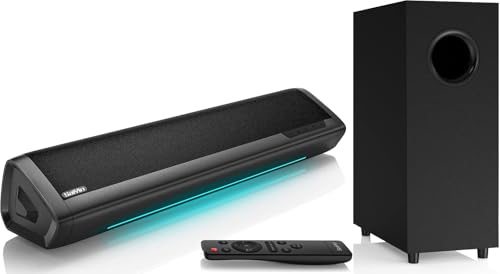
The Saiyin option is a 2.1 soundbar package with a wired, five-inch subwoofer. The exact listing identifies optical, AUX, and Bluetooth input. This makes it a candidate for a modest television setup with a compatible optical output, or for music from a Bluetooth source, without assuming that the bar has HDMI ARC.
Consider it if those inputs match your equipment and you have room for both the bar and the sub. Check before buying the TV’s optical audio-format settings, the supplied cable, and the controls you will use. If your TV sends a format the bar does not support, merely plugging in optical will not settle the issue. No universal TV-remote integration or separate surround speakers should be inferred. Its 2.1 layout and input list are a clearer reason to shortlist it than a general claim that it will create a cinema experience.
ULTIMEA Poseidon M30: a bar with its own wireless sub

The Poseidon M30 is ULTIMEA’s 2.1 bar package with a matching wireless subwoofer. It suits someone who wants to avoid routing an audio lead between those two components, while accepting that the sub still needs power and its intended pairing relationship. Bluetooth source input is distinct from the sub’s system connection.
ULTIMEA’s M30 connection guide covers HDMI ARC, optical, Bluetooth, and USB flash-drive playback. It explicitly says USB cannot connect a source device directly by USB cable; AUX is not an input to assume. Consider it if ARC or optical matches your TV and the sub’s power location works. Check before buying the source-format settings and pairing instructions. App controls and bass adjustment are options to explore, not evidence that one setting will suit every room or improve every soundtrack.
Rockville HTS56: separate speakers for a room you can wire
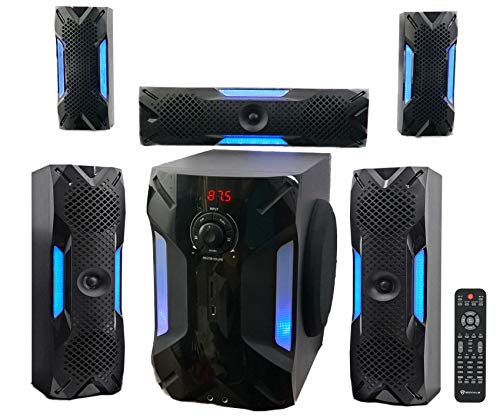
Rockville’s HTS56 uses an eight-inch subwoofer with its receiver electronics, a center speaker, and four other satellite speakers. Unlike the bar packages, this places separate speakers around the room. Rockville’s package inventory identifies Bluetooth and other inputs, with physical front, center, and rear speaker positions to plan.
Consider it if you have space and can route the speaker cables responsibly. Review the HTS56 manual against your source equipment; a 5.1 speaker layout does not prove that Bluetooth or optical supplies discrete surround from every source. The two microphone sockets are inputs, not confirmation that two microphones are included. Look elsewhere if your main priority is a simple HDMI ARC bar, a concealed installation with no rear wiring, or a guaranteed Atmos decoding path. Peak power advertising does not establish continuous output or comparative sound quality.
Match the TV before choosing a surround label
Take a clear look at the labels on the television and check its manual. Identify the output you will use, then identify the matching input on the chosen system. The relevant question is whether that complete route supports your usual source and controls, not whether both boxes advertise modern connectivity.
For a TV with an appropriate ARC or eARC connection, confirm which port is assigned to audio return. Check whether the soundbar supports the required version and formats. The M60’s documented Atmos guidance and the M30’s ARC guidance describe different requirements; do not transfer a feature from one model because their brand and names are similar.
For an optical connection, review the supported audio formats on both devices. If a manufacturer specifies PCM for a particular setup, follow that model’s guidance rather than applying a universal surround setting. PCM in that workflow should not be confused with a promise of decoded multichannel sound. It is sensible to know your fallback connection before purchase.
AUX is an analog audio input where the selected product supports it. Check whether the source provides a usable analog output and how that output’s volume behaves. The M30 is not an AUX candidate merely because some other bars have that socket. A product photograph with many ports is less useful than the actual input list for the selected variant.
Finally, identify who will control the system. Check whether you will use the supplied remote, the television remote through a supported control route, or an app. Optical does not automatically give the same control integration as a supported HDMI arrangement. Decide whether another remote is acceptable before it becomes an everyday irritation.
Make a room plan that includes the subwoofer
Measure the place for the bar, including height below the TV picture and access to the television’s remote sensor. Leave the ventilation and clearance required by the manufacturer. A bar that physically fits a shelf may still block controls or have its side drivers crowded by furniture.
For a subwoofer, plan floor space and a power route where needed. Avoid placing it where a door strikes the cabinet, a cable becomes a walkway hazard, or the enclosure cannot breathe. Do not hide it inside a closed cupboard simply because the wireless connection reaches that location. Usable placement includes everyday access to its controls and connections.
Bass impressions change with placement and seating, so treat initial positioning as a starting point rather than a permanent verdict. Compare a few practical locations allowed by the manual while keeping the same familiar material and a similar listening level. You do not need to maximize the bass control to discover whether the arrangement suits your room.
For the HTS56, add the center, front, and rear speaker locations to the plan before you buy. Measure actual routes around furniture rather than straight lines across the floor. The supplied lead lengths need to cover those routes with sensible slack. Do not assume a package’s mounting accessories suit every wall surface or that the necessary installation is allowed in a rental.
Set priorities for movies, music, and shared spaces
Dialogue at your normal evening level
If dialogue is the reason for replacing TV speakers, judge speech at the level you ordinarily use. A voice setting may change the presentation, but it cannot guarantee that every recording becomes clear. Try familiar material with conversation, music, and quieter scenes, and decide whether the result reduces how often you reach for the remote.
Increasing bass can make a soundtrack seem more dramatic without addressing your original dialogue complaint. Start with the standard setting recommended by the maker, then make one adjustment at a time. Keep a note of the input and mode, so you can repeat a useful setting instead of constantly changing several controls together.
Music from a phone
Bluetooth source input makes casual music playback convenient when the source is compatible. Check what happens when the phone moves away, receives a call, or reconnects later. If several people will use the system, learn how to release the current connection and pair another device using the model’s instructions.
That convenience does not establish an uncompressed multichannel movie connection. Keep the music workflow and the television workflow separate in your plan. You may use Bluetooth for music while keeping the TV connected through the supported wired input; there is no need to force one connection to do every job.
Apartments and neighboring rooms
Choose a setup you can enjoy at a level that fits the household. A larger peak wattage does not make a system automatically better for quiet listening. Check access to bass level and other settings, and consider the location of adjoining rooms. If you only enjoy the package with its sub at an intrusive level, the system may not suit your living arrangement.
Do not assume a night or voice setting makes bass inaudible next door. What matters is the result in the actual space. If practical, ask someone elsewhere in the home to help you assess ordinary use while you make reasonable adjustments. This is an everyday suitability check, not an acoustic measurement.
Compare specifications without buying a number
Peak and RMS power figures are different descriptions and should not be ranked as if they were measured in the same conditions. A listing with a large peak number does not establish that it plays cleaner, deeper, or more usefully than another package. Avoid choosing between these systems by their largest advertised figure.
Driver size also needs context. A subwoofer’s enclosure, settings, position, and source material contribute to the experience. Treat a stated driver size as a physical specification, not proof of a lowest usable frequency in your room. We have not measured the output of these systems, so there is no laboratory bass ranking here.
Likewise, a channel label can describe different implementations. The M60 places its described drivers within a bar, while the HTS56 has physical room speakers. Those arrangements have different installation demands. Neither label tells you that a stereo Bluetooth track becomes discrete multichannel content simply because more drivers can reproduce it.
Plan the full cost and the first evening of use
Include any required audio cable, allowed mounting hardware, and suitable cable management in your budget. Check package contents for the selected seller and variant rather than relying on a promotional photo. Microphone inputs do not mean microphones are in the box, and a USB socket does not mean a USB cable can send laptop sound.
Keep the packaging and installation reversible while you check basic operation. Confirm the audio input, playback format, controls, and sub connection before drilling holes or permanently routing cables. Use the same familiar material for initial checks, then test your normal TV app, external player, and music source separately if you use them.
- Confirm that ordinary speech plays from the selected TV source and that the input setting is correct.
- Check that the supplied sub works with the system without trying to pair an unrelated Bluetooth device to it.
- Inspect the planned cable routes when people move around the room, including behind the sofa.
- Test how you change volume and switch between TV sound and phone music.
- Check reconnection after standby, rather than assessing only the first successful pairing.
- Review the seller’s return terms before disposing of packaging or committing to permanent mounts.
Questions that commonly cause the wrong purchase
Can these subs pair with any Bluetooth soundbar?
No universal pairing is established. The recommended packages include their own subwoofers. A compatible source pairs with the system’s Bluetooth input; that does not make a separately purchased sub a compatible system component. Check the maker’s documented subwoofer support for any existing soundbar.
Does wireless mean the sub needs no cable at all?
No. A wireless audio link can remove an audio lead while leaving a power connection necessary. Confirm the supplied sub’s power arrangement and intended placement. The bar, sub, and any separate speakers may have different cable requirements within one package.
Is Atmos available through every input?
Do not assume that. For the M60, the maker describes an appropriate Atmos source and eARC route and excludes DTS decoding. Check the source, TV passthrough, input, and model instructions together. A format logo on a shopping page does not establish that Bluetooth or an unrelated TV output delivers it.
Should I replace a system that sounds weak immediately?
First confirm the correct input, working sub connection, normal settings, and a practical placement. Check the same material at a sensible level and avoid changing several settings together. If the result still does not suit your needs, use the return window rather than trying to force an incompatible layout or source into service.