
Best Bluetooth TV for Car: Top in-Car Displays for Backseat Entertainment
Answering the question: the best Bluetooth-enabled car TVs are those that combine easy wireless connectivity, reliable mounting, and kid-friendly multimedia features. This guide highlights five in-car TVs and headrest monitors ideal for backseat entertainment, road trips, and family travel. Each pick targets different needs—from Android streaming and wireless CarPlay to overhead flip-down displays. Best for long trips, frequent travelers, and households seeking wireless integration without sacrificing screen clarity.
| Product | Display Size | Top Use Case | Best For |
|---|---|---|---|
| Seventour 15.6″ Android Car TV Headrest (Pair) | 15.6″ | Rear-seat entertainment with Android apps | Families wanting 4K-friendly playback and Miracast/AirPlay |
| Seventour 12.4″ Android Car TV Headrest (Pair) | 12.4″ | Compact second screen for kids and travel | Smaller SUVs and sedans needing efficient space use |
| PASLDA 7″ Portable Wireless CarPlay/Android Auto Screen | 7″ | On-the-go wireless CarPlay/Android Auto | Drivers needing a small, flexible, wireless system |
| Bsldtor 10.1″ Android Car Headrest Monitor (Pair) | 10.1″ | Android streaming with Bluetooth and FM | Budget-friendly, versatile backseat option |
| XTRONS 14″ Android Overhead Car Monitor | 14″ | Overhead viewing for all passengers | Family trips with shared 4K/HD media |
Seventour 15.6″ Android Car TV Headrest Monitor (Pair)

This 15.6-inch headrest monitor runs Android 13.0 and supports 4K video decoding for clear playback. It features WiFi 5G/2.4 GHz and screen-mirroring from iOS AirPlay and Android Miracast. Dual power adapters are included, and a MyCar Link App enables synchronized control between phone and car TV. Best for families needing a full Android streaming experience in the backseat. Caution: Some apps may require updates or alternate APK sources for the latest versions.
- HD IPS 15.6″ touchscreen with 4K-capable decoding
- Android 13.0, WiFi 5G/2.4 GHz, Google Play access
- Wireless screen mirroring (AirPlay, Miracast)
- Universal metal mounting bracket; compatible with most cars
- HDMI input/output; USB/SD card expansion; Bluetooth audio
Seventour 12.4″ Android Car TV Headrest (Pair)
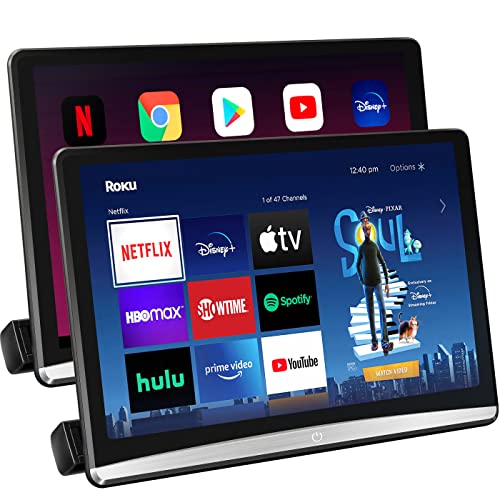
This 12.4-inch headrest monitor uses Android 10.0 and a 1920×1080 IPS touchscreen for crisp visuals. It connects to mobile hotspots via WiFi and supports apps from APKPure for streaming. The metal mounting bracket ensures compatibility with most vehicle models, and dual power adapters enable use both in cars and at home. Best for mid-size vehicles and families who want reliable streaming without the weight of larger units. Limitation: Some streaming apps may require version-specific updates.
- 12.4″ IPS HD touchscreen
- Android 10.0; WiFi 5G/2.4 GHz
- APKPure access for apps like Prime Video
- Universal metal bracket; dual power adapters
PASLDA Portable Wireless CarPlay & Android Auto Screen

This compact 7-inch touchscreen supports wireless CarPlay and Android Auto, along with manual switches for wired connections. It features Bluetooth 5.2, AUX, FM transmission, and a built-in speaker. It’s ideal for drivers seeking a lightweight, install-it-anywhere option with hands-free control and simple navigation. Choose this if you want a portable, all-in-one solution that doesn’t require a dedicated rear-seat system. Caution: Wireless range and compatibility can vary by vehicle’s head unit.
- Wireless CarPlay and Android Auto
- 560×360 resolution; easy dash installation
- Bluetooth, AUX, FM transmitter; built-in speaker
- DC 12V–24V compatibility
XTRONS 14-Inch Android Car Overhead Player

Transform drives with a 14-inch overhead Android display that supports HDMI, USB, and wireless screen mirroring. Its large, adjustable screen is designed for shared viewing, with the ability to install streaming apps via APK on Android. Best for families who want a primary backseat entertainment solution with a big screen and flexible inputs. Limitation: Overhead systems may require more installation space and careful mounting in some vehicle interiors.
- 14″ HD Android overhead monitor
- HDMI, USB, RCA inputs; 4K-friendly media playback
- Wireless screen mirroring; APK installation supported
- Rotates up to 120° for optimal viewing
Buying Guide
What should you consider when choosing a Bluetooth TV for your car?
- Screen size and placement: Headrest models save seat space, while overhead monitors offer shared viewing for all passengers.
- Operating system and apps: Android-based players enable streaming apps, while Apple CarPlay/Android Auto compatibility supports seamless smartphones integration.
- Connectivity: Look for Bluetooth audio, Miracast/AirPlay, WiFi streaming, HDMI/USB inputs, and FM transmission options for flexible audio routing.
- Mounting compatibility: Ensure the bracket fits your vehicle model and that dual power adapters are included or readily available.
- Content and firmware: Some units rely on APKs or OTA updates; verify ease of updating and app availability for your needs.
FAQ
- What is the best screen size for backseat viewing? A: It depends on vehicle size and seating. 10–14 inches often balance visibility and space, with 12–15 inches ideal for larger SUVs.
- Do these units support wireless CarPlay or Android Auto? A: Several models offer wireless CarPlay/Android Auto, while others rely on wired connections or separate head units.
- Can I connect gaming consoles to these displays? A: Many models provide HDMI inputs or USB/AV options, allowing connection to consoles or streaming devices.
- Are headrest and overhead mounts universal? A: Most headrest brackets fit the majority of cars, but some vehicle interiors may require alternative mounting solutions.
- Do these devices require an internet connection for playback? A: Many can stream via WiFi or a mobile hotspot; some offline playback is possible via USB/SD card.
- Is there a recommended best option for families on a budget? A: Bsldtor and similar 10.1″ models provide solid value with essential features and expandable audio options.