Best Bypass Module Options for Remote Start: A Practical Buyer’s Guide
When selecting a bypass module for remote start, choose models that balance compatibility, ease of programming, and clear guidance for vehicle security integration. This guide highlights five reliable options suited for different car security setups, from universal adapters to brand-specific solutions. Ideal buyers include car enthusiasts who want seamless remote start on modern vehicles, installers seeking flexible integration, and owners who want to preserve factory anti-theft protections without key recoding. Below is a quick summary table of the selected products and what they’re best for.
| Product | Best For | Notes |
|---|---|---|
| Idatalink Blade-AL Universal Bypass | Universal, modern vehicles | Web-programmable, broad model support |
| IdataLink ADS-ALCA | Multi-platform immobilizer bypass | Wide controller compatibility, data bypass |
| IData Link Universal Remote Start Kit Bypass | 4000+ vehicle models | Web-programmable, flexible firmware |
| Idatalink ADS-USB Weblink Updater | Firmware programming | PC/Mac interface for updates |
| GM VATS PASSkey II Bypass | GM vehicles with VATS | Simple three-wire installation |
Note: Each product below serves distinct customer needs—from universal compatibility to brand-specific immobilizer bypassing. Use this guide to match the right module with your vehicle, remote start kit, and installation complexity.
Idatalink Blade-AL Universal Bypass

Best for: Vehicle owners seeking an all-in-one bypass and CANbus integration for Blade-enabled remote starters. This module acts as the middle man between your remote start and the vehicle computer, enabling seamless operation across thousands of models from 1997 to present. It is web-programmable and designed for easy integration with the Blade-compatible ecosystem, making it a preferred choice for installers prioritizing broad compatibility and centralized programming.
Why selected: Universal integration cartridge supports a wide model range, reduces the need for multiple adapters, and aligns with modern remote start systems that rely on CANbus data. This is especially advantageous for tech-savvy buyers who want to manage firmware via Weblink Updater. Caution: In some vehicles with complex security configurations, professional programming may still be required to ensure flawless operation.
IdataLink ADS-ALCA Multi-Platform Immobilizer Bypass

Best for: Installers or owners who need a robust data bypass that communicates directly with the vehicle’s onboard computer and works with multiple controller brands. The ADS-ALCA bypass module enables “mimicking” your key through directed commands, helping remote starters function without permanently altering factory security features.
Why selected: It supports a broad range of controllers, offering a hardwire option for compatibility with various brands. Caution: Requires careful configuration to ensure compatibility with specific vehicle immobilizer strategies and controller models.
iDatalink Universal Remote Start Kit Bypass

Best for: A universal bypass solution that supports 4000+ models and helps integrate remote starters with factory security protection. This module serves as the critical link between the remote starter and the vehicle computer, enabling immobilizer and starter coordination without disabling anti-theft protections.
Why selected: Clear promise of wide model coverage and web-programming capability. Caution: Requires a web updater for vehicle-specific firmware customization, so expect some setup time for optimal results.
Idatalink ADS-USB Weblink Updater
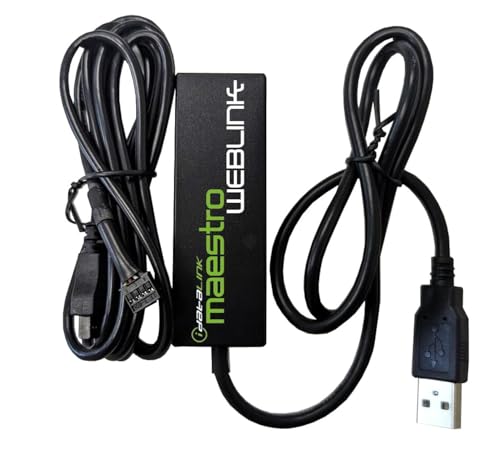
Best for: Technically inclined buyers who need a dedicated PC/Mac interface for online firmware programming across all iDatalink products. It’s essential for updating and maintaining compatibility with evolving vehicle electronics.
Why selected: Provides a centralized method to download software and firmware for multiple bypass modules, supporting broader vehicle compatibility and future updates. Caution: Requires a computer and compatible Weblink software; not a standalone feature without the updater.
GM VATS PASSkey II Bypass Module

Best for: GM vehicles equipped with VATS security. This bypass module is designed to bypass GM’s VATS system in a controlled way, enabling remote start functionality without altering core immobilizer logic.
Why selected: Simple three-wire installation makes it accessible for certain GM models and reduces the need for more invasive procedures. Caution: Primarily suited for GM vehicles; compatibility with non-GM cars is limited.
Car Immobilizer Bypass Module (BNVE)

Best for: Users looking to bypass chip-key immobilizers when remote engine start is not a full remote-start kit. This module addresses immobilizer bypass primarily for chip-key systems and is not a universal remote starter solution.
Why selected: Two-wire simplicity and broad compatibility with chip-key immobilizers. Caution: Not a complete remote start replacement; it bypasses the immobilizer rather than enabling full remote start on its own.
Buying Guide
What should you consider when choosing a bypass module?
- Vehicle compatibility: Is the module designed for your model year, immobilizer system, and network architecture (CANbus, data bypass, etc.)?
- Controller compatibility: Will the bypass work with your remote start or security system controller, and does it support the needed firmware updates?
- Programming and updates: Do you have access to Weblink Updater or the USB updater for ongoing firmware improvements?
- Installation complexity: Is the module intended for DIY installation or professional programming and integration?
- Security considerations: Will the bypass preserve factory anti-theft protections, or will it require disabling certain features?
- Future-proofing: Does the module support a wide model range to reduce the need for future replacements as vehicles update?
What about price and warranties?
Prices vary by model and scope of compatibility. Look for modules that include clear installation documentation and official support channels. Warranties and return policies differ by seller and product, so review these before purchasing.
Common installation scenarios
- Universal bypass integration with Blade-enabled remote starters for broad vehicle coverage.
- Multi-platform bypasses when mixing controller brands or upgrading to newer remote start kits.
- GM VATS-specific bypass for certain General Motors vehicles requiring VATS compatibility.
Quick configuration tips
- Use the Weblink Updater when available to apply vehicle-specific firmware updates.
- Verify connector types and wire counts before installation to avoid miswiring.
- Test the system in a controlled environment after installation and before finalizing an install.
FAQ
- What is a bypass module used for in remote start systems?
A bypass module allows the remote starter to mimic or communicate with the vehicle’s immobilizer or ECU so remote starting can function without compromising security. - Do these modules work with all vehicles?
No, compatibility depends on the immobilizer type, model year, and the remote start system. Check model lists and controller compatibility. - Is Weblink Updater required for all bypass modules?
Not always, but many universal options rely on Weblink Updater for vehicle-specific firmware updates and easier configuration. - Can I install a bypass module myself?
Some models are DIY-friendly, especially those with simple wiring. Others may require professional installation for proper integration and safety. - Will a bypass module disable factory security?
The goal is to preserve factory security while enabling remote start. However, improper installation can affect security features; follow manufacturer guidance carefully. - Are there risks in using bypass modules with modern vehicles?
Yes, improper wiring or firmware mismatches can cause ignition or immobilizer issues. Always verify model compatibility and use official updater tools when available.