
Best Car Cassette to MP3 Converter Solutions for Modern Decks
Looking to convert your car’s cassette tapes to MP3 without a computer? This guide highlights five reliable cassette-to-MP3 converters, perfect for different buyer needs—from USB-drive only players to SD-card options and Bluetooth-enabled adapters. The top picks are ideal for classic car owners, vintage listeners, and on-the-go travelers who want a quick, portable digitization or playback setup. The following sections detail who each product is best for, why it was selected, and practical trade-offs to consider before you buy.
Summary of chosen products
- DIGITNOW USB Cassette Player BR607 — Best for USB-only digitization on the go
- SEMIER Small Cassette Tape Player — Best for flexibility with SD card and USB
- Arsvita Car Audio Bluetooth Wireless Cassette Adapter — Best for Bluetooth streaming in vintage cars
- KLIM K7 Cassette Tape Player — Best for built-in mic, speaker, and SD storage
- ClearClick Cassette Tape to USB 2.0 (Second Generation) — Best for automatic track splitting
DIGITNOW USB Cassette Player BR607
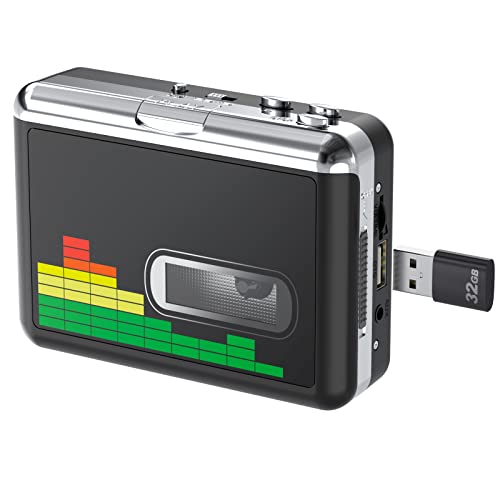
What it is best for: Quick, PC-free cassette-to-MP3 conversion on a USB drive. Best for buyers who want a simple, plug-and-play solution that stores directly to USB without software.
Why it was selected: It supports USB flash drives up to 128GB (FAT32) and records at 128 Kbps with 32KHz sampling, offering straightforward playback through earphones or speakers. The auto-reverse feature reduces manual tape handling, making it user-friendly for casual listeners or seniors who prefer simplicity. A volume control helps manage playback during recording.
Key features:
- Plug-and-Play: USB drive required; no PC needed
- Auto reverse and built-in volume control
- Compatible with USB 2.0 power or 2x AA batteries
Who this is for: Best for travelers, students, or commuters who want a compact, distraction-free device to digitize tapes on the go.
Limitations: Audio quality is fixed at 128 Kbps; more demanding listeners may want higher bitrate options.
SEMIER Small Cassette Tape Player

What it is best for: A flexible, compact converter that can export to SD card or USB with optional Audacity software for editing. Great for hybrid workflows that mix digital and analog archives.
Why it was selected: It supports two conversion paths: to an SD card (included) or via USB with Audacity software. It is compact and includes an LCD, aiding navigation during setup. Note that it does not support Type IV or metal tapes, which is common for many portable units.
Key features:
- Two-way conversion: SD card and USB with Audacity
- Built-in microphone and loud speaker; easy navigation via LCD
Who this is for: Best for value seekers who want multiple storage options and occasional on-the-go digitization.
Limitations: Does not support Type IV or metal tapes, limiting compatibility with some older tapes.
Arsvita Car Audio Bluetooth Wireless Cassette Adapter

What it is best for: Cars with non-digital head units that still rely on cassette playback but want modern Bluetooth streaming.
Why it was selected: This adapter enables wireless Bluetooth audio from a phone or tablet to a cassette deck, preserving the classic car’s interior while enabling modern playback. It’s a solution for users who prefer streaming over direct data transfer, making it ideal for long drives or daily commuting.
Key features:
- Bluetooth receiver for car stereo systems
- High-quality sound adjustment via car’s own equalizer
Who this is for: Best for owners of vintage cars with working cassette players but no Bluetooth capability, or for those who want a wireless option.
Limitations: No hands-free calling; designed for audio streaming rather than full digital conversion to MP3.
KLIM K7 Cassette Tape Player

What it is best for: A portable, all-in-one unit with SD storage and built-in microphone for quick digitization and on-device playback.
Why it was selected: The KLIM K7 includes a 16GB SD card and a built-in speaker, with an emphasis on portability and ease of use. It is suitable for users who want a self-contained device that can function as a quick recorder, not just a converter. Note that recording to cassette tape itself is not supported—the focus is on digital storage via SD.
Key features:
- Built-in microphone and speaker
- Rechargeable battery; 16GB SD card included
Who this is for: Best for mobile users who want a compact unit that can record directly to an SD card and play back through built-in audio.
Limitations: Does not support recording back to cassette tapes; emphasis on digital storage only.
ClearClick Cassette Tape to USB 2.0 (Second Generation)

What it is best for: A streamlined, computer-free workflow with automatic track splitting, ideal for users who want organized MP3 files right away on a USB drive.
Why it was selected: It saves tapes directly to a 16GB USB drive, with an automatic track-splitting mode that creates individual MP3 files. No software or drivers are required, making it a solid choice for quick digitization and clean file organization.
Key features:
- Instant setup; USB drive included
- Automatic track splitting
Who this is for: Best for collectors who want ready-to-use MP3s and minimal setup steps.
Limitations: Higher fidelity options may require more advanced gear or higher bitrate settings than some users need.
Buying Guide: How to Choose Your Car Cassette To MP3 Converter
- Storage format: Decide between USB, SD card, or both. USB is universal; SD cards are great when you want a self-contained device with onboard storage.
- Connectivity: If you want wireless audio, choose a Bluetooth cassette adapter. For direct digitization, look for USB or SD options with simple transfer workflows.
- Ease of use: Consider whether you prefer automatic features (auto reverse, auto track splitting) or manual control for precision edits.
- Audio quality: Higher bitrates yield crisper MP3s. Check sampling rate options and whether the device supports 44.1 kHz or higher.
- Compatibility: Some units do not support Type IV or metal tapes. Verify tape compatibility if you own rare tapes.
FAQs
- Do these devices require a computer? Some models are PC-free and save directly to USB or SD cards; others can connect to a computer for editing with software like Audacity.
- What is the typical audio quality? Most units record around 128 Kbps at 32 kHz or 44.1 kHz; this is suitable for casual listening and archival copies, though higher-end units may offer better settings.
- Can I use these in a car with an existing stereo? Yes, many models connect via standard 3.5mm AUX or Bluetooth, depending on the device.
- What tapes are not supported? Some converters do not support Type IV or metal tapes, so check tape compatibility if you have a diverse tape collection.
- Is Bluetooth in-take compatible with all phones? Bluetooth adapters typically work with most smartphones, but not all offer hands-free calling; they focus on audio streaming.
- Should I choose USB vs SD card? USB is plug-and-play with most computers and devices, while SD cards provide onboard storage and can function as a standalone music player in some units.