
Best Car Chargers to 120V Inverters for Safe in-Vehicle Power
Looking for a reliable car inverter that converts 12V DC to 110V–120V AC to power laptops, phones, and small appliances on the go? This guide covers five top car power inverters, ideal for traveling families, road-trippers, and daily commuters who need portable, in-vehicle power. Each option is evaluated for output, USB charging, cooling, and portability to help you pick the best match for your devices and vehicle setup.
Summary of selected products
| Product | Best For | Output | Notable Feature |
|---|---|---|---|
| PiSFAU 200W Car Power Inverter | Casual use, light devices | 200W continuous | 2 AC outlets + 4 USB ports |
| BESTEK Power Inverter 300W | All-around power, longer trips | 300W continuous | 2 AC outlets + 2 USB ports |
| AeternaSol 200W Portable Inverter | Multiple devices, fast USB charging | 200W continuous | 2 USB-C PD, 2 USB-A, LCD display |
| Pro Chaser 400W Car Inverter | Power-hungry devices on road trips | 400W continuous | Dual 110V outlets + 2 USB ports |
| Vansoet 400W Car Power Inverter | Smart charging and quiet cooling | 400W continuous | PD Type-C, multiple USB ports, independent AC switch |
PiSFAU 200W Car Power Inverter

Best for light electronics and casual road trips. This inverter provides 200W continuous power with two U.S. standard AC outlets and four USB charging ports, making it suitable for laptops, tablets, and phones. Its compact, cellphone-sized form helps keep your vehicle uncluttered. The unit emphasizes quiet, efficient operation with an advanced cooling approach.
Why chosen: It balances sufficient AC power with multiple USB ports, ideal when you need both AC devices and wall-charging capability in a small footprint.
Caution: Do not exceed the total 200W continuous draw; high-wan devices may trip the inverter if run simultaneously with multiple USB-C/USB-A loads.
BESTEK Power Inverter DC 12-17V to AC 110V
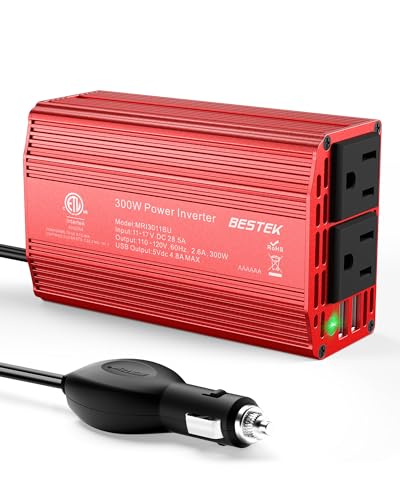
Best for versatile, long trips with bigger devices. BESTEK offers 300W continuous power and a peak of 700W, including two AC outlets and USB ports. Its compact, iPhone-sized design and 32-inch plug make it adaptable to many vehicles, including larger cabins where multiple devices must charge simultaneously.
Why chosen: Higher continuous output supports larger devices like laptops and cameras, while USB ports provide fast charging for mobile devices.
Caution: Some vehicles may require careful heat management during heavy use; ensure adequate ventilation around the inverter when charging power-hungry gear.
AeternaSol 200W Portable 12V to 110V

Best for travelers who need robust USB-C charging alongside AC power. This inverter supports 2x USB-C (PD 20W) and 2x USB-A (QC 3.0 36W) plus two AC outlets. Its LCD display shows DC input voltage, and the cooling system includes an intelligent fan to manage heat during longer use.
Why chosen: The PD-enabled USB-C ports deliver fast recharging for phones and some laptops, while the 2 USB-A ports cover a broader range of devices.
Caution: Power output is capped at 200W; plan device usage accordingly to avoid overloading when running multiple high-demand devices.
Pro Chaser 400W Car Inverter
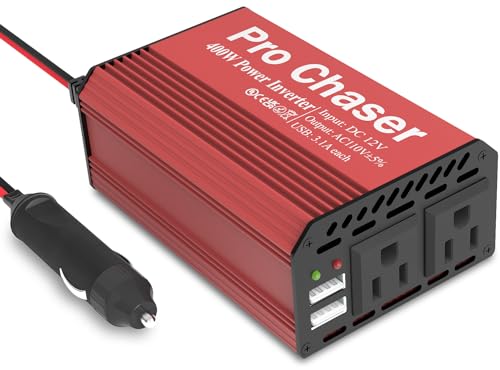
Best for road trips requiring higher wattage. It provides 400W continuous power with dual 110V outlets and two high-speed USB ports, suitable for laptops, tablets, and portable appliances. A long 30-inch cord adds flexibility for seating and arrangement in the car.
Why chosen: The higher continuous output supports more demanding devices while the extended cord and dual outlets enhance convenience on the road.
Caution: The 400W limit requires careful device selection to avoid overloading the inverter, especially when charging multiple devices simultaneously.
Vansoet 400W Car Power Inverter

Best for a balance of power and smart charging. The Vansoet inverter outputs 400W with 2 standard AC outlets, a PD 30W USB-C port, a 15W USB-C, and two 15W USB-A ports. An independent AC switch helps conserve energy, and an intelligent cooling fan manages heat for longer sessions.
Why chosen: The independent AC switch and PD USB-C port provide flexible control and fast charging while maintaining thermal efficiency.
Caution: Ensure total draw remains within 400W to avoid overheating and tripping the circuit in small vehicles with limited electrical capacity.
Buying Guide: How to Choose the Right Car Inverter
What size of inverter do I need? Choose based on peak and continuous power needs. If you plan to run laptops or power-hungry appliances, select 300W–400W with ample USB ports. For basic phone charging or small devices, 150W–200W may suffice.
Should I get USB-C PD ports? PD ports charge newer smartphones and some laptops faster. If you rely on USB-C devices, prefer at least one PD port along with USB-A ports.
Why is cooling important? Inverters generate heat. Units with intelligent cooling or quiet fans help maintain performance and extend lifespan during long use.
Do I need multiple outlets? Yes, dual AC outlets are helpful when you need to power two laptops or a laptop plus a blender on the go. If space is tight, prioritize units with compact form factors and long cords for easy placement.
What about safety features? Look for overload protection, short-circuit protection, overheat protection, and automatic shutdown when the battery is low to protect the vehicle’s electrical system.
FAQ
- What does continuous wattage mean? It is the steady power the inverter can deliver without overheating.
- Can I run a hair dryer from a car inverter? Most 400W–600W hair dryers exceed typical portable inverters. Check the device’s wattage before plugging in.
- Will an inverter drain my car battery quickly? Heavy use can. Many units include low-voltage protection to prevent battery depletion.
- Is it safe to use USB-C PD in a car? Yes, PD ports are designed for fast, compatible charging on the move, provided you don’t exceed the inverter’s total wattage.
- Do all inverters fit in cigarette lighter sockets? Some require direct battery or fuse box connections; check your vehicle’s port type and the inverter’s plug requirements.
- How do I prevent overheating? Ensure adequate airflow around the inverter and avoid stacking devices directly on top of it during operation.