Best Car Charger to Plug Converter Options for Travel and on the Road
Yes, a car power inverter converts DC from a vehicle’s 12V system into standard AC power, letting you plug in laptops, cameras, and other devices. This guide highlights top 5 car inverter models that balance portability, safety, and charging speed, making them ideal for road trips, camping, and daily commutes. Best for travelers who need multiple outlets, best for laptop-heavy use, and best for compact storage are covered. The summary table below helps you compare essential details at a glance.
| Product | Brand | Key Features | Best For |
|---|---|---|---|
| PiSFAU 200W Car Power Inverter | PiSFAU | DC 12V to 110V, 2 AC outlets, 4 USB ports, compact, USB-C 20W | Multi-device charging on the go |
| FOVAL 150W Car Power Inverter | FOVAL | 12V to 110V, 2 USB ports, 1 AC outlet, compact, 3.1A USB | Lightweight road trips with laptop charging |
| PiSFAU 150W Power Inverter | PiSFAU | CD 12V to 110V, 2 USB ports, 150W continuous power | Value-focused gadget charging |
| BESTEK 300W Power Inverter | BESTEK | 300W continuous, 700W peak, 2 AC outlets, 2 USB ports | High-power needs like laptops |
| YSOLX 300W Portable Car Inverter | YSOLX | 4 USB-C/A ports, 2 AC outlets, camping-ready | Camping and multiple-device charging |
PiSFAU 200W Car Power Inverter

The PiSFAU 200W Car Power Inverter converts DC 12V to AC 110V with two standard outlets and multiple USB ports. It is best for travelers who need to energize laptops, tablets, and phones simultaneously in a compact form. Best for users who want fast USB-C charging and a portable package that fits in a glove compartment. Caution: ensure total load stays within 200W to avoid overload and overheating.
FOVAL 150W Car Power Inverter
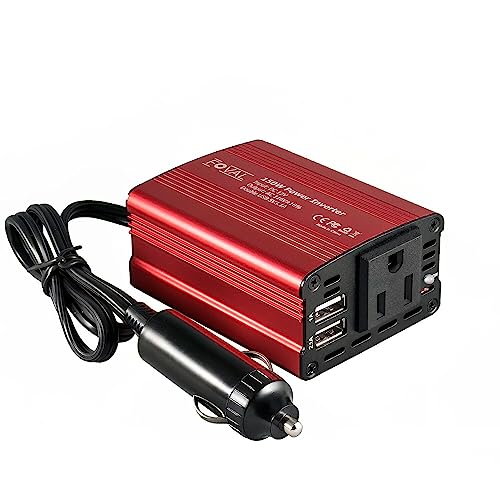
The FOVAL 150W inverter offers a compact, aluminum-shelled design with 150W continuous power, two USB ports, and one AC outlet. It’s better for users who prioritize portability and quick charging on road trips or mobile work setups. Limitation: 150W may not support power-hungry devices for extended periods, such as certain CPAP machines or full-size laptops under heavy load.
PiSFAU 150W Power Inverter

This PiSFAU model provides 150W continuous power with two USB ports. It’s a solid choice for light to moderate device loads, such as charging phones, tablets, or a small laptop. Best for budget-conscious buyers who still need a dependable car inverter. Caution: ensure devices plugged in do not exceed the overall 150W rating for safe operation.
BESTEK 300W Power Inverter
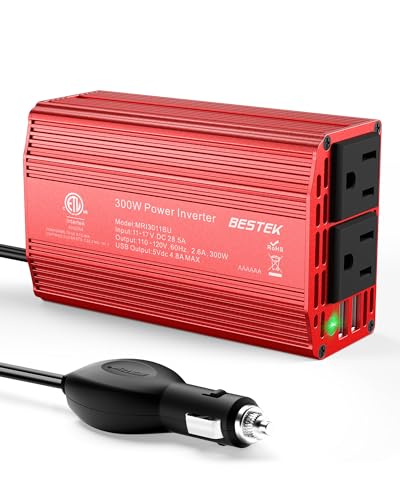
The BESTEK 300W Power Inverter delivers 300W continuous power and 700W peak with two AC outlets and two USB ports. It’s best for users who need reliable laptop charging while on the road or camping. A potential limitation is its larger size compared to ultra-compact models, requiring more storage space in small vehicles.
YSOLX 300W Portable Car Inverter

The YSOLX model stands out with four USB-C/A ports and two 110V outlets, making it ideal for multi-device households or groups traveling together. It’s best for camping or long trips where multiple gadgets must stay charged. Limitation: higher output can increase heat; ensure adequate ventilation and avoid blocking vents in tight spaces.
Buying Guide
Key purchase considerations help match the right inverter to your needs:
- Power rating: Choose continuous wattage for steady loads and peak wattage for short bursts. Exceeding continuous ratings can overheat the unit.
- Number of outlets: Count the devices you plan to run simultaneously and pick a model with enough AC outlets and USB ports.
- Portability vs. power: Small, lightweight inverters are easy to store but may cap continuous power; larger models offer more capacity but take more space.
- Safety protections: Look for overload, overvoltage, short-circuit, and temperature protections to guard both the inverter and connected devices.
- Ventilation: Ensure adequate space around the unit and avoid enclosing it in a tight compartment where heat can build up.
- Device compatibility: Some devices require pure sine wave output for sensitive electronics; check your device’s requirements if applicable.
Practical buying questions
- What power rating do I need for a laptop and charger combo? Look for at least 150W continuous power or more for laptop plus accessories.
- Is USB-C fast charging beneficial in a car inverter? Yes, USB-C ports can significantly speed up charging for recent smartphones and laptops that support USB-C PD.
- Should I prioritize more USB ports or higher wattage? If you have many small devices, more USB ports help; for laptops or power-hungry devices, higher wattage is essential.
- Can I run a CPAP or small fridge from a car inverter? Some inverters handle CPAP machines and similar devices, but verify continuous power limits and device compatibility before use.
- How important is cooling for extended use? A quiet cooling system reduces heat buildup and prolongs inverter life during long trips.
- Are aluminum housings better? They typically offer sturdiness and heat dissipation, but weight and cost vary by model.
FAQ
- What is the difference between continuous and peak power? Continuous power is the steady load the inverter can sustain; peak power is the brief surge it can handle for startup or brief spikes.
- Can I power household appliances from a car inverter? Yes, but only within the inverter’s rated wattage and the vehicle’s electrical system limits.
- Do inverters require special adapters? Most use a standard cigarette lighter/power plug; some models use direct battery connections or require an additional power cord.
- Is a higher wattage inverter always better? Not necessarily; match wattage to your most power-hungry device and consider portability and heat management.
- How do I prevent device damage? Avoid plugging incompatible devices or overloading the inverter; monitor heat and turn off if alarms or red indicators appear.
- Do these inverters include safety features by default? Reputable models include multiple protections, but always review the product’s safety documentation.