
Best Car Radio USB Port Upgrades for Clear, Fast Connectivity
If you’re upgrading a car radio or adding USB ports for charging and data, this guide helps you choose the right USB port options. The top picks below cover fast charging, data passthrough for CarPlay/Android Auto, flush-mount designs, and reliable Bluetooth radios. Best for frequent travelers, commuters, and DIY installers who want a clean dash and dependable power. The following table compares the five selected products for quick reference.
| Product | Best For | Key Benefit |
|---|---|---|
| Scosche PowerVolt Dash Port 27W USB-C Car Charger with Data Pass-Through | Smartphone-heavy layouts | 27W USB-C Power Delivery and CarPlay/Android Auto pass-through |
| REAKOSOUND Car Radio Bluetooth Single DIN Stereo | All-in-one radio with Bluetooth | Bluetooth hands-free calling and USB/FM/AUX options |
| USB 3.0 AUX Flush Mount Car Mount Extension Cable, 3 Feet | Clean dash installations | Dash flush mount USB 3.0 extension |
| BATIGE Single Port USB 3.0 Male to Female AUX Car Mount Flush Cable 3ft | Dashboard-friendly extensions | Flush-mount USB 3.0 extension for dash access |
| Jensen MPR210 Single DIN Bluetooth Car Stereo, USB | Compact Bluetooth stereo with USB | Hands-free calling and USB input in a compact unit |
Scosche PowerVolt Dash Port 27W USB-C Car Charger with Data Pass-Through

The Scosche PowerVolt Dash Port delivers 27W via USB-C Power Delivery, enabling faster charging for phones and tablets while driving. It includes a data-pass-through feature for wired CarPlay or Android Auto, and a dedicated dash USB-A connection point for a clean, dash-mounted setup. Best for drivers who want rapid charging on the go and easy CarPlay/Android Auto access without clutter.
Who it’s best for: users with USB-C devices seeking quick top-ups and seamless CarPlay/Android Auto integration. Why selected: high charging power, data passthrough, and a dash-mount port reduce cable clutter. Limitation: USB-A is data-only, not for charging, so plan your charging needs around USB-C where possible.
BATIGE Square Single Port USB 3.0 Panel Flush Mount Extension Cable 3ft
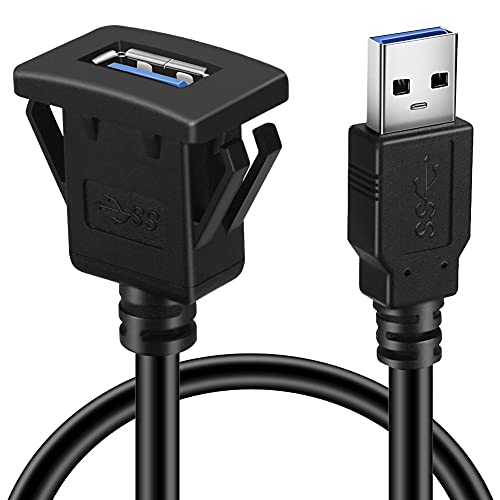
This BATIGE flush-mount USB 3.0 extension cable is designed for clean dash installations in cars, boats, and motorcycles. It’s a durable, heavy-duty option that can serve as a USB data extension or power path when you need a dedicated dash port. Best for: installers wanting a tidy, flush mount look. Why selected: robust construction and straightforward flush mounting. Caution: data transfer speed will adhere to USB 3.0 standards, not newer USB generations.
BATIGE Single Port USB 3.0 Male to Female AUX Car Mount Flush Cable 3ft

This BATIGE flush-mount USB 3.0 A male to USB 3.0 A female extension provides a neat, in-dash data path for USB devices. Suitable for cars, boats, and motorcycles, it helps conceal cables while keeping access to a USB port. Best for: simple dash extensions with a clean profile. Limitation: limited to USB 3.0 speeds and two-way data transfer depends on connected devices.
Jensen MPR210 Single DIN Bluetooth Car Stereo, USB

The Jensen MPR210 is a single-DIN Bluetooth car stereo with an AM/FM radio and USB input. It offers hands-free calling via Bluetooth and a straightforward interface for safe, in-vehicle control. Best for: drivers seeking a compact aftermarket head unit with integrated USB and Bluetooth. Limitation: lacks USB-C charging in this variant and may require additional adapters for some CarPlay/Android Auto setups.
Buying Guide
- What is the primary use? If you need fast charging, prioritize USB-C PD ports like the Scosche PowerVolt. If you want a full radio experience with Bluetooth, look at REAKOSOUND or Jensen options.
- Flush-mount vs. dash-port: Choose flush-mount cables for a clean, factory-like look; choose dash ports for quick access to charging without disturbing dash aesthetics.
- Data vs. power: USB-C PD provides higher power; USB 3.0 extensions are primarily for data transfer with basic power.
- Compatibility: Ensure your head unit and vehicle support the chosen interface (CarPlay/Android Auto via pass-through, Bluetooth pairing, USB-A vs. USB-C).
- Durability and installation: For DIY installs, look for complete installation kits and sturdy cable materials to withstand dash heat and vibration.
FAQ
- Do USB-C ports charge faster than USB-A? Yes, USB-C with Power Delivery can charge devices faster than standard USB-A ports in many cases.
- Can I use these ports with CarPlay or Android Auto? Some products include data pass-through for CarPlay/Android Auto; verify the specific product’s compatibility.
- Are flush-mount cables suitable for all dashboards? Flush-mount cables work best where there is a clean, flat surface or a pre-existing hole for mounting.
- Is Bluetooth required for car radios? Not always; it depends on the unit. Bluetooth adds hands-free calling and streaming capabilities even when wired connections exist.
- Will these cables affect sound quality? Data-only USB-A connections typically do not affect audio quality; power-focused ports should not impact audio unless there are power surges.
- What is the best option for a compact dash setup? The Jensen MPR210 or Scosche PowerVolt options provide a compact footprint with practical features for many vehicles.