Best External CD/DVD Drives for Laptops in 2026
For laptop users needing optical media access, external CD/DVD drives offer a simple, portable solution. This guide highlights five reliable options with USB 3.0 and Type-C compatibility, plug-and-play setup, and broad operating system support. Each product emphasizes fast transfer speeds, durability, and easy use for everyday media tasks, from reading discs to backing up data.
| Product | Brand | Interface | Highlights |
|---|---|---|---|
| Amicool External DVD Drive | Amicool | USB 3.0 / Type-C | Plug & Play; 5Gbps; 8x DVD, 24x CD; Cross-OS |
| Rioddas External CD/DVD Drive | Rioddas | USB 3.0 | Plug & Play; 5Gbps; Backwards USB2.0; Stable |
| ORIGBELIE External CD/DVD Drive | ORIGBELIE | USB 3.0 / Type-C | 8x DVD, 24x CD; Wide OS support |
| JKNJX External DVD Drive | JKNJX | USB 3.0 / Type-C | 8x DVD, 24x CD; Broad compatibility |
| ROOFULL External CD DVD Drive | ROOFULL | USB 3.0 / USB-C | Case included; 5Gbps; 8x/24x speeds |
Amicool External DVD Drive

The Amicool model offers plug-and-play operation with no driver installation required. It supports USB 3.0 and Type-C interfaces, delivering up to 5Gbps data transfer speeds for smooth playback and reliable file transfers. Its compatibility spans Windows, macOS, and Linux, making it suitable for most laptops and desktops lacking an internal optical drive. The drive reads DVD formats including DVD+R, DVD, DVD-R, and CD formats like CD-ROM, CD-R, and CD-RW, with read speeds up to 8x for DVDs and 24x for CDs. It is designed for portability and broad software compatibility. Note that it is intended for laptops and desktops, not TVs, tablets, Chromebooks, or car systems.
The product emphasizes a user-friendly setup, fast data transmission, and universal compatibility. Its dual-interface design supports quick connections to a wide range of devices, enabling users to watch media, install software, or create back-up copies with minimal fuss.
Rioddas External CD/DVD Drive

The Rioddas drive operates via USB 3.0 with backward compatibility to USB 2.0, delivering up to 5Gbps data transfer. It is designed for plug-and-play use, requiring no external power or drivers. It also includes a physical eject button for situations where the computer fails to recognize the drive, adding a practical safeguard for disc access. The device is built to minimize freezing, skipping, and errors, ensuring stable playback and reliable burning. In desktop setups, using a rear USB port is recommended to maximize power delivery and performance.
It’s compatible with Windows, macOS, and Linux, and is designed for use with most laptops and desktops. The Rioddas drive emphasizes reliability, ease of use, and fault tolerance, helping users work with discs without complicated installation steps.
ORIGBELIE External CD/DVD Drive

The ORIGBELIE drive emphasizes plug-and-play use with USB 3.0 and Type-C connectivity. It is backward compatible with USB 2.0 and delivers up to 8x DVD read/write speeds and 24x CD read/write speeds, with data rates up to 5 Gbps. The device supports Windows, macOS, and Linux, and is compatible with a broad range of laptops and desktops. For Mac systems, the device icon may appear only after a disc is read, depending on system behavior. The drive is designed to be simple, fast, and versatile for everyday disc tasks.
With wide compatibility and strong data transfer performance, the ORIGBELIE model aims to provide a straightforward solution for users who need reliable optical drive access across multiple operating systems.
BPAKDU External CD/DVD Drive

The BPAKDU drive is described as an 8-in-1 device that not only reads and writes CDs and DVDs but also serves as a USB 3.0 hub with four USB-A ports and a USB-C port, plus SD/TF card readers. It is a plug-and-play unit designed to work with Windows, macOS, and Linux laptops and desktops. The product notes include guidance on providing extra power if needed and mention a troubleshooting tool. The feature set makes it a multifunctional accessory for people who need optical drive capabilities along with peripheral expansion.
As a versatile option, BPAKDU targets users who want a combined disc drive and USB hub, enabling media tasks and quick data transfer in a compact form factor.
ROOFULL External CD/DVD Drive
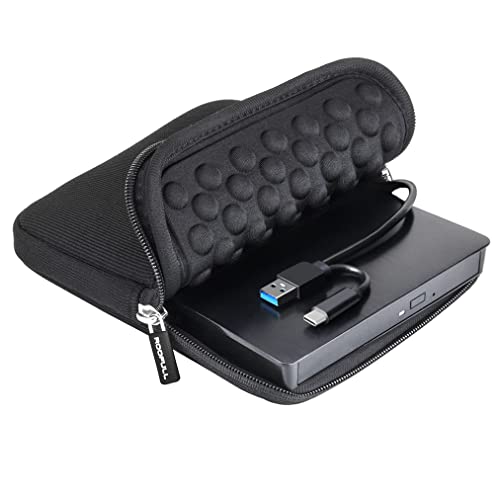
The ROOFULL drive targets both Windows and Mac users with USB 3.0 and USB-C connectivity. It supports standard CD and DVD formats (excluding Blu-ray and 4K discs) and offers fast read/write speeds up to 8x for DVDs and 24x for CDs. The device is designed for plug-and-play use, recognizing discs automatically when connected to a computer or powered hub. The included protective case adds portability and protection for on-the-go use, making it a practical choice for travel or school work. The dual-connectors (Type-A and Type-C) enhance compatibility across many devices without extra adapters.
ROOFULL emphasizes simplicity, speed, and reliability, providing a durable external drive option for multimedia playback, software installation, and data backups.
Buying Guide: Key Purchase Considerations
When choosing an external CD/DVD drive for a laptop, consider the following:
- Interface and compatibility: Look for USB 3.0 or USB-C with dual connectors for broad device support. Ensure compatibility with Windows, macOS, and Linux if you use multiple systems.
- Performance: Check read/write speeds (CD up to 24x, DVD up to 8x) and data transfer rates (up to 5 Gbps) to ensure smooth playback and efficient burning
- Power and installation: Plug-and-play devices reduce setup steps. Some models may require a powered USB hub or external power for high-demand laptops.
- Durability and portability: A slim form factor, protective case, and sturdy build help for travel and daily use.
- Additional features: Eject button usefulness, integrated USB hubs, SD/TF card readers, and compatibility notes for Mac systems (where icons may appear after first read).
- Limitations: Not all drives support Blu-ray or 4K discs; some features may be limited on certain Chromebooks or tablets.