Best External CD Players for MacBook and Beyond: Top Picks in 2026
Finding a reliable external CD/DVD drive for a MacBook or other Apple devices can be essential for restoring legacy media, installing software, or backing up files. Below is a curated guide to five durable, USB 3.0/USB-C external drives that work well with macOS and Windows. Each option balances speed, compatibility, and portability, helping you pick the right drive for your setup.
Summary of chosen products
- Amicool External DVD Drive – USB 3.0 & Type-C, plug-and-play with Mac and Windows
- ROOFULL External CD DVD Drive – dual connectors, Mac and PC compatibility
- Rioddas External CD/DVD Drive – USB 3.0, easy plug-and-play on most systems
- ROOFULL External CD DVD Drive (White) – reliable reader/writer for Mac and PC
- JKNJX External DVD Drive – USB 3.0 and Type-C, broad OS support
Amicool External DVD Drive: USB 3.0 & Type-C

The Amicool external drive offers plug-and-play operation with both USB 3.0 and Type-C interfaces, making it suitable for newer MacBooks and other laptops without internal optical drives. It supports multiple disc formats, including DVD+R, DVD, DVD-R, CD-ROM, CD-R, and CD-RW, with a maximum DVD read speed of 8x and a maximum CD read/burn speed of 24x. This versatility makes it convenient for software installations, media playback, or archival tasks. No external power supply or drivers are required, which simplifies setup for both beginners and professionals. Compatibility spans Windows, macOS, and Linux, though it’s designed primarily for laptops and desktops, not TVs or Chromebooks. The dual interfaces help future-proof against USB-C upgrades in the macOS ecosystem.
Key considerations: The device is marketed as universal, but users should verify software compatibility for ripping or burning beyond basic playback. For macOS users, ensure you have a compatible disc player or conversion software if you intend to rip or digitize content. The build is slim, portable, and ideal for travelers who need optical drive access without carrying a bulky external unit.
ROOFULL External CD DVD Drive (ECD829-Y)
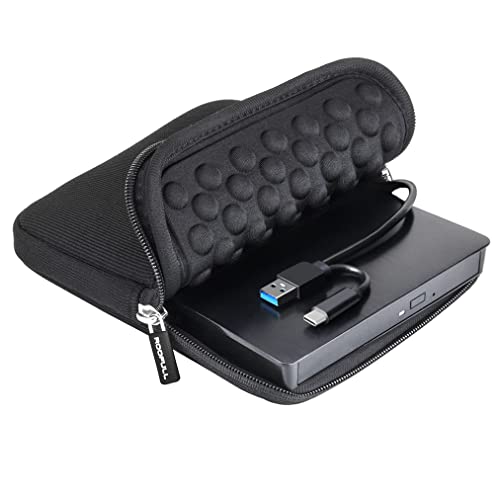
The ROOFULL ECD829-Y external drive has established a track record with more than a million units sold worldwide, emphasizing durability and broad compatibility. It supports common CD/DVD formats and can be used for playing, burning, and ripping content. The drive ships with a protective carrying case and features dual connectors (USB 3.0 and USB-C) for flexible use across laptops and desktops. Installation is straightforward with plug-and-play functionality; the Mac desktop will show a disc icon once a disc is inserted, and you can use preferred software to manage discs. Read/write speeds reach up to 8x for DVDs and 24x for CDs, with a data transfer rate up to 5 Gbps via USB 3.0. Ideal for users who need a dependable, no-fuss solution for media tasks on both Mac and Windows platforms.
Considerations: While not supporting Blu-ray or 4K discs, this drive covers the vast majority of standard discs. It’s well-suited for permanent setups or travel with its included case. Users may want to pair it with quality burning software on macOS to maximize archival fidelity and ensure compatibility with older media formats.
Rioddas External CD/DVD Drive: USB 3.0

The Rioddas drive emphasizes simplicity and reliability with USB 3.0 connectivity and a fully plug-and-play experience. It operates without requiring an external power adapter, making it a convenient option for desktop setups or laptops with sufficient USB bandwidth. This drive is compatible with USB 3.0 and backward compatible with USB 2.0, delivering up to 5 Gbps data transfer speeds. It includes a sturdy build designed to reduce freezing and skipping during playback or burning tasks and features a physical eject button to safely release discs even when the host computer is not recognizing the drive. The unit is compatible with Windows, macOS, and Linux, enabling broad usage across different ecosystems.
Considerations: For Mac users, ensure you have the preferred media software to manage discs and that power stability is adequate when using front USB ports on some laptops. If you frequently work with high-capacity or long-form media, verify buffer requirements for your chosen software to avoid hiccups during burning or ripping operations.
ROOFULL External CD DVD Drive (White)

This ROOFULL model emphasizes a clean white design and dual-connectivity, delivering high-speed USB 3.0 performance up to 5 Gbps and read/write speeds of up to 8x (DVD) and 24x (CD). It supports a comprehensive set of disc formats and is built to be plug-and-play with both Mac and Windows devices. The dual-connector design (USB Type-A & USB-C) eliminates the need for adapters, simplifying compatibility with modern laptops while still supporting older systems. The drive is well-suited for daily media tasks, software installations, and archival projects where a dependable external optical drive is beneficial.
Considerations: While focused on versatility, this device does not support Blu-ray or 4K discs. For macOS users who intend to rip or convert media, pairing the drive with compatible software will facilitate efficient workflows and ensure you can catalog your library effectively.
JKNJX External DVD Drive: USB 3.0 & Type-C

The JKNJX drive is designed for effortless plug-and-play use with both USB Type-A and Type-C connections, providing up to 5 Gbps data transfer speeds. It supports a broad range of OS environments, including Windows, macOS, and various Linux distributions, making it a versatile option for mixed-OS households or lab environments. It claims fast read/write speeds for DVDs (up to 8x) and CDs (up to 24x) and emphasizes compatibility with several Windows versions and macOS 10.16 or later. Aimed at users who value cross-platform operability, this drive prioritizes ease of setup and reliable performance across devices.
Considerations: The product’s broad OS coverage is beneficial, but Mac users should verify the specific software stack they rely on for playback, ripping, or burning tasks. Desktop users may benefit from direct USB connections to back panels for stable power delivery in high-throughput workflows.
Buying Guide: How To Choose The Best CD/DVD Drive For Your MacBook
- Compatibility: Check that the drive is listed as compatible with macOS versions you use (and Windows or Linux if needed). Some drives automatically appear on macOS when a disc is inserted, but others require specific software to manage playback or ripping.
- Interface and power: USB 3.0 and USB-C are common bare-minimums today. Dual-connector models (Type-A and Type-C) provide flexibility for older and newer machines. External power isn’t always required, but some desktop setups might benefit from powered hubs or rear USB ports for stable transmission.
- Speed and reliability: Read/write speeds (CD 24x, DVD 8x) influence time-to-completion for burning and ripping tasks. For general media playback, higher transfer rates help reduce stuttering with large files.
- Build and durability: A sturdy chassis and included carry case can be valuable for travel or fieldwork. Consider models with a simple plug-and-play setup to minimize driver conflicts.
- Software compatibility: Mac users often need third-party software to burn or rip discs to digital formats. Verify that your preferred apps work well with the drive you choose and that the drive supports the file formats you plan to use (MP3, MP4, ISO, etc.).
- Disc formats: Ensure the drive supports common CD/DVD formats (CD-ROM, CD-R/RW, DVD-ROM, DVD±R/RW, DVD-RAM, DL). Blu-ray and 4K discs are typically not supported by these external drives.
- Use case: If you primarily need to play media from discs, look for a model emphasizing readability and compatibility. If you also burn discs regularly, prioritize a drive with reliable write speeds and robust error correction.
- Portability vs. features: Slim drives are great for travel, while drives with extra USB ports or card readers offer convenient data transfer options. Pick based on how you work and where you work.
Overall, any of the chosen drives can serve a MacBook user who needs optical drive access. The selection above balances practical performance with broad compatibility, ensuring you can read, write, and manage discs across multiple operating systems without inconvenient setup steps.