
Best USB Input CD Players for Cars, Desktops, and Laptops in 2026
The best USB input CD players offer seamless plug‑and‑play operation, reliable reading of standard CDs, and flexible compatibility with computers, car stereos, and home audio setups. This guide highlights five top options that emphasize USB input, easy setup, and broad compatibility. Ideal buyers: car owners without built‑in CD players, desktop users needing portable disc playback, and Bluetooth or USB enthusiasts seeking multi‑function CD/MP3 playback.
Summary of chosen products:
| Product | Best For | Key Benefit | Limitations |
|---|---|---|---|
| Amicool External DVD Drive | Desktop/Laptop Users | USB 3.0 & Type-C for fast data transfer | Not for Blu-ray or DVD-RAM |
| Gueray CD Player Portable Bluetooth Desktop | Home/Desk Use | Bluetooth transmission and reception with LCD display | Requires power for Bluetooth modes |
| KLIM CD Player for Car | Car Owners | Plug & Play USB with AUX for cars | Limited to car/USB/AUX usage |
| POSSPO Jupiter USB CD Player for Car | Car Stations | USB play and WAV compatibility | Car stereo must support WAV |
| MEGATEK Boombox with Bluetooth | Living Room or Office | Dual speakers and multiple formats | Bulkier design |
Amicool External DVD Drive With USB-C and USB 3.0

The Amicool external drive provides dual connectivity via USB 3.0 and Type-C, delivering fast data transfer up to 5 Gbps. It reads DVD+R, DVD-R, CD-R, and CD-RW, with a maximum DVD read speed of 8x and CD read/write up to 24x. It is plug‑and‑play and recommended to connect directly to a computer’s port for stable power and operation. Best for: desktop or laptop users who need a compact, versatile optical drive that works with Windows, macOS, and Linux. Limitation: does not support DVD-RAM or Blu-ray formats. Not recommended for standalone TVs or gaming consoles.
Gueray CD Player Portable Bluetooth Desktop

Gueray blends a desktop CD player with Bluetooth 5.0, FM radio, TF card, USB drive, and 3.5mm input. It features a clear LCD display for track info and a remote control for convenient operation. Best for: home desks or small workspaces where a single device handles disc playback, Bluetooth streaming, and auxiliary input. Consideration: audio output depends on Bluetooth range and built‑in speakers, so use wired output for higher fidelity when possible.
KLIM CD Player for Car

KLIM’s external car CD player is designed for vehicles lacking a built‑in CD player. It plugs via USB and AUX for immediate use and also serves as an external drive for laptops. Best for: drivers who want a plug‑and‑play solution that works with many cars and laptops. Limitation: features are centered on basic playback, with no built‑in advanced streaming unless supplemented by connected devices.
POSSPO Jupiter USB CD Player for Car

POSSPO Jupiter is a portable car CD player that plugs into a car USB port and ships with a USB extension cable for flexible placement. It recognizes discs when connected as a USB drive on the car stereo and supports WAV format through compatible car systems. Best for: cars with USB playback that need a simple, portable CD option. Caution: WAV compatibility depends on the car stereo’s capabilities; some units may require WAV support to function fully.
MEGATEK Boombox With Bluetooth
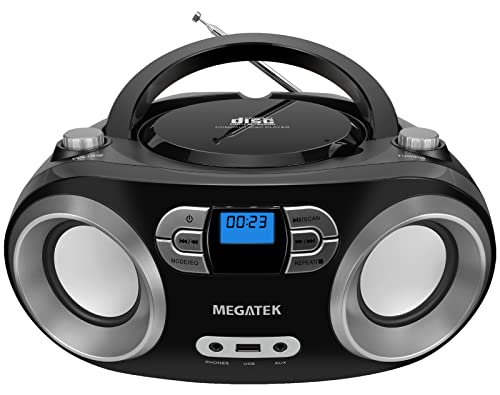
MEGATEK’s portable boombox combines a top‑loading CD player with Bluetooth, FM radio, and dual front speakers. It supports CD‑R/RW and MP3/WMA discs, with multiple EQ modes for customized sound. Best for: spaces that benefit from a larger, more robust audio setup with wireless playback options. Limitation: larger footprint may reduce portability compared to slim external drives.
Buying Guide: Key Purchase Considerations
- Device type and use case: Determine if you need a desktop/laptop external drive, a car‑oriented CD player, or a multi‑function boombox for home use.
- Connectivity: Prioritize USB 3.0/Type-C for fast transfers, or USB/AUX/Bluetooth if you plan wireless playback or car integration.
- Disc formats: Ensure the unit supports CDs, CD-R/RW, MP3/WMA, and, if required, WAV compatibility for car stereos.
- Power and portability: Consider whether a powered USB hub is acceptable or if direct USB port connection is necessary for stability.
- Display and controls: LCD displays and remotes can simplify navigation, especially for multi‑function devices.
- Compatibility notes: Some devices may not work with Blu-ray, DVD‑RAM, or certain media players; confirm with your hardware ecosystem.
Frequently Asked Questions
- What is the main benefit of a USB input CD player?
It allows direct disc data transfer and playback through USB-enabled devices, simplifying connections without extra hubs. - Can USB CD players work with car stereos?
Yes, many models are designed to plug into a car’s USB or AUX port, functioning as external CD drives or Bluetooth devices. - Do these devices require drivers?
Most listed models are plug‑and‑play and do not require additional drivers on modern Windows, macOS, or Linux systems. - Are Blu-ray discs supported?
No; these products generally support CD and standard DVD formats, but not Blu-ray or BD-RAM formats. - Which option is best for a desk setup?
Gueray or MEGATEK boombox models suit a desk or living area, offering Bluetooth and multiple inputs for flexible playback. - Is a bigger boombox better for sound quality?
Typically, larger designs with dual speakers provide stronger, room-filling sound, but may sacrifice portability.