
Best CD Player USB Output: Top External Drives for Easy CD/DVD Use
Answering the search query for reliable USB CD players, this guide highlights external drives that connect via USB or USB-C, ideal for laptops, desktops, cars, and home entertainment setups. The featured picks are best for travelers, office workers, and multimedia lovers who want simple plug-and-play CD/DVD access without fuss. Below is a quick buying table of the five products selected for strong USB output compatibility and broad OS support.
| Product | Best For | Key Benefit |
|---|---|---|
| Amicool External DVD Drive | Laptops and desktops needing fast, driver-free setup | USB 3.0 / Type-C with up to 5Gbps |
| Rioddas External CD/DVD Drive | Reliable plug-and-play on various PCs | USB 3.0 with strong fault tolerance |
| YOTUO External CD/DVD Drive | Travelers who want dual USB-C and USB 3.0 | Slim, portable with dual interfaces |
| MEGATEK Portable CD Player | Bluetooth and USB playback fans | USB playback plus Bluetooth RX/TX |
| KLIM Car CD Player | Car owners needing external car CD drive | USB/ AUX plug-and-play in vehicle |
Amicool External DVD Drive

The Amicool drive offers plug-and-play setup via USB 3.0 or Type-C, with simple detection and no extra drivers. Best for users who want quick, direct connections to laptops and desktops, especially those who avoid hubs. It supports DVD+R, DVD-R, CD-R, and CD-RW, with read/write up to 8x for DVDs and 24x for CDs. Caution: does not support DVD-RAM, Blu-ray discs, or some proprietary formats. Ideal for general software installs and media playback on Windows, macOS, and Linux systems.
Who it’s best for: professionals who need fast, reliable disc access without installing drivers; students performing software installs; home users needing broad compatibility. Why selected: strong USB 3.0 and Type-C versatility, plus broad OS support and a compact form factor.
ENVYCLOUD Portable Car CD Player
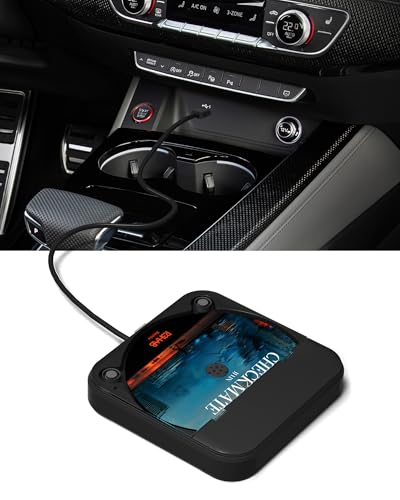
This car-friendly CD player is designed for vehicles without built-in CD players. It connects via USB or AUX and supports touchscreen or steering-wheel control. It’s broadly compatible with car stereos, TVs, laptops, or computers, making it a flexible option for in-car listening. Caution: mostly positioned for playback rather than high-fidelity CD mastering; it emphasizes convenience over audiophile-grade features. Best for road trips, daily commuting, and vehicles lacking a built-in CD drive.
Who it’s best for: drivers who want an easy, in-car CD option without dedicated head units; families seeking simple, shared music playback. Why selected: exceptional portability and car-ready operation with USB/AUX simplicity.
MEGATEK Portable CD Player

The MEGATEK player blends CD playback with USB and Bluetooth RX/TX, offering versatile listening options. It supports CD, CD-R/RW, MP3 CDs, and audio formats like MP3, WMA, and WAV. Features such as resume play, shuffle, and repeat modes add convenience for everyday listening. Caution: Bluetooth functionality typically cannot pair with Bluetooth car stereos, so use with standard headphones or speakers for best results. Best for: music lovers who want flexible playback across formats and Bluetooth-enabled devices; travelers who may need both wired and wireless options.
Why chosen: strong multimedia versatility with Bluetooth and USB, plus convenient playback controls for diverse audio needs.
KLIM CD Player for Car

KLIM’s car-focused CD player emphasizes plug-and-play operation via USB and AUX, making it a straightforward external drive for cars lacking a built-in CD player. It’s designed to work with most vehicles and laptops, providing a practical solution for in-car music. Caution: ensure your car stereo supports WAV or CD playback formats; some combinations may require adapters or alternate connections. Best for: drivers who want a simple, dependable external CD drive for car use and occasional laptop playback.
YOTUO External CD/DVD Drive

YOTUO offers a dual USB 3.0 and USB-C interface for fast data transfer, with a compact, travel-friendly design. It supports reading up to 8x DVD and 24x CD speeds and aims to minimize power issues by recommending desktop port connections for optimal performance. Caution: some users may need to connect to a powered port when using high-demand discs. Best for: travelers and mobile workers who want a stylish, lightweight drive with flexible connectivity.
Buying Guide: Key Buy Considerations
What connectivity do you actually need? If you primarily use a laptop, USB-C or USB 3.0 with USB-C compatibility matters. For desktops, ensure you can access a high-power USB port on the back of the motherboard to avoid power shortages.
What formats do you require? Look for drives that support DVD±R/RW and CD-R/RW. Some models add MP3/WMA/WAV playback, Bluetooth, or USB playback, which expands use beyond discs alone.
How important is portability? Slim, light drives are ideal for travel, car use, and classrooms. A recessed cable design helps with organization and reduces snag hazards in bags or glove compartments.
Is your use case car-centric or desk-based? Car CD players should emphasize easy plug-and-play, AUX/USB compatibility, and compact sizing. Desk and laptop users benefit from faster transfer speeds and broad OS compatibility.
Power and compatibility considerations: some models require direct USB connections for power. Avoid USB hubs for initial setup to minimize connection issues; powered hubs can help with high-demand devices.
FAQ
- Do external CD/DVD drives require drivers? Most modern drives are plug-and-play and auto-detect on Windows, macOS, and Linux without third-party drivers.
- Can these drives read Blu-ray discs? No, most listed models do not support Blu-ray; they focus on CD/DVD formats.
- Will these drives work with a car stereo? Many do, if the car stereo supports USB or AUX input and recognizes the drive as a USB storage device. Check your vehicle’s compatibility first.
- Is USB-C necessary? Not strictly, but USB-C models offer greater compatibility with newer laptops and some tablets. USB-A remains widely supported.
- What is the typical read/write speed range? DVD speeds commonly reach up to 8x, while CD speeds can reach up to 24x, with data transfer up to 5Gbps on USB 3.0/USB-C.
- Should I choose a Bluetooth-enabled drive? Bluetooth adds wireless playback options but may introduce latency; use it when wireless listening is a priority and you don’t require high-fidelity wired performance.