
Best Chargers for Wireless Headphones: Quick, Safe, and Portable Power
When selecting a charger for wireless headphones, the focus is on compatibility, charging speed, and durability. This guide highlights five practical options that fit common micro-USB and USB-C needs, with clear notes on which users will benefit most. The top picks range from universal micro-USB cables for Beats devices to USB-C kits for newer earbuds. Whether you travel, work from home, or need a reliable backup, these chargers help keep headphones powered without fuss. Below is a quick summary of the five products to compare at a glance.
| Product | Best For | Key Benefit |
|---|---|---|
| icevein Replacement Micro USB Charging Charger | Beats by Dr Dre Micro-jack devices | Built-in safe charging chip |
| WZHENB Micro USB Charging Cable | Powerbeats 3/2/1 and Sony/XB series | Wide compatibility |
| FEIYIU Micro 5-ft Charging Cable | Speakers and Bluetooth devices | Fast charging up to 3A |
| ienza USB-C Headphone Charger | USB-C earbuds and headphones | USB-C fast charging compatibility |
| ienza Short Universal USB Cable | Beats Flex, Studio Buds, and similar | Universal compatibility |
icevein Replacement Micro USB Charging Cable for Beats and More

Best for Beats by Dr Dre Micro-jack devices. This professional charging cable targets the Beats by Dr Dre family, focusing on the micro-USB headset and speaker charging jack. It includes a built-in safe and quick charging chip to protect battery longevity. The aluminum alloy shell and PVC flame-retardant material add durability. Avoid this if you own devices with USB-C or Apple Lightning jacks, as it is not compatible with those ports. This option is ideal for users who need a dedicated micro-USB charging solution for Beats Studio and Powerbeats devices.
WZHENB Micro USB Charging Cable For Beats And Sony

Best for Powerbeats 3/2/1, Sony XB series, and similar micro-USB devices. This cable emphasizes broad compatibility across Beats and Sony models, plus other micro-USB devices. It’s suitable for users who need a single cable that works across multiple brands, including portable speakers. A limitation is noted: certain Beats and Studio models with non-micro jacks are not supported. Choose this if you want a single charging cord for several micro-USB devices in your ecosystem.
FEIYIU Micro USB Charging Cable For Speakers And Headphones

Best for Bose, JBL, Beats, and Sony Bluetooth speakers and headphones. This cable markets rapid charging up to 3A and targets devices that support 100mA to 3000mA. The 5-foot length and thick copper core promote durability and flexible usage. It’s a solid pick for home setups and travel kits where multiple devices may need quick power. A potential limitation is that the fast-current claim depends on the charger you pair with the cable. Use this for devices that support higher current charging for fastest results.
ienza USB-C Headphone Charger And Block

Best for USB-C earbuds and newer headphones. This set includes a USB-C charger compatible with multiple brands using USB-C ports, including Beats Flex, JBL, and Bose. It comes with a USB-A to USB-C cable, serving as a compact solution for USB-C powered devices. A limitation is that it may be less effective for older micro-USB-only headphones. Choose this if your primary devices use USB-C and you want a single wall charger and cable combo.
ienza Short Universal USB Cable For Earbuds And Headphones
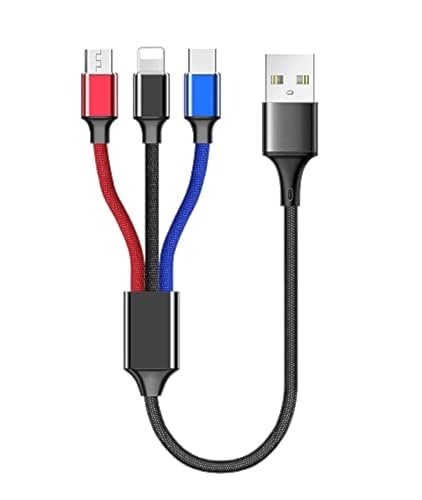
Best for Beats Flex, Studio Buds, and similar earbuds. This short universal USB cable emphasizes broad compatibility with both older and newer earbuds and headsets. It suits users who want a compact, travel-friendly solution without sacrificing device compatibility. A noted caveat is that some non-beats models may require different adapters or ports. This is a convenient choice for minimal setups where space matters, and you need a dependable micro- or USB-C charging option.
Buying Guide: Key Purchase Considerations
- Charging port compatibility: Match the device port (micro-USB vs USB-C). Many older headphones use micro-USB, while newer models rely on USB-C.
- Charging speed: Look for cables and adapters that support higher currents (up to 3A where advertised) to reduce charging time, especially for larger battery packs in portable speakers.
- Durability and construction: Aluminum shells and flame-retardant plastics improve lifespan in travel environments.
- Cable length: 3–6 feet offers flexibility for desk setups and convenience in outlets away from devices.
- Brand compatibility: If you own multiple brands, choose cables with broad compatibility while noting any noted incompatibilities in product descriptions.
- Safety features: Built-in charging chips can help prevent battery damage from overcharging and heat buildup.
- Portability: For frequent travelers, consider compact or short cables to minimize bulk.
How to Choose First: Quick Decision Answers
- Do you mainly charge Beats devices? Look for micro-USB cables specifically labeled for Beats.
- Do you own USB-C headphones? Prioritize USB-C charging kits and cables with verified USB-C compatibility.
- Are you seeking a single cable for multiple devices? Opt for universal micro-USB or multi-brand USB-C options.
- Will you use these on the go? Favor 3–5 foot cables with durable housings.
FAQ
- What is the most universal charger for wireless headphones?
A universal USB-C or micro-USB cable is best, depending on your devices’ ports, with emphasis on cables labeled to support multiple brands. - Can I use a standard charger for wireless headphones?
Yes, if the charger outputs a compatible current and matches your device’s port type (micro-USB or USB-C). - Do charging cables affect battery health?
Cables with built-in safety chips help regulate charging and protect battery longevity over time. - Is longer always better for charging cables?
Longer cables offer flexibility but may introduce more resistance; choose length based on your typical charging setup. - Are there risks with fast charging cables?
Use cables with proper current ratings and pair them with compatible adapters to avoid overheating or damage. - Should I replace cables regularly?
If the cable frays or the connector becomes loose, replacement is recommended to maintain charging safety and efficiency.