
Upgrade your monitor audio with a compact sound bar that fits under or clips to your screen. Below is a quick summary of the five selected monitor sound bars reviewed in this article so you can compare features at a glance.
| Product | Key Features | Connectivity |
|---|---|---|
| SOULION R50 Bluetooth Computer Speakers | LED Modes, Bluetooth & Aux, USB Powered | Bluetooth, 3.5mm Aux, USB power |
| Redragon GS560 RGB Desktop Soundbar | RGB Audio-Light Sync, Touch Controls, Compact | USB powered, 3.5mm cable |
| Bluedee Bluetooth Soundbar | HiFi Dual Drivers, Bluetooth 5.0, Ambient Lights | Bluetooth 5.0, 3.5mm Aux, USB power |
| Nylavee HiFi Computer Sound Bar | 4 Speaker Units, Bass Diaphragms, Dual Connect | Bluetooth, 3.5mm Aux, USB power |
| LENRUE A39PRO Wired USB-Powered Sound-bar | 2x5W Stereo, Wide Compatibility, AUX Input | 3.5mm Aux, USB power |
SOULION R50 Bluetooth Computer Speakers

Key Features: 4 dynamic LED lighting modes (gradient, breathing, rhythm, monochrome), USB power mode, 3.5mm aux input, Bluetooth pairing labeled “R50”, memory-clear function.
This sound bar combines visual lighting with multiple input options. The USB connection provides power while the “M” mode selector toggles between Aux and Bluetooth. The lighting can be turned off with the light button, and Bluetooth memory can be cleared for fresh pairing. Designed for desktops and laptops, the R50 supports basic media playback, voice calls, and casual gaming audio when paired with a compatible device.
Redragon GS560 RGB Desktop Soundbar

Key Features: Upgraded driver for richer sound and bass, RGB backlit modes, audio-light sync, touch-control backlit with volume knob, USB powered with 3.5mm cable.
The GS560 emphasizes synchronized lighting with audio for an immersive desk presence. Its upgraded drivers aim to balance clarity and low-end response. The compact footprint (roughly 16 inches) is meant to fit under most monitors. Controls are front-facing for quick adjustments. Use the USB for power and the 3.5mm cable or compatible USB audio adapter for sound input.
BLUEDEE Computer Speakers Bluetooth Soundbar
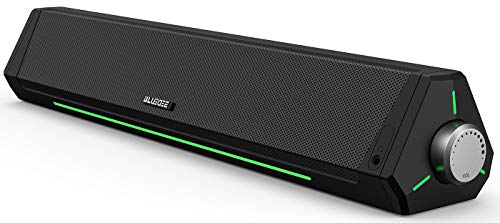
Key Features: Dual drivers with dual diaphragms for Hi-Fi stereo, anti-magnetic tech to reduce interference, Bluetooth 5.0 and 3.5mm aux connection, ambient light strips.
Bluedee focuses on stereo separation and clearer highs with supporting bass from the dual driver layout. Bluetooth 5.0 enables wireless streaming with more stable connectivity. The 3.5mm aux ensures legacy device compatibility. Ambient lighting adds desk aesthetics without being the primary feature. This unit targets users after improved audio fidelity over simple mono soundbars.
Nylavee HiFi Sound Quality Computer Sound Bar
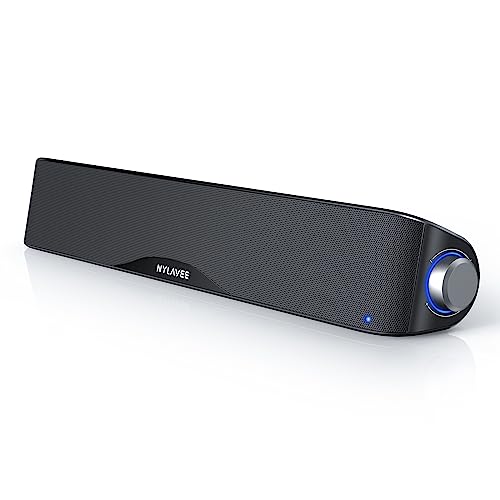
Key Features: Four speaker units plus two independent bass diaphragms, double layer neodymium magnets, mica fiber diaphragms, Bluetooth and AUX connectivity.
Nylavee’s configuration is engineered to maximize loudness and low-frequency output for a compact sound bar. The dual bass diaphragms and cavity design aim to produce fuller bass than typical single-driver bars. Material choices like neodymium magnets and mica fiber diaphragms are used to improve responsiveness and reduce distortion. Multiple connection methods suit desktops, laptops, and consoles requiring a compact external speaker.
LENRUE A39PRO Wired USB-Powered Sound-bar

Key Features: 2x5W stereo output, 3.5mm AUX and microphone jacks, wide compatibility with standard headphone jack devices, USB power, plug-and-play design.
LENRUE focuses on straightforward wired functionality and broad device compatibility. The stereo design and noiseless operation aim for clear playback of movies, music, and gaming audio. Included auxiliary and microphone jacks provide flexibility for private listening or connecting wired headsets. USB-powered plug-and-play simplicity is suited for users who prefer a reliable wired setup without driver installs.
Buying Guide: How To Choose A Monitor Sound Bar
Choosing the right sound bar for your monitor depends on several factors. Below are key considerations to guide your decision.
Audio Performance
- Driver Configuration: Multiple drivers and dedicated bass diaphragms usually produce fuller sound and better stereo separation than single-driver bars.
- Bass Response: Passive radiators or dual diaphragms improve low-end. If you want punchy bass for games or movies, prioritize units with these features.
- Clarity and Loudness: Look for upgraded driver specs or neodymium magnets for higher sensitivity and lower distortion at higher volumes.
Connectivity
- Bluetooth vs Wired: Bluetooth adds convenience for mobile devices; 3.5mm aux delivers consistent latency and compatibility with older gear. USB often provides only power—confirm where audio is routed.
- USB-C Support: If you use modern laptops or tablets, check for USB-C adapters or native USB-C support to avoid extra dongles.
Physical Fit And Controls
- Size And Placement: Measure available space beneath or clipped to your monitor. Compact bars (around 12–16 inches) typically fit most setups.
- Mounting/Clamping: Some models clip to the monitor with G-sensors or adaptive switching to keep stereo channels correct when flipped.
- Controls: Front-mounted knobs, touch controls, or remote control ease daily use. Check if lighting controls are separate from audio controls.
Lighting And Aesthetics
- LED Effects: RGB and ambient lights enhance desk aesthetics and can sync to audio on select models. If lighting is distracting, ensure it can be turned off.
- Build And Finish: Materials and grille design affect both looks and acoustic output—metal grilles can be more durable than thin plastic.
Compatibility And Use Cases
- Gaming: Prioritize low latency (wired or aptX variants), punchy bass, and lighting sync if desired.
- Work/Video Calls: Clear vocal reproduction and noise reduction trump extreme bass. Wired connections reduce dropouts during calls.
- Media & Music: Stereo separation and broader frequency response improve music enjoyment; Bluetooth convenience is a plus.
Additional Comparison Perspectives
- Feature-to-Price Balance: Compare driver count and connectivity features relative to cost to find the best value.
- Power And Efficiency: Wattage ratings matter for volume headroom. Higher wattage typically equals louder output but check efficiency and driver quality too.
- Long-Term Reliability: Simpler wired designs often have fewer failure points than complex Bluetooth systems with lights and sensors.