
Best Computer Speaker Extension Cables for Easy Audio Reach
Answering the need for flexible, cleaner audio connections, this guide highlights five reliable 3.5mm extension cables suited for computer setups, desktops, and home entertainment centers. These picks are best for users who want longer cords to reach speakers, headsets, or auxiliary devices without sacrificing sound quality. The top options target different use cases—from compact home-office desks to long-distance couch setups—so you can choose based on length, durability, and compatibility.
| Product | Length | Best For | Notes |
|---|---|---|---|
| MCSPER Headphone Extension Cable | 6.6 ft | Compact desks, shared workspaces | TRRS note: mic may not work with certain headsets |
| UGREEN Headphone Extension Cable | 3.3 ft | Everyday audio, quick protection of ports | TRRS mic compatibility limited |
| Syncwire Headphone Extension Cable | 6 ft | General purpose, rugged daily use | TRS only; no microphone support |
| QianLink Headphone Extension Cable | 6.6 ft | Home office, living room setups | TRRS mic compatibility varies by device |
| CableCreation 3.5mm Extension Cable | 10 ft | TVs, PC to speakers, long reach | TRS; no mic support |
Buyer note: All five selections emphasize durability, shielding, and gold-plated connectors for clearer, lossless audio. Length options range from about 3.3 to 10 feet, ideal for desktop setups, couches, or living room entertainment systems where the speaker or headset must sit far from the audio source.
MCSPER Headphone Extension Cable — 2-Pack, 6.6ft

The MCSPER extension cable uses polished 24K gold-plated connectors and pure copper wire with triple shielding to minimize signal loss and noise. It comes in a 2-pack, offering two 6.6-foot cables in one purchase. Best for users who want a budget-friendly dual-pack to extend both a primary computer speaker setup and a secondary device simultaneously. Note: When used with TRRS headphones, microphone functionality may be limited, and inline mic controls might not work on certain devices. The tangle-free Nylon Braided jacket supports durability and easy storage, and the step-down design helps accommodate cases on phones or tablets.
Who this is best for: Desktop users needing longer, reliable connections for headsets or speakers without mic support concerns on some devices. Choose this if you want value with a two-pack option and ease of use in a compact setup.
Limitations: Mic compatibility varies with some TRRS configurations; not ideal for headsets requiring microphone input via the extension.
UGREEN Headphone Extension Cable — 3.3ft

The UGREEN extension cable emphasizes protecting the 3.5mm port from repeated plugging and unplugging while delivering a clean, high-fidelity signal. With gold-plated connectors and double shielding, it aims to minimize signal loss and noise in everyday listening scenarios. It is a solid choice for users who frequently swap headphones or speakers and want to preserve the longevity of their devices.
Who this is best for: Computer users who value port protection and a compact, reliable extension for everyday listening. Best for desks where space is tight but audio quality matters.
Limitation: Microphone support is not guaranteed with TRRS headsets; primarily designed for audio output only.
Syncwire Headphone Extension Cable — 6ft

The Syncwire cable uses a soft nylon braided jacket and 24K gold-plated connectors to deliver stable, high-quality audio with minimal interference. The 6-foot length makes it versatile for living rooms, desks, or station setups where speakers or headphones sit a reasonable distance from the computer. This model is TRS (three-pole) and does not support microphone input through the extension.
Who this is best for: Users who want a durable, mid-length extension with strong shielding and no microphone extension needs.
Limitation: No mic support; not suitable for headsets requiring microphone extension via the cable.
QianLink Headphone Extension Cable — 6.6ft
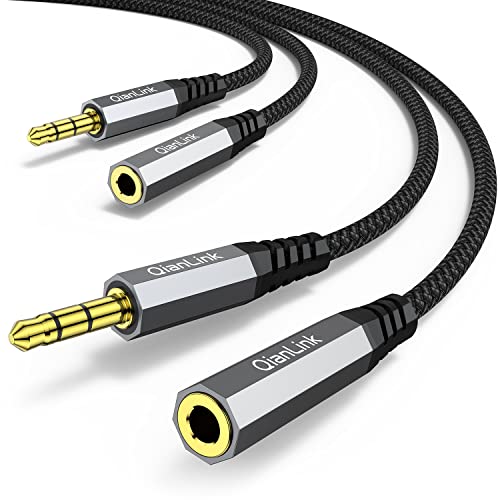
The QianLink extension offers a 6.6-foot reach with 24K gold-plated connectors and double shielding, designed to deliver clear, lossless audio for everyday listening. It is a TRS/3-pole cable intended for audio output only. It’s positioned as a practical option for people who want to extend their headphone connection while protecting the device port from wear and tear.
Who this is best for: Home users seeking a mid-to-long extension for speaker or headphone use, with strong shielding and easy storage.
Limitation: Mic functionality is not supported on many devices when using TRRS configurations with this cable.
CableCreation 3.5mm Extension Cable — 10 ft

The CableCreation option emphasizes universal compatibility with a long 10-foot reach. It uses a high-quality OFC core, 24K gold-plated connectors, and a durable aluminum shell to minimize signal loss and oxidation. The 10-foot length makes it well-suited for connecting speakers or headphones to a desktop PC from across a room or for couch setups near a TV or computer.
Who this is best for: Users needing maximum reach without sacrificing audio fidelity or durability, particularly for TVs, desktops, and long-range speaker connections.
Limitation: Does not provide microphone support via the extension cable itself; check device compatibility if you rely on inline mic features.
Buying Guide: Key Considerations for Computer Speaker Extension Cables
What length do you actually need? If your computer and speakers sit on a desk, a 3.3–6.6 foot cable is often sufficient. For couch setups or TVs, a 10-foot model may be more convenient.
Do you need microphone support? Many 3.5mm extensions are TRS (audio only). If your headset requires microphone passthrough via the extension, look for TRRS compatibility and verify device compatibility before purchase.
Should you prioritize shielding and connector quality? Gold-plated connectors and double shielding reduce signal loss and noise. If you use high-fidelity speakers or sensitive headsets, this matters more for maintaining audio clarity.
Is port protection important? Some cables advertise port protection to prevent wear from repeated plugging. This can extend the life of laptops and desktop jacks when cables are moved often.
Durability features matter in daily use. Nylon-braided jackets, bend longevity ratings, and tangle-free designs help with long-term reliability and ease of storage.
Frequently Asked Questions
- Can I use a 3.5mm extension to connect computer speakers? Yes. Most 3.5mm extensions are compatible with standard 3.5mm speaker jacks, but confirm the plug type (TRS vs TRRS) if you rely on microphone or remote controls.
- Do these cables degrade sound quality? When using quality extension cables with proper shielding and gold-plated connectors, sound quality remains strong with minimal signal loss compared to shorter cables.
- Will a longer cable cause latency? No. Latency is typically negligible for analog 3.5mm extensions; it’s more related to digital processing in devices.
- Are these cables durable for daily use? Most listed options feature braided jackets and high-quality connectors designed for tens of thousands of bends, making them suitable for frequent use.
- Should I avoid TRRS if I need a microphone? Yes. If microphone functionality is needed, ensure the extension supports TRRS with your specific device and headset.
- Is there an advantage to longer cables for desktops? Longer cables can improve flexibility in arranging speakers and headsets on a cluttered desk or multimedia setup, reducing strain on ports.