Best Computer Surround Sound Speakers for Immersive Audio
Looking for the best computer surround sound speakers to upgrade your PC gaming, movies, or music? This guide highlights five strong options across 2.0, 2.1, and 7.1 setups, emphasizing clarity, bass, and ease of use for different setups. It helps readers choose by space, budget, and connection needs. The top picks include compact desk speakers, THX-certified systems, and Bluetooth-enabled models for flexible layouts. Each listing notes who it’s best for and why it stands out.
Summary table of selected products:
| Product | Best For | Key Benefit |
|---|---|---|
| Saiyin Sound Bars for Smart TV | Small rooms, desktop setups | Deep bass from dedicated subwoofer, versatile connections |
| Logitech Z906 | Home theaters, larger desks | THX-certified 5.1 surround with high output |
| Redragon GS520 | Budget RGB aesthetic and desk space | 2.0 with USB power and colorful lighting |
| ULTIMEA Aura A60 | Mid-size rooms, immersive Dolby Atmos | 7.1ch with wireless rear speakers |
| Cyber Acoustics CA-3090 | Simple setup, budget 2.1 | Compact subwoofer with easy controls |
Saiyin Sound Bars For Smart TV With Subwoofer

Best for compact rooms and desktop setups, this 2.1 system blends a soundbar with a dedicated subwoofer for punchy bass. It supports Optical, Bluetooth, and AUX connections and is wall-mountable for space efficiency. The LED indicators show optical, Bluetooth, and auxiliary modes, helping you switch without confusion. The three EQ modes tailor sound to news, movies, or music. A replacement remote is provided, though it does not work with universal remotes.
Who it’s best for: Small living rooms, dorm desks, or PC/game stations needing deep bass without a large footprint. Why selected: It combines a dedicated subwoofer with a compact soundbar for immersive sound in limited spaces. Caution: Remote compatibility is restricted to its own remote control; universal remotes may not work.
Logitech Z906 5.1 Surround Sound
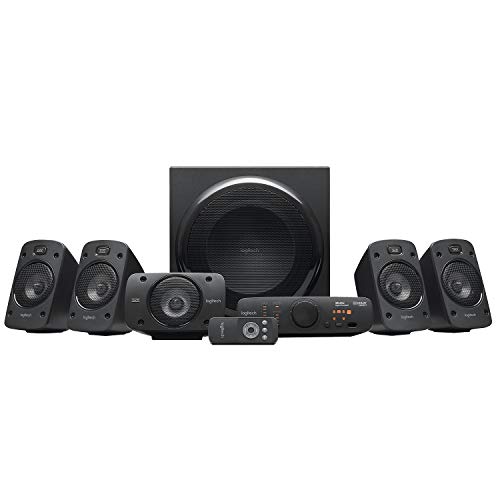
Best for larger desks and living rooms that need robust cinema-like audio, this 5.1 system delivers true surround with a 165-watt subwoofer and 500-watts continuous power. THX certification suggests cinema-quality sound. Multiple satellites provide enveloping sound, and wall-mountable options help reduce clutter. Note: It’s a larger setup that requires more space and power.
Who it’s best for: Home theaters, big desks, or media rooms where maximum surround effect matters. Why selected: THX certification and full 5.1 layout deliver a high-fidelity listening experience. Caution: Requires more space and setup effort than compact models.
Redragon GS520 RGB Desktop Speakers

Best for budget-conscious buyers who still want style and decent sound, this 2.0 setup emphasizes a clean desk footprint and USB power. It features six color-changing LED modes to match mood and activity. Sound quality is solid for casual listening and gaming, with a minimalist design that fits modern setups. Caution: It lacks a dedicated subwoofer for deep bass if you need cinematic lows.
Who it’s best for: Students, gamers, or office desktops seeking good sound without breaking the bank. Why selected: Combines attractive RGB lighting with compact, straightforward stereo performance. Caution: No dedicated subwoofer means bass is lighter than 2.1 systems.
ULTIMEA Aura A60 7.1ch Dolby Atmos

Best for mid-to-large rooms seeking immersive Dolby Atmos channels, this system uses three main channels plus four surround speakers. The rear surrounds connect wirelessly to the soundbar, reducing cables and clutter. It’s designed for rooms up to 270 ft² and aims to deliver a dynamic, multidimensional soundscape. Caution: Wireless rear speaker setup may require careful placement for optimal effect.
Who it’s best for: Enthusiasts wanting a modern Atmos experience with flexible setup and strong surround presence. Why selected: Combines 7.1ch processing with wireless rear speakers for spacious sound. Caution: Larger footprint and higher price point relative to 2.1 systems.
Cyber Acoustics CA-3090 2.1 Speaker System

Best for budget-friendly, entry-level setups, this 2.1 system combines an 18W peak, 9W RMS subwoofer with two satellites for solid music and movie playback. The control pod allows easy volume adjustments and on/off switching, while the subwoofer bass port adds depth. Caution: May not satisfy deep-bass enthusiasts seeking high-end cinema bass.
Who it’s best for: Casual users, students, or first-time buyers wanting straightforward 2.1 sound. Why selected: Balanced price-to-performance with simple controls and a dedicated subwoofer. Caution: Bass may feel underwhelming for action-heavy content at higher volumes.
Buying Guide: Key Considerations For Computer Surround Sound Speakers
Room size and layout: Choose a system that fits your space. 2.0 and 2.1 setups save desk space, while larger 5.1 and 7.1 systems fill bigger rooms.
Sound goals: For cinema-like effects, prioritize subwoofers and multi-channel configurations. For gaming and music, consider clarity and imaging in the front channels.
Connection options: Look for Optical, Bluetooth, USB, and AUX to match your PC, TV, or gaming console. Wireless rear speakers can reduce cable clutter but may require precise placement.
Power and SPL: Higher wattage generally means louder playback with more headroom, but pair power with room acoustics to avoid distortion at high volumes.
Size, aesthetics, and controls: Compact desks benefit from 2.0 or 2.1 designs; eye-catching RGB lighting may fit modern setups. Easy controls help during gaming sessions or movie watching.
Frequently Asked Questions
- What is the difference between 2.1 and 5.1 speaker systems?
- Do I need a dedicated subwoofer?
- Are THX-certified systems worth it?
- Can Bluetooth speakers replace wired connections for PC use?
- How should I place surround speakers for best effect?
- Is a 7.1 system necessary for casual use?
2.1 systems have two satellites and a subwoofer, delivering clear stereo sound with extra bass. 5.1 systems add multiple satellite speakers to create true surround for immersive movies and games.
A dedicated subwoofer enhances low-end bass and is especially beneficial for movies and gaming. Smaller 2.0 systems may lack deep bass.
THX certification indicates the system meets a standardized level of audible quality and performance. It’s a reliability indicator, not a guarantee of subjective preference.
Bluetooth adds wireless convenience, but wired connections (Optical, USB, AUX) can offer lower latency and higher fidelity for gaming and movies.
Front left and right speakers should align with your screen, center channels facing the listener when present, and rear surrounds placed behind or to the sides at ear level for an enveloping soundstage.
Not necessarily. For most casual users, a quality 2.1 or 5.1 system provides excellent audio, with 7.1 offering enhanced room-filling effect in larger spaces.