
Quick Summary: This guide compares common cables and adapters used to connect computers to speakers, highlighting durable AUX cables, speaker terminal adapters, USB-powered speaker systems, specialty replacement lines, and 3.5mm-to-1/4″ splitters. The table below lists the five selected products with their primary features for easy comparison.
| Product | Type | Key Features |
|---|---|---|
| CableCreation Aux Cord (3FT) | 3.5mm Male-to-Male AUX | 24K Gold-Plated Slim Connector, Double Shielding, Woven Jacket |
| Poyiccot 3.5mm Speaker Wire Adapter | TRRS To Screw Terminal Adapter | 4-Pole TRRS Jack, AV 4-Pin Screw Terminal Block |
| LENRUE Computer Speakers (A39PRO) | USB-Powered Soundbar Speaker | 3.5mm AUX Input, 10W Stereo, Plug-n-Play |
| Syncwire 3.5mm Nylon Braided Aux Cable (3.3ft) | 3.5mm Male-to-Male AUX | 24K Gold-Plated Connectors, Nylon Braid, 15000+ Bend Life |
| 3.5mm to Dual 1/4 Adapter (Y Splitter) | 3.5mm To Dual 6.35mm TS Splitter | OFC Conductor, Nylon Braid, Studio/Hi-Fi Compatibility |
CableCreation Aux Cord (3FT/0.9M) 3.5mm Audio Cable
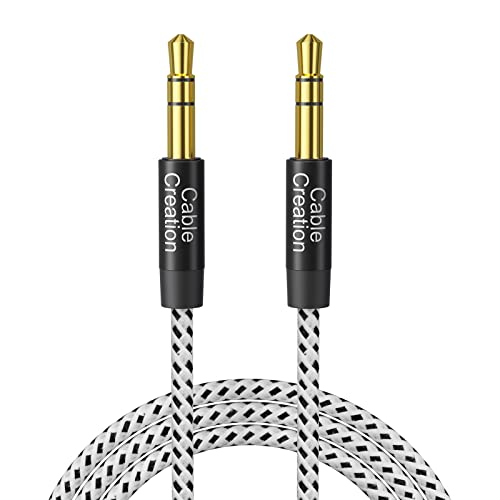
This 3.5mm Male-to-Male AUX cable is designed for standard computer-to-speaker connections when both devices have a 3.5mm port. It features an aluminum alloy shell with double shielding to reduce signal loss and noise. The 24K gold-plated ultra-slim connector allows it to fit most devices without removing cases. The woven cotton jacket and claimed 10,000+ bend lifespan improve resilience and reduce tangling. Use this cable for straightforward analog line-out to line-in connections between laptops, desktops, and powered speakers.
Poyiccot 3.5mm Speaker Wire Adapter TRRS To Screw Terminal

The Poyiccot TRRS to 4-pin screw terminal adapter converts a 3.5mm 4-pole (TRRS) jack to an AV-style screw terminal block, enabling direct connection of bare speaker wires to a 3.5mm port. This is useful for interfacing custom speaker runs, certain projectors, or legacy equipment to a computer’s headphone/AV output. Note that TRRS carries four conductors (three signals plus ground), so confirm pinout compatibility with your target device. The adapter simplifies temporary wiring without soldering.
LENRUE Computer Speakers, Wired USB-Powered Sound-bar

The LENRUE A39PRO sound-bar is a USB-powered speaker system intended for desktop PCs. It provides a standard 3.5mm AUX input for direct connection from a computer’s headphone or line-out jack and supports plug‑and‑play operation. With dual 5W drivers (10W total), the unit targets clear stereo playback for gaming, video, and conferencing. The speaker also offers pass-through headphone jacks for private listening and broad compatibility with laptops and tablets that provide analog output.
Syncwire 3.5mm Nylon Braided Aux Cable (3.3ft)
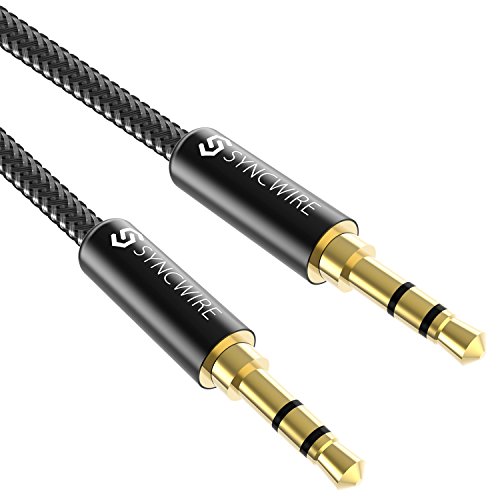
The Syncwire 3.5mm aux cable emphasizes durability and signal integrity. It has polished 24K gold-plated connectors to minimize corrosion and signal loss, plus a nylon-braided jacket and an advertised 15,000+ bend lifespan. This cable suits frequent plugging, in-desk routing, or use in mobile setups where a robust, tangle-resistant lead is desired. It connects line-out from computers to powered speakers, receivers, or speaker docks with a standard 3.5mm input.
3.5mm To Dual 1/4 Adapter Y Splitter

This 3.5mm-to-dual 6.35mm TS Y-splitter adapts a computer’s 3.5mm stereo output to two 1/4″ mono inputs commonly found on studio monitors, mixers, or older amplifiers. Constructed with oxygen-free copper conductors and a protective nylon braid, it is suitable for sessions requiring balanced routing to separate left/right mono inputs. This cable is useful when integrating a laptop or desktop into pro-audio gear that lacks a female 3.5mm input.
Buying Guide: Choosing The Right Computer To Speaker Cable
Selecting the proper cable or adapter depends on the audio chain, ports available, and use case. Below are key considerations to match your computer to your speakers effectively.
Port Types And Compatibility
- 3.5mm TRS/Headphone Jack: Most laptops and desktops have a 3.5mm analog output. Use a male-to-male 3.5mm AUX cable for powered speakers or speaker systems with a 3.5mm input.
- TRRS And AV Connections: TRRS carries extra conductors; adapters like TRRS-to-terminal are for special AV or multi-conductor speaker arrangements. Verify pinouts before connecting.
- 1/4″ (6.35mm) Inputs: Studio monitors and mixers often use 1/4″ TS or TRS. Use a 3.5mm-to-dual-1/4″ splitter or balanced cable to feed these devices correctly.
- USB-Powered Or USB Audio: Some desktop speakers use USB for power and still accept 3.5mm audio. Others use USB as a digital audio interface—check whether the USB provides power only or digital audio.
Signal Type: Analog Vs Digital
- Analog (Line-Level): Cables such as 3.5mm AUX carry analog signals. Ensure speakers accept analog line-in to avoid need for DACs or USB audio interfaces.
- Digital (USB/SPDIF/Optical): If your computer or speakers use digital outputs, an analog cable will not work and a DAC or digital cable is required.
Cable Construction And Durability
- Conductors: Oxygen-free copper (OFC) improves conductivity for reduced loss in longer runs.
- Shielding: Foil or braided shielding reduces interference and hum from nearby electronics.
- Connectors: Gold plating resists corrosion and can improve contact reliability.
- Jackets: Nylon braid or woven jackets enhance abrasion resistance and reduce tangling for desktop setups.
Length And Signal Degradation
- Short runs (<3–6 feet) are best for preserving signal quality with analog cables.
- For longer runs, use shielded or balanced connections (TRS or XLR) or consider a powered speaker near the source to reduce noticeable losses.
Use Case Perspectives
- Casual Desktop Listening: A high-quality 3.5mm male-to-male AUX cable with good shielding is usually sufficient.
- Home Office / Video Calls: USB-powered speakers with 3.5mm pass-through can simplify power and connectivity.
- Pro Audio / Studio Integration: Prefer 3.5mm-to-dual-1/4″ or balanced adapters and verify levels between consumer (-10 dBV) and professional (+4 dBu) gear.
- Custom Speaker Wiring: Terminal adapters like TRRS-to-screw-blocks allow connecting bare speaker wires for prototyping or fixed installations.
Troubleshooting Tips
- Confirm the computer’s output is enabled and volume levels are up.
- Check whether the speaker expects line-level or amplified input; passive speakers need an amplifier.
- Avoid mixing mono and stereo connectors incorrectly—use proper splitters or adapters for left/right separation.
- If hum or noise appears, switch ports, try a different shielded cable, or isolate power sources to reduce interference.