Best External DVD Drives for Computers With DVD Player
Looking for a reliable external DVD drive to add optical versatility to a computer without an internal drive? This guide highlights top USB 3.0 and USB-C external DVD drives that work with Windows, Mac, and Linux. Each option supports common DVD and CD formats, easy plug-and-play setup, and portable designs for laptops or desktops. The selections below emphasize compatibility, speed, and ease of use to help you pick a drive that fits your everyday tasks—from movie playback to data backups.
| Product | Brand | Key Strength | Connectivity |
|---|---|---|---|
| Amicool External DVD Drive | Amicool | Dual USB 3.0 and Type-C with broad OS compatibility | USB 3.0 / Type-C |
| Rioddas External CD/DVD Drive | Rioddas | Plug & Play with robust USB 3.0 performance and fault tolerance | USB 3.0 |
| Dell USB Slim DVD RW Drive DW316 | Dell | Pre-loaded CyberLink Media Suite for quick playback/burning | USB (external) |
| BPAKDU External CD/DVD Drive | BPAKDU | 8-in-1 functionality with USB 3.0 hub and card reader | USB 3.0 |
| ORIGBELIE External CD DVD Drive | ORIGBELIE | High-speed USB 3.0 with USB-C option and broad OS support | USB 3.0 / USB-C |
Note: Each drive is designed for laptops and desktops, not for TVs or tablets. Compatibility notes and setup basics are summarized in the product sections below to help you compare options quickly.
Amicool External DVD Drive — Dual Connection

The Amicool external DVD drive offers plug-and-play operation with no driver installation. It provides both USB 3.0 and Type-C interfaces, delivering data transfer speeds up to 5Gbps. It supports DVD formats including DVD+R, DVD-R, and CD formats up to 24x read/burn speeds, with a maximum 8x DVD read speed. It’s designed for laptops and desktops lacking internal optical drives and works across Windows, macOS, and Linux. Users should note it is not compatible with TVs or tablets.
Rioddas External CD/DVD Drive — Reliable Plug & Play

The Rioddas drive emphasizes easy setup with USB power and no driver requirements. It works well with USB 3.0 (backwards compatible with USB 2.0) and includes a physical eject button for discs that won’t mount. The drive prioritizes stable data transmission, reducing freezes and errors during playback and burning. It’s designed to work with PCs and Macs, and typical troubleshooting advice suggests trying a different USB port if the device isn’t initially recognized.
Dell USB Slim DVD RW Drive DW316

Dell’s slim external drive is designed for portability, with a low-profile 14mm form factor and a light 200g weight. It is powered through the USB port and ships with pre-installed CyberLink Media Suite for straightforward playback and burning of DVDs and CDs. The drive is suitable for travel or small workspaces where space is at a premium, delivering convenient plug-and-play functionality across compatible Windows systems.
BPAKDU External CD/DVD Drive — 8-in-1

BPAKDU combines multiple functions in one compact device. It is an 8-in-1 external drive that includes a USB 3.0 hub, multiple USB ports, and a card reader, in addition to reading and burning DVDs and CDs. It supports Windows, macOS, and Linux, and provides a plug-and-play experience. A driver troubleshooting note is included for Windows users who may encounter recognition issues, and a power cable might be required in some setups for stable operation.
ORIGBELIE External CD DVD Drive — USB-C Ready

The ORIGBELIE drive is designed for quick, driver-free recognition via USB-A or USB-C connections. It supports USB 3.0 with backward compatibility to USB 2.0/1.1 and delivers up to 8x DVD read/write and 24x CD read/write speeds. It’s compatible with Windows, macOS, and Linux, and power considerations suggest using the back USB ports on desktops for reliable performance. It emphasises broad OS support and a straightforward plug-and-play experience, with a note about macOS icon behavior when a disc is not yet inserted.
JKNJX External DVD Drive — USB-C And USB-A

JKNJX offers a plug-and-play external drive with USB 3.0 and Type-C connectivity. It supports up to 8x DVD read and 24x CD write speeds and is compatible with Windows, Linux, and macOS. The drive emphasizes automatic recognition without drivers and highlights considerations for Mac users regarding disc visibility. The packaging and included cable aim to simplify setup for both laptops and desktops.
ROOFULL External CD DVD Drive — Durable And Portable
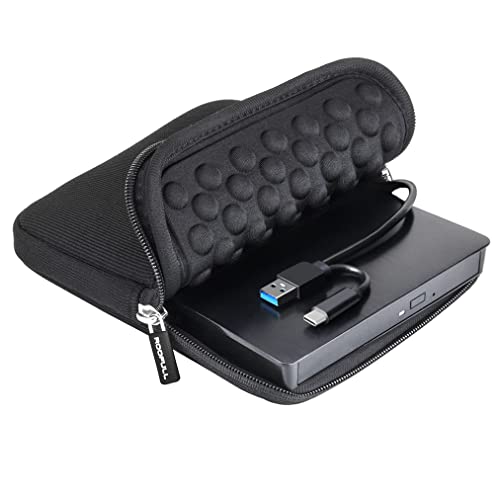
ROOFULL’s drive is a durable, plug-and-play option with dual connectors (USB 3.0 and USB-C) and a carrying case for portability. It supports common CD and DVD formats (excluding Blu-ray and 4K) and provides high-speed data transfer up to 5 Gbps. It’s suitable for Mac and Windows systems and emphasizes simple setup and reliable data handling, along with strong error correction and stable operation in real-world use.
Buying Guide
Key purchase considerations when selecting an external DVD drive for a computer include:
- Compatibility: Ensure the drive supports your operating system (Windows, macOS, Linux) and matches your computer’s ports (USB-A or USB-C).
- Connectivity: Dual USB-C and USB-A options offer flexibility for modern laptops and older desktops. Check whether a powered vs. bus-powered setup is required for your use case.
- Speed and formats: Look for read/write speeds up to 8x/24x and support for common formats (DVD±R, DVD-ROM, CD-R, CD-RW). If you plan to burn discs, verify write speeds and media compatibility.
- Portability and build: Slim profiles and included carrying cases improve travel use. Consider whether a drive includes extra features such as an eject button, card readers, or USB hubs.
- Software: Some drives come with bundled software (e.g., CyberLink) for immediate playback or burning. If software quality matters, factor this into your decision.
- Power considerations: Desktop setups may require back-panel USB ports or an external power adapter for stable performance; laptops usually rely on bus power.
- Durability and warranty: For frequent travel, prioritize durable builds and clear warranty terms to cover potential defects.
- Limitations: Most drives do not support Blu-ray or 4K discs. If you need Blu-ray playback, verify compatibility or consider a separate Blu-ray drive.
Compared to internal optical drives, external models offer portability and easy upgrade for devices without built-in discs. When choosing, align features with your primary tasks—simple data transfers, media playback, or occasional burning—and verify that your system recognizes the drive without extra setup steps.