
Choosing the right conference call speaker for your laptop improves meeting audio, reduces distractions, and makes remote collaboration smoother. Below is a concise comparison of the selected models followed by focused reviews and a practical buying guide to help you match features to your workspace needs.
| Product | Key Strength | Connectivity |
|---|---|---|
| EMEET M0 Plus | 360° AI mics, daisy-chain expandability | USB-C, Bluetooth |
| Jabra Speak 510 | Portable, simple setup, Bluetooth/USB | Bluetooth, USB |
| Anker PowerConf | 6-mic array, long battery life, Zoom certified | Bluetooth 5.3, USB-C |
| Yealink SP92 | AI noise cancelling, 20H call time, Teams certified | Bluetooth, USB |
| Dell SP3022 | Compact soundbar design, Teams indicators | USB |
EMEET Conference Speakerphone M0 Plus

The EMEET M0 Plus Features A Four-Microphone Array With 360° Voice Pickup And The Brand’s VoiceIA Algorithm For Background Noise Filtering And Echo Elimination. Audio Is Delivered Via A 3W Speaker With Full-Duplex Support For Natural Conversation Flow. The Unit Supports Daisy Chain Expansion Allowing Two Devices To Work Together To Cover Larger Rooms Or Up To 16 Attendees When Linked. Connectivity Options Include USB-C And Bluetooth, And The Device Is Compatible With Leading Conferencing Applications.
Jabra Speak 510 MS Wireless Bluetooth Speakerphone
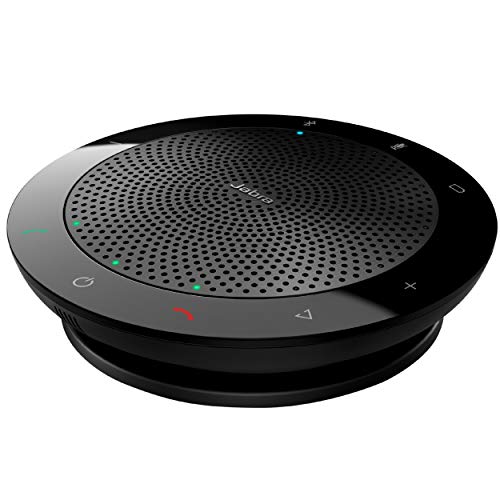
The Jabra Speak 510 Emphasizes Portable, Plug-and-Play Use With Bluetooth Or USB Connectivity. It’s Certified For Microsoft Teams And Aims To Deliver Clear, Professional-Sounding Calls With Minimal Setup Time. The Design Prioritizes Mobility And Simple Controls, Making It Suitable For Users Who Move Between Meeting Spaces Or Need A Compact Speaker For Laptop-Based Calls.
Anker PowerConf Speakerphone

The Anker PowerConf Uses A Six-Microphone 360° Array For Wide Coverage And Real-Time DSP Algorithms To Enhance Voice And Reduce Ambient Noise. It’s Zoom-Certified And Offers Extended Battery Runtime, Making It A Good Option For Personal Workspaces Or Small Rooms Where Mobility And Long Call Times Matter. Connections Include USB-C And Bluetooth 5.3 For Flexible Laptop Pairing.
Yealink SP92 Conference Speaker And Microphone

The Yealink SP92 Is Designed For Small Meeting Rooms With AI Noise Cancellation That Filters Hundreds Of Common Noises. It Boasts Omnidirectional Pickup With A 13-Foot Radius, Built-In Full-Duplex Capabilities, Echo Cancellation, And Virtual Bass To Improve Voice Clarity. The Device Is Teams-Certified And Offers Up To 20 Hours Of Call Time When Using Battery Power, Supporting Extended use Away From Power Sources.
Dell SP3022 USB Computer Speaker
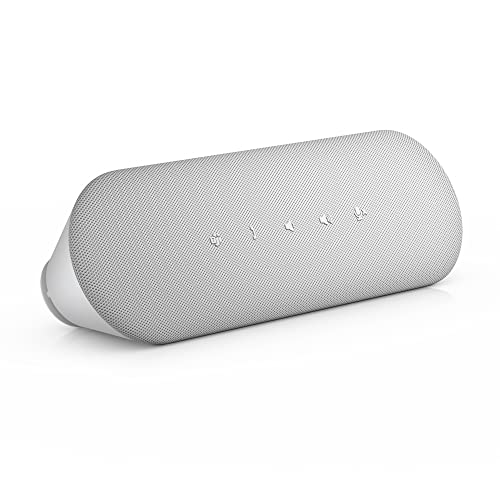
The Dell SP3022 Is A Compact Desk Soundbar Styled For Placement On A Monitor Base Or Beside A Laptop. It Features Full-Duplex Audio And AI Noise/Echo Cancellation To Allow Multiple Participants To Speak Simultaneously While Remaining Intelligible. Visible LED Indicators For Teams App Status And Call Controls Aim To Improve Usability In Business Environments. The Unit Connects Via USB For Simple Laptop Integration.
Buying Guide: Choosing The Right Conference Call Speaker For Your Laptop
Selecting the best speakerphone depends on room size, mobility needs, preferred conferencing platform, and microphone coverage. Use the following checklist to align features with use cases.
Room Size And Microphone Array
- Personal / Small Desk Use: Compact units with 1–3 mics (Jabra Speak 510, Dell SP3022) are usually sufficient.
- Small Group / Huddle Rooms: Choose 4–6 mic arrays (EMEET M0 Plus, Anker PowerConf) for reliable 360° pickup.
- Larger Rooms: Look For Daisy-Chain Or Expandable Options (EMEET M0 Plus) Or Dedicated Room Systems.
Noise Reduction And Call Clarity
- AI Noise Cancellation: Filters keyboard clicks, AC hum, and background chatter—important for shared workspaces (Yealink SP92, EMEET models).
- Echo Cancellation And Full-Duplex: Ensures natural two-way conversation when multiple people speak simultaneously (Anker, Dell).
Connectivity And Compatibility
- USB-C / USB: Reliable wired connection to laptops; plug-and-play works with most platforms.
- Bluetooth: Adds mobility and easy pairing with phones and tablets; check Bluetooth version for stability (Anker Bluetooth 5.3).
- Platform Certification: Microsoft Teams or Zoom certification ensures native control and status integration on supported apps (Jabra Speak 510, Yealink, Anker).
Battery Life And Portability
- Portable Needs: Prioritize battery runtime and compact size (Jabra Speak 510, Anker PowerConf).
- Desk-Bound Use: Wall/monitor-mounted or USB-powered models without batteries offer constant readiness (Dell SP3022).
Audio Quality And Speaker Power
- Voice-Centric Calls: Clarity and midrange reproduction are more important than bass.
- Multipurpose Use: If you also play music, consider models with stronger speaker drivers or virtual bass (Yealink SP92).
Expandability And Future-Proofing
- Daisy Chain / Multi-Unit Support: Useful for growing collaboration spaces—allows adding mic/speakers without full system replacement (EMEET).
- Firmware And Software Updates: Vendors That Provide Ongoing Updates May Improve Noise Filtering And Compatibility Over Time.
Comparison Perspectives
- Best For Portable Use: Choose lightweight, quick-setup devices with Bluetooth and decent battery life (Jabra Speak 510, Anker PowerConf).
- Best For Small Rooms With Multiple Participants: Favor 4–6 mic arrays and full-duplex support for natural multi-person conversations (Anker, EMEET, Yealink).
- Best For Simple Desk Integration: Opt For compact USB soundbars with Teams indicators if you want an always-ready desktop solution (Dell SP3022).
Use this guide to prioritize mic coverage, noise cancellation, and connectivity based on whether you work from a laptop at home, in a shared office, or travel between meeting spaces.