Best Conference Room Audio Solutions for Modern Meetings
Find the right conference room audio setup for your space. This guide highlights five practical options for large and small rooms, from all-in-one video bars to flexible speakerphone systems. The selections are suitable for buyers seeking plug-and-play setups, better audio coverage, and clear collaboration on Zoom, Teams, and other services. Each product is evaluated for who it’s best for and why it fits typical conference layouts.
Summary of chosen products:
| Product | Best For | Key Benefit |
|---|---|---|
| Poly Studio X70 Video Bar + TC8 Controller (Renewed) | Large conference rooms; Teams and Zoom rooms | Dual 4K video, NoiseBlockAI, Acoustic Fence |
| Logitech Group Video and Audio Conferencing System | Mid-to-large rooms; quick setup | All-in-one design; plug-and-play USB |
| Logitech MeetUp HD Video and Audio Conferencing (Renewed) | Small meeting rooms; huddle spaces | Ultra-Wide FOV; integrated camera/mics/speakers |
| Conference Speakerphone, Daisy Chain up to 9 | Growing rooms; hybrid meetings | Expanded pickup; 360° mics across multiple units |
| TONGVEO 2-in-1 Conference Speaker and Microphone | Medium rooms; flexible setup | Daisy chain; 360° pickup; full duplex audio |
Poly Studio X70 Video Bar + TC8 Controller

The Poly Studio X70 is designed for large rooms and cloud video services. It integrates dual 4K cameras, advanced speaker tracking, and group framing. The system uses NoiseBlockAI and Acoustic Fence to minimize side conversations and background chatter. It offers native compatibility with Zoom, Teams, and other leading services without a PC gateway. A TC8 dedicated touch controller provides quick in-room control. Best for teams needing high-quality AV in sizable spaces and straightforward room setup. Caution: Power over Ethernet (PoE) is required for optimal operation.
Logitech Group Video and Audio Conferencing System

Logitech Group offers an all-in-one approach for mid-to-large rooms. It provides a plug-and-play USB connection to a laptop and a chosen conferencing platform, simplifying setup. The system supports a 90-degree field of view and a wide audio range suitable for groups up to about 14 people (20 with optional expansion mics). Best for teams seeking a cost-effective, self-contained solution that scales with room size.
Logitech MeetUp HD Video and Audio Conferencing System (Renewed)

MeetUp is tailored for small meeting rooms and huddle spaces. Its all-in-one design includes an integrated camera, beamforming mics, and speakers, with an ultra-wide 120° field of view. The 4K-capable output and motorized pan/tilt help capture participants and whiteboards clearly. Choose MeetUp when space is modest but you still need strong audio and video pickup up to several participants.
Conference Speakerphone, Daisy Chain Up to 9
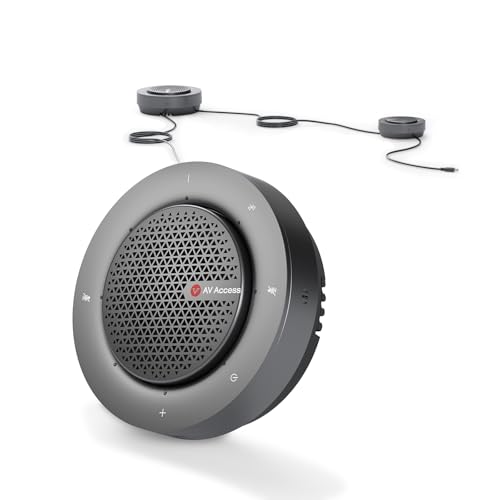
This system expands voice pickup with up to nine speakerphones linked in a daisy chain. It supports 360° pickup with a four-mic array and is designed for large rooms with up to 50 attendees. Features include AI noise reduction, echo cancellation, and auto gain control to balance far-end and near-end voices. Best for flexible, scalable coverage, but consider the extra cabling and management for multiple units.
TONGVEO 2-in-1 Conference Speaker and Microphone

TONGVEO combines a conference speaker with a microphone array in a 2-in-1 design. It supports daisy chaining to expand range for hybrid meetings and up to 30 attendees. The device emphasizes 360° omnidirectional pickup and intelligent noise reduction, with a 5W speaker for clear local audio. Best for mid-sized rooms needing flexible expansion without routers or complex setups. Limitation: wired daisy chain connections are recommended to reach full coverage.
N newline Conference Speaker and Microphone

NewPie focuses on 360° voice pickup with dual AI-enhanced mics. It supports 10–14 hours of call time and connects via Bluetooth or USB-C/A. This option is suitable for small teams or home offices that occasionally host video calls. It offers flexible wired or wireless use, but its coverage is best in smaller or semi-private spaces.
Poly Studio G62 Video Conferencing System

Poly Studio G62 is designed for large room support with 4K video and content sharing, compatible with H.239, SIP, and H.323. It targets larger meeting spaces requiring reliable video and conferencing protocols. Choose G62 when you need robust IT-grade compatibility and high-quality collaboration features in a sizable environment. Caution: Integration with legacy systems may require additional configuration.
Poly Studio X70 Video Bar (Renewed)

Another renewal option of the Poly Studio X70 emphasizes life-like video from dual 4K lenses and advanced audio with NoiseBlockAI and Acoustic Fence. It provides seamless native experience on Zoom and Teams, with no PC gateway required. Best for large conference rooms needing a turnkey, cloud-first solution. Caution: Renewed devices may have limited availability or return policies that differ from new units.
Buying Guide: Key Purchase Considerations
- Room size and layout: Choose a system that offers both broad voice pickup and wide video coverage suitable for the space.
- Platform compatibility: Ensure native support for your collaboration tools (Zoom, Teams, etc.).
- Scalability: For growing teams, consider daisy-chaining options or expandable mics/speaker units.
- Installation ease: All-in-one solutions should require minimal setup; USB plug-and-play is ideal for quick deployment.
- Connectivity and controls: Prefer devices with dedicated room controllers or simple app-based management for in-room use.
- Audio quality features: Noise reduction, echo cancellation, and beamforming mics improve clarity in busy rooms.
- Budget vs. future needs: Balance upfront cost with long-term room usage and potential expansion.
FAQ for Conference Room Audio Solutions
- What should I choose for a very large conference room?
Consider a high-capacity video bar with multiple mics and expansion options, like the Poly Studio X70 or a similar large-room system, to ensure consistent coverage and clear audio across the space.
- Are all-in-one systems easier to deploy than multi-piece setups?
Yes. All-in-one systems reduce setup complexity and cabling, making them ideal for teams needing quick room readiness.
- Which features reduce background noise most effectively?
AI-based noise reduction, acoustic fencing, and echo cancellation deliver the clearest conversations in active rooms.
- Is it important to match the device to the conferencing platform?
Yes. Native compatibility with your primary platform minimizes configuration steps and improves reliability.
- Can I expand a conference room system later?
Many systems support daisy chaining or modular mic arrays to grow pickup range and seating capacity as needs change.
- What is the benefit of a dedicated room controller?
A controller provides fast in-room controls, reduces reliance on laptops, and helps maintain a consistent user experience.